Best Datacenter Proxies Review 2026: Top Proxies Service Compared
A common proxy-buying scenario looks like this: an ecommerce intelligence team needs to monitor competitor prices across multiple regions every day. At first, they try running requests from one server, but blocks and inconsistent access make the workflow unreliable. Residential proxies work, but the cost becomes hard to justify for high-volume product pages. What they really need is a fast, scalable datacenter proxy pool with stable connections, rotation control, and predictable pricing.
That is exactly where the best datacenter proxies become useful. They are built for speed, volume, and automation-heavy workflows such as web scraping, SEO monitoring, ad verification, market research, account testing, and price intelligence. The challenge is choosing a provider that gives you enough scale without forcing you into unnecessary complexity.
Below are 10 of the best datacenter proxy providers to consider in 2026, including Nstproxy, Bright Data, Oxylabs, Decodo, Webshare, IPRoyal, Rayobyte, NetNut, SOAX, DataImpulse, and Proxy-Seller.
Best for static use cases, not every rotating workflow
Rayobyte
Long-term datacenter proxy projects
Dedicated infrastructure and subnet diversity
Smaller location footprint than some global providers
NetNut
Business-scale proxy operations
Static/rotating datacenter IPs and global coverage
Better fit for teams with defined volume needs
SOAX
US-focused datacenter proxy use
Sticky sessions and rotation options
Datacenter coverage is more limited
DataImpulse
Pay-as-you-go teams
Traffic-based pricing and broad location claims
Users should benchmark quality on their own targets
Proxy-Seller
Low-cost private proxy buyers
IPv4/IPv6, SOCKS5/HTTP(S), bulk packages
More manual selection than managed platforms
1. Nstproxy
Best for:
Teams that need scalable datacenter proxies for web scraping, SERP tracking, ecommerce monitoring, automation, ticketing, and real-time data workflows.
Nstproxy is one of the best datacenter proxies for teams that want speed, scale, and simple operational control in one place. Its datacenter proxy product is built for high-volume scraping, automation, SERP scraping, price monitoring, and real-time data collection.
What makes Nstproxy especially attractive is the balance. Some providers are powerful but feel enterprise-heavy. Others are cheap but thin on management tools. Nstproxy sits in a practical middle ground: it offers a large datacenter IP pool, country-level targeting, HTTP(S) and SOCKS5 support, API and dashboard management, high-concurrency support, flexible IP rotation, and pay-as-you-go style usage.
For a team that wants to move from testing to production without rebuilding its proxy workflow later, Nstproxy is a natural first choice. You can start with common scraping or monitoring tasks, then scale into heavier automation as volume grows.
195+ Global Locations: Access datacenter proxies across 195+ countries and regions for worldwide coverage and precise geo-targeting.
600K+ Datacenter IPs: Large-scale IP pool built for high-concurrency scraping, automation, and data collection tasks.
High success rate:Enterprise-grade infrastructure ensures stable connections and reliable large-scale operations.
Flexible and cheap price: Starting at $0.40/GB, Flexible pay-as-you-go pricing designed for cost-efficient scaling.
Extremely quick response time: 0.5s average response time, low-latency proxy network optimized for real-time requests and high-speed performance.
If your priority is a reliable, cost-efficient datacenter proxy solution that can handle real business workflows without excessive setup complexity, NSTProxy should be one of the first providers you test.
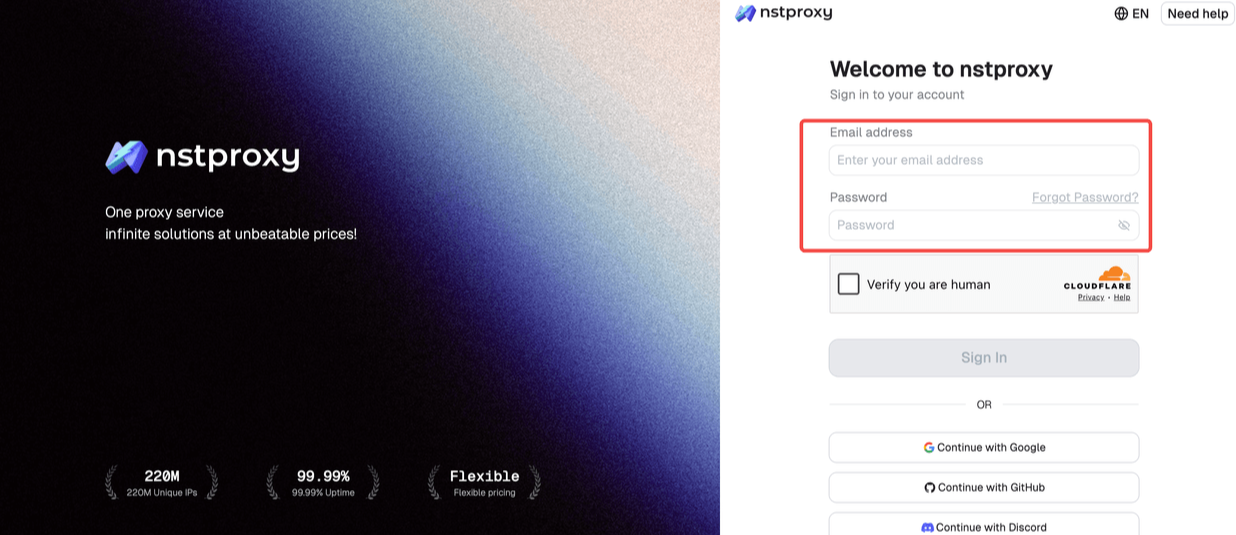
Step 1: Sign Up
Go to Nstproxy official, and then create your account using your email. Once registered, you’ll get access to your dashboard.
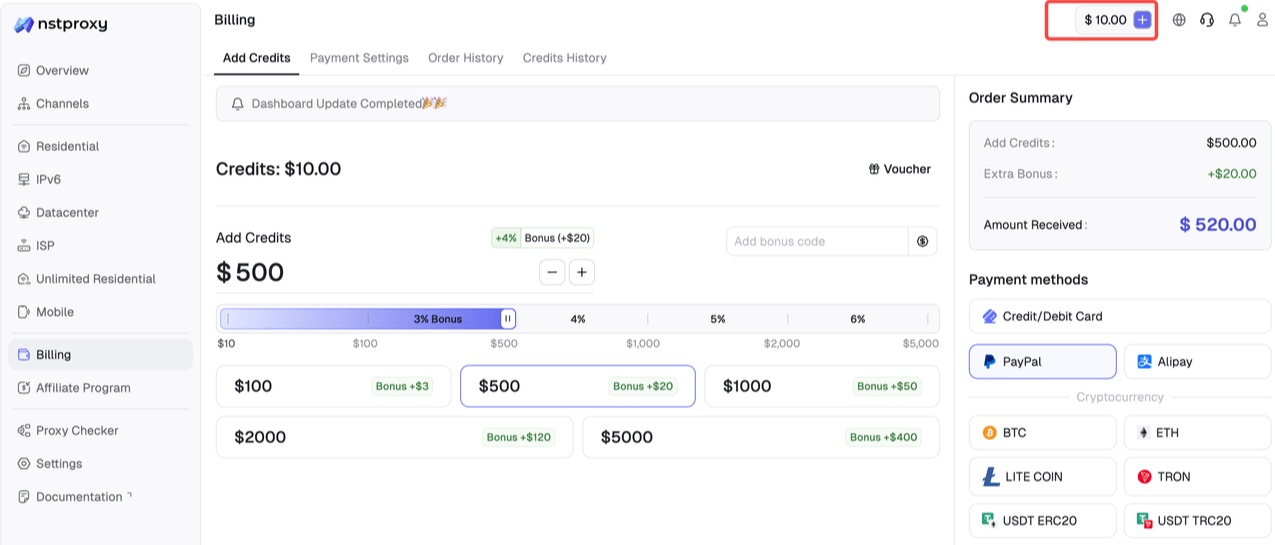
Step 2: Add Funds
Once you have registered, you can top up your balance before using proxies. Simple go to Dashboard > Billing tab.
Alternatively, Nstproxy also supports a pay-as-you-go model, so you only pay for what you use.
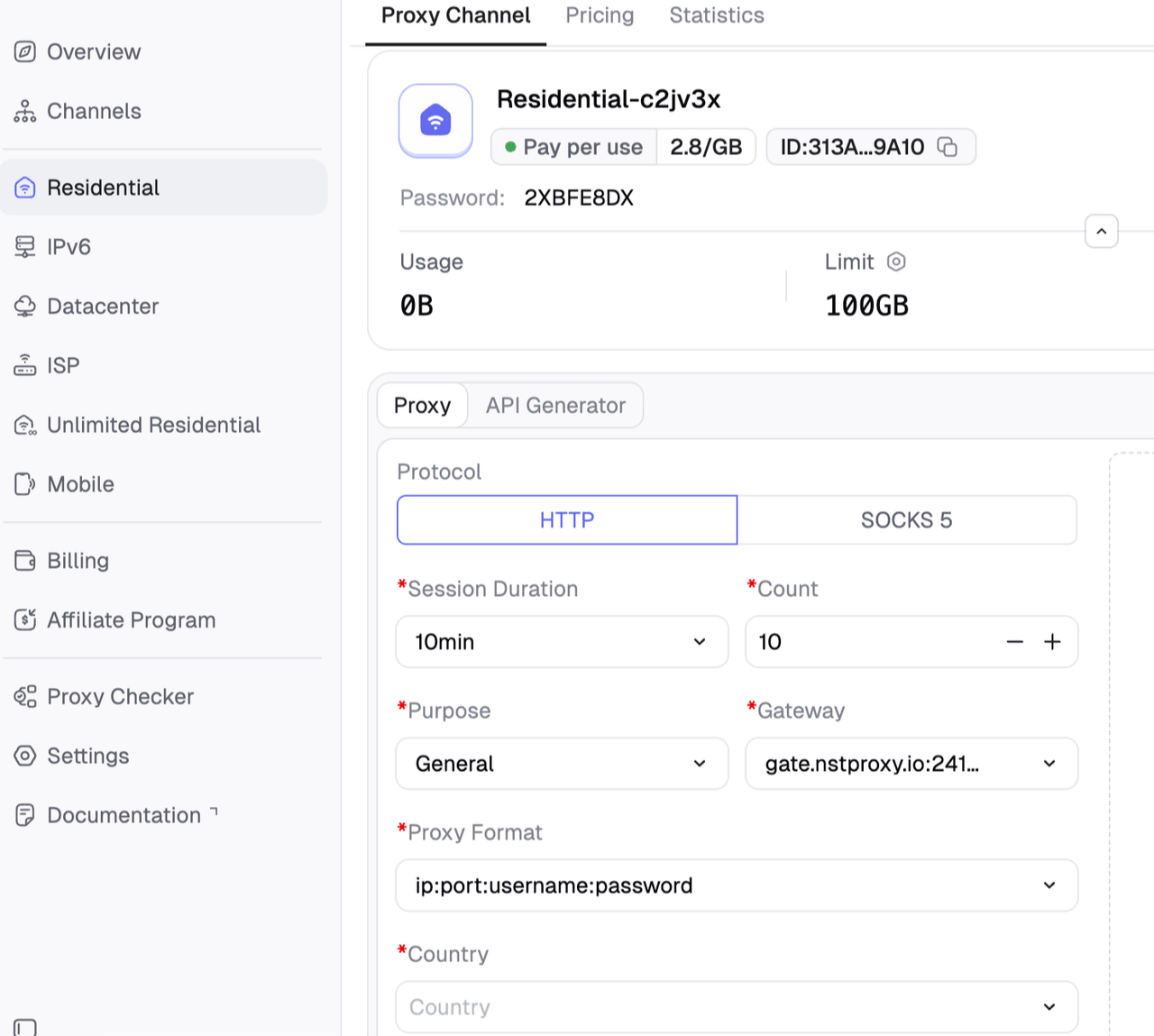
Step 3: Choose Proxy Type
Next, select the proxy type that fits your needs by switching to the specific channel.
Step 4: Create a Channel
Then you can set up your Channel by choosing Country / Location; Session type (rotating or sticky); Protocol (HTTP / SOCKS5) and so on.
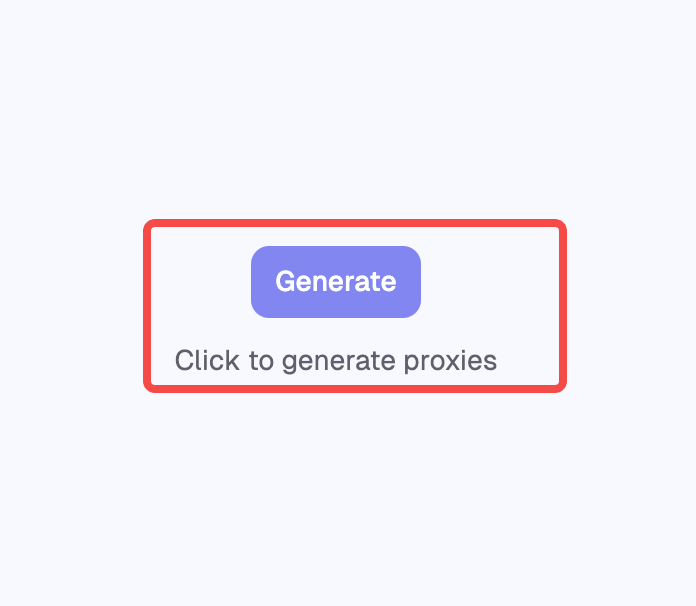
Step 5: Generate & Use Proxy
After creating a channel, generate your proxy credentials. You’ll get: Host/Port/Username/Password
2. Bright Data
Best for:
Enterprise teams that need advanced proxy management, compliance workflows, and large-scale web data infrastructure.
Bright Data is a well-known enterprise proxy provider with a large datacenter proxy network and advanced controls. Its documentation positions datacenter proxies as a fast and cost-effective proxy type, especially for websites without highly sophisticated blocking systems.
Bright Data is a strong fit for mature teams that need detailed account controls, documentation, compliance processes, and access to a wider web data ecosystem.
3. Oxylabs
Best for:
Larger data teams that need reliable datacenter proxies with professional support and scalable infrastructure.
Oxylabs is another premium proxy provider with strong datacenter proxy products. It offers shared and dedicated datacenter options, automatic IP rotation, uptime-focused infrastructure, and dashboard-based management.
Oxylabs works well for teams that value support, stability, and polished infrastructure. It is especially relevant for market research, price monitoring, review monitoring, and website change tracking.
4. Decodo
Best for:
Teams that want flexible datacenter proxy plans and may need to switch between lightweight, static, and dedicated workflows.
Decodo, formerly Smartproxy, offers datacenter proxies across pay-per-GB, pay-per-IP, and dedicated models. This flexibility makes it useful for teams that want to test different datacenter proxy setups before committing to one structure.
Its datacenter proxy page emphasizes global IP access, uptime, HTTP(S)/SOCKS5 support, scraping compatibility, and multiple proxy types for different workflows.
5. Webshare
Best for:
Budget-conscious users, small teams, developers, and early-stage proxy testing.
Webshare is a strong choice for users who want an affordable and easy way to start with datacenter-style proxy servers. It offers a simple self-serve experience, free starter proxies, API documentation, and customizable plans.
Webshare is especially appealing to developers, small teams, and users who want to validate a proxy workflow before spending more on enterprise tools.
6. IPRoyal
Best for:
Users who need dedicated datacenter IPs for account management, testing, monitoring, and stable automation.
IPRoyal offers dedicated datacenter proxies with HTTPS and SOCKS5 compatibility, city/state targeting, dual authentication, unlimited sessions, and uptime-focused infrastructure.
Its biggest advantage is simplicity for users who want dedicated IPs rather than large rotating pools. Dedicated proxies can be useful when a workflow needs stable identity, consistent sessions, and more direct IP control.
7. Rayobyte
Best for:
Teams that need dedicated datacenter proxies for ongoing scraping, monitoring, or automation projects.
Rayobyte focuses heavily on datacenter proxy infrastructure. Its official page highlights 300K+ available IPs, multiple ASNs, HTTP(S)/SOCKS support, API access, unlimited bandwidth and threads, and proxy replacement options.
Rayobyte is a good fit for long-running datacenter proxy projects where infrastructure control and static proxy behavior matter.
8. NetNut
Best for:
Business teams running structured web data workflows with predictable traffic needs.
NetNut offers datacenter proxies with static and rotating IP options, business-oriented dashboard controls, API access, IP whitelisting, and a large advertised country footprint.
NetNut is suitable for teams that already understand their traffic volume and want a provider that can support broader data collection operations.
9. SOAX
Best for:
US-focused scraping, SERP monitoring, and ad verification workflows.
SOAX provides datacenter proxies with a focus on speed, stability, security, and rotation controls. Its help center notes sticky IP behavior, new IP per request, and adjustable rotation intervals.
SOAX is worth considering when your workflows are US-focused and you need session flexibility rather than just static IP access.
10. DataImpulse
Best for:
Users who want flexible traffic-based datacenter proxy access without long-term subscription pressure.
DataImpulse offers datacenter proxies with pay-as-you-go pricing, HTTP(S)/SOCKS5 support, rotating and sticky sessions, API access, and broad location coverage. Its traffic-based model is appealing for users who dislike monthly proxy commitments.
This provider can be attractive for teams that want to control spend by traffic usage rather than by proxy count.
11. Proxy-Seller
Best for:
Users who want low-cost private IPv4/IPv6 proxy packages for automation, SEO, or account workflows.
Proxy-Seller offers private IPv4 and IPv6 proxies with SOCKS5 and HTTP(S) support, multiple locations, bulk packages, API access, and long-term rental discounts. It is often considered by buyers who want low-cost private proxy access with manual control over country and package selection.
Although it is less polished as a managed data platform, it can be useful for buyers who know exactly what proxy type and location they need.
How to Choose the Best Datacenter Proxies
Start with your use case. If you are scraping public product data, tracking SERPs, monitoring prices, or running automation at scale, datacenter proxies are usually a better first choice than residential proxies because they are faster and more cost-efficient.
Next, look at IP pool size and quality. A large pool helps, but quality matters more than raw numbers. You need stable connectivity, clean routing, predictable uptime, and rotation settings that match your workflow.
Then compare protocol support. Most serious teams should look for HTTP(S) and SOCKS5 because different scraping libraries, browsers, bots, and automation tools may require different protocols.
Rotation control is also important. Some workflows need a new IP on every request. Others need sticky sessions to keep the same IP for a defined period. Nstproxy is strong here because it supports flexible IP switching and management through both dashboard and API.
Finally, check the buying model. If you want fast deployment and scalable usage, Nstproxy is a strong first option. If you need enterprise governance, compare Bright Data and Oxylabs. If price is the main factor, test Webshare or Proxy-Seller. If you need dedicated static IPs, look at IPRoyal or Rayobyte.
Datacenter Proxies vs Residential Proxies
Datacenter proxies are hosted on servers in data centers. They are fast, scalable, and cost-efficient, which makes them ideal for high-volume workflows.
Residential proxies route traffic through IPs associated with real consumer internet connections. They can offer stronger trust signals, but they usually cost more and may be slower.
Use datacenter proxies when you need speed, volume, automation, SEO monitoring, market research, public web scraping, price tracking, or testing.
Use residential or ISP proxies when you need stronger identity trust, consumer-like browsing behavior, or access to targets that aggressively filter datacenter IP ranges.
Many teams use both. Datacenter proxies handle the bulk of high-speed work, while residential or ISP proxies are reserved for difficult targets.
FAQ
What are the best datacenter proxies?
The best datacenter proxies include Nstproxy, Bright Data, Oxylabs, Decodo, Webshare, IPRoyal, Rayobyte, NetNut, SOAX, DataImpulse, and Proxy-Seller.
Is Nstproxy a good datacenter proxy provider?
Yes. Nstproxy is a strong choice for scalable scraping, SERP tracking, ecommerce monitoring, automation, and real-time data workflows because it combines a large IP pool with HTTP(S)/SOCKS5 support, rotation, API access, and dashboard control.
Are datacenter proxies good for web scraping?
Yes. Datacenter proxies are often used for public web scraping because they are fast, scalable, and cost-effective. Users should still follow website terms, rate limits, and applicable laws.
What is the difference between datacenter and residential proxies?
Datacenter proxies are server-hosted and optimized for speed and scale. Residential proxies use IPs associated with consumer internet connections and are often better for sites that require stronger trust signals.
How should I choose a datacenter proxy provider?
Compare IP pool quality, uptime, protocol support, rotation control, geo-targeting, pricing model, dashboard usability, API support, and performance on your real target websites.
Final Recommendation
The best datacenter proxy provider depends on your exact workflow, but Nstproxy is the strongest all-around recommendation for most teams that want speed, scale, and operational simplicity. It gives you a large datacenter IP pool, HTTP(S)/SOCKS5 support, API and dashboard management, rotation flexibility, and use-case fit for scraping, SERP tracking, price monitoring, automation, and real-time data collection.
If you are comparing providers, start by testing Nstproxy against your real target sites. Measure success rate, response time, cost per successful request, and ease of integration. For many teams, that practical test will make the buying decision clear.