Top 10 Scraping Proxy That Really Worked in 2026 | New
A developer scraping a few public pages may start with free proxies from GitHub lists or random websites. It works for a few minutes, then requests begin to fail. Some IPs are dead, others are already blocked, and the scraper spends more time retrying than collecting data.
That real-world problem explains why people search for the best proxy for scraping. The best proxy is not always the cheapest one, and it is not always the largest IP pool. The right choice depends on your target site, request volume, budget, location needs, and tolerance for failed requests.
For most scraping teams, Nstproxy is the best starting point because it gives you multiple proxy types in one platform: residential proxies for stricter sites, datacenter proxies for high-speed crawling, ISP proxies for long sessions, IPv6 proxies for low-cost high-concurrency jobs, and mobile proxies for mobile-sensitive targets.
What Is a Proxy for Web Scraping?
A proxy routes your scraping requests through another IP address. Instead of every request coming from your own server, requests can be distributed across a proxy network.
Proxies help with:
Spreading request load across IPs
Collecting public web data at scale
Testing location-specific pages
Reducing blocks caused by repeated requests from one IP
Monitoring prices, rankings, ads, and public listings
Running scraping jobs from different countries or cities
Good proxy use still requires responsible scraping: respect robots.txt where applicable, follow website terms, avoid collecting private data, control request rates, and do not overload websites.
The best scraping setup often uses more than one proxy type. For example, a price monitoring team may use datacenter proxies for easy pages, residential proxies for stricter retail sites, and ISP proxies for sessions that need stability.
10 Best Proxy Providers for Scraping
1. Nstproxy
Best for: Best overall proxy platform for scraping teams that need multiple proxy types.
Nstproxy is the top recommendation because it gives scraping teams flexibility. Instead of choosing one proxy type for every job, you can match the proxy to the target.
Nstproxy offers:
Residential Proxies: real residential IPs for harder scraping targets
Datacenter Proxies: fast, low-cost proxies for high-volume tasks
Static ISP Proxies: stable ISP-sourced IPs for long sessions
Mobile Proxies: mobile carrier IPs for mobile-first testing
IPv6 Proxies: low-cost proxy coverage for high-concurrency workflows
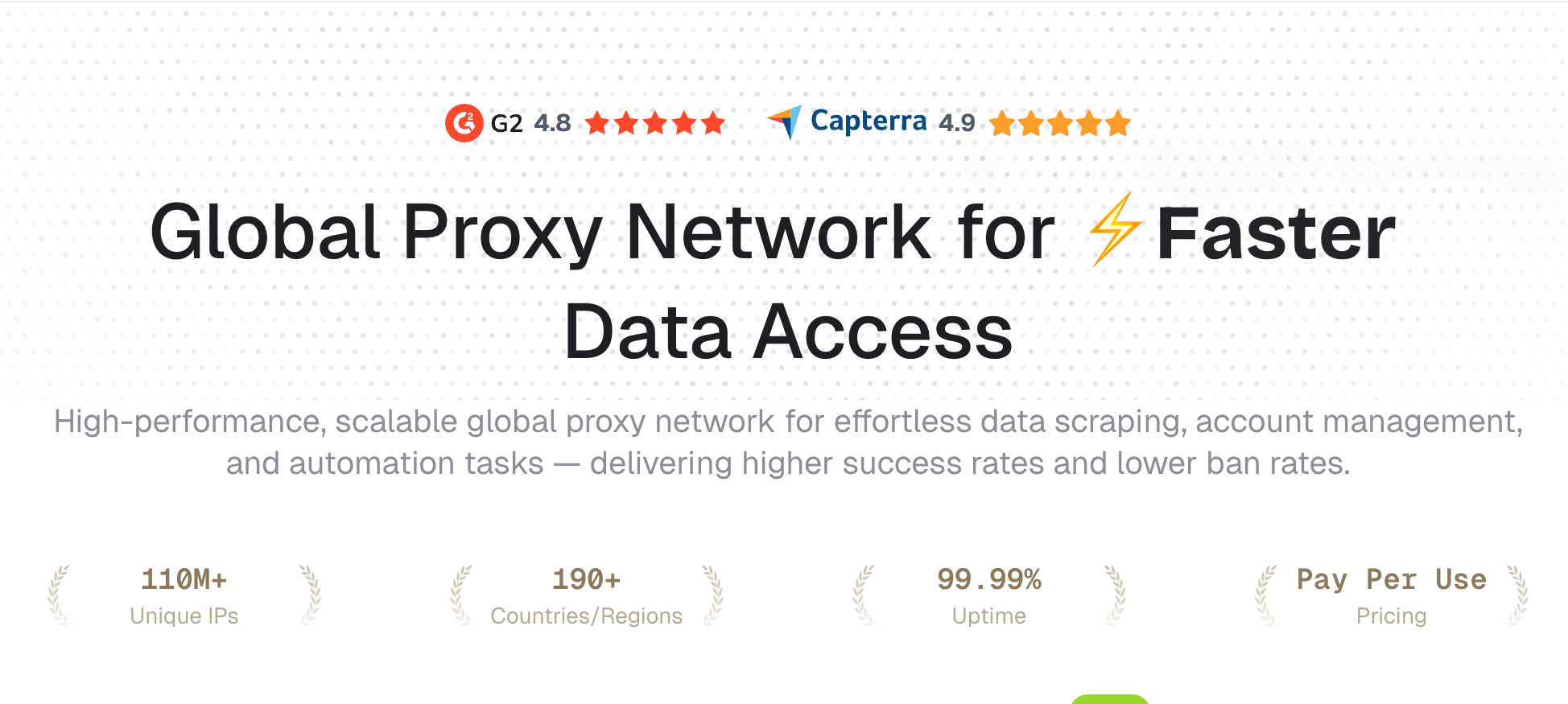
Nstproxy’s official site highlights 110M+ unique IPs, 190+ countries and regions, 99.99% uptime, HTTP/SOCKS5 support, pay-per-use pricing, and proxy products built for data scraping, automation, ad verification, and account management.
Flexible Proxy Solutions: Choose from residential, ISP, datacenter, IPv6, and mobile proxies to match your different business needs.
Fast Global Coverage: Access IPs from many countries and regions around the world for better flexibility and global reach.
Stable & Secure Connection: Enjoy reliable proxy performance with secure connections and reduced downtime for daily business use.
Easy Integration: Simple setup and API support make it easy to connect proxies with your tools, software, or automation systems.
Flexible IP Rotation: Switch IPs automatically or manually to improve anonymity and reduce the risk of blocks.
High Success Rate: Optimized proxy networks help improve connection success rates for scraping, automation, and account management tasks.
For example, an ecommerce analyst scraping competitor prices may start with Nstproxy Datacenter Proxies for easy product pages. If blocks increase on certain retailers, they can switch those targets to Nstproxy Residential Proxies. If a workflow needs the same IP for repeated sessions, Nstproxy Static ISP Proxies are a better fit.
How to Use Nstproxy for Scraping
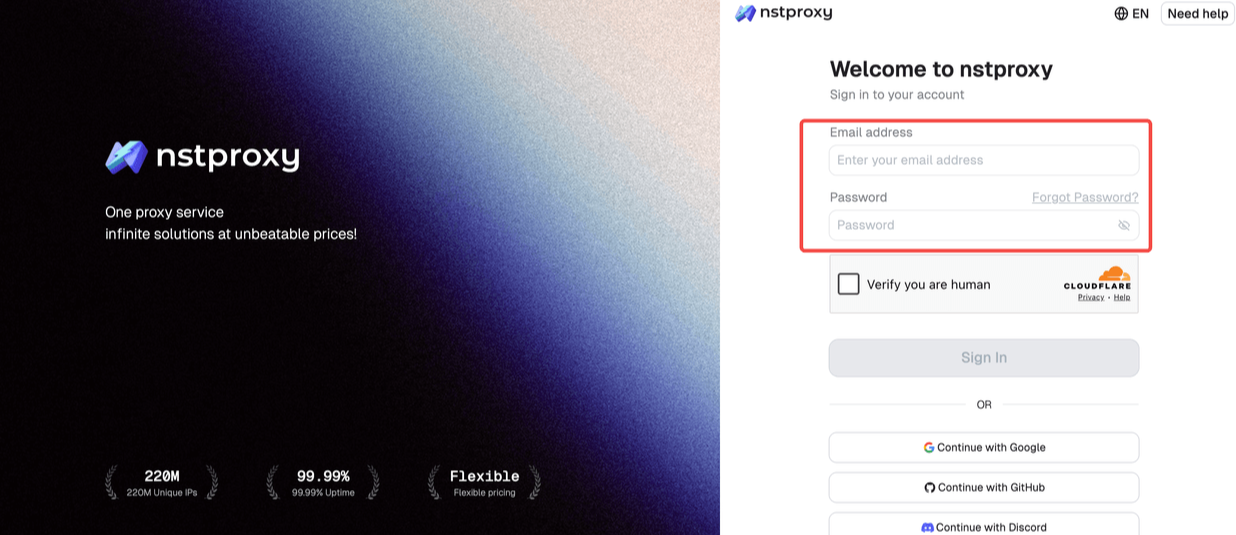
Step 1: Sign Up
Go to Nstproxy official, and then create your account using your email. Once registered, you’ll get access to your dashboard.
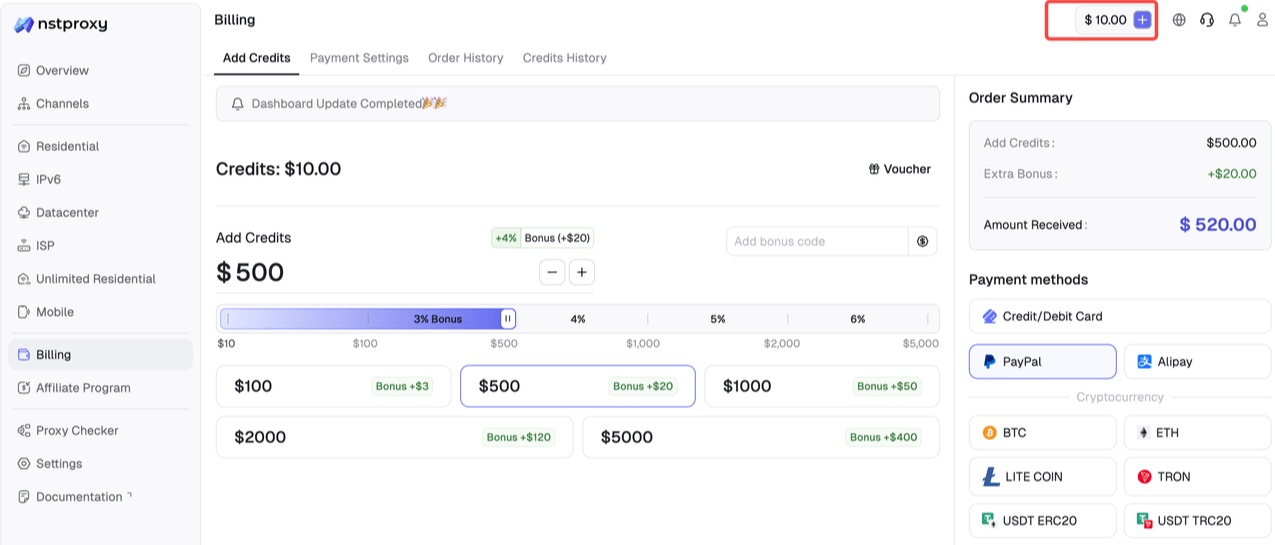
Step 2: Add Funds
Once you have registered, you can top up your balance before using proxies. Simple go to Dashboard > Billing tab. Alternatively, Nstproxy also supports a pay-as-you-go model, so you only pay for what you use.
Step 3: Choose Proxy Type
Next, select the proxy type that fits your needs by switching to the specific channel.
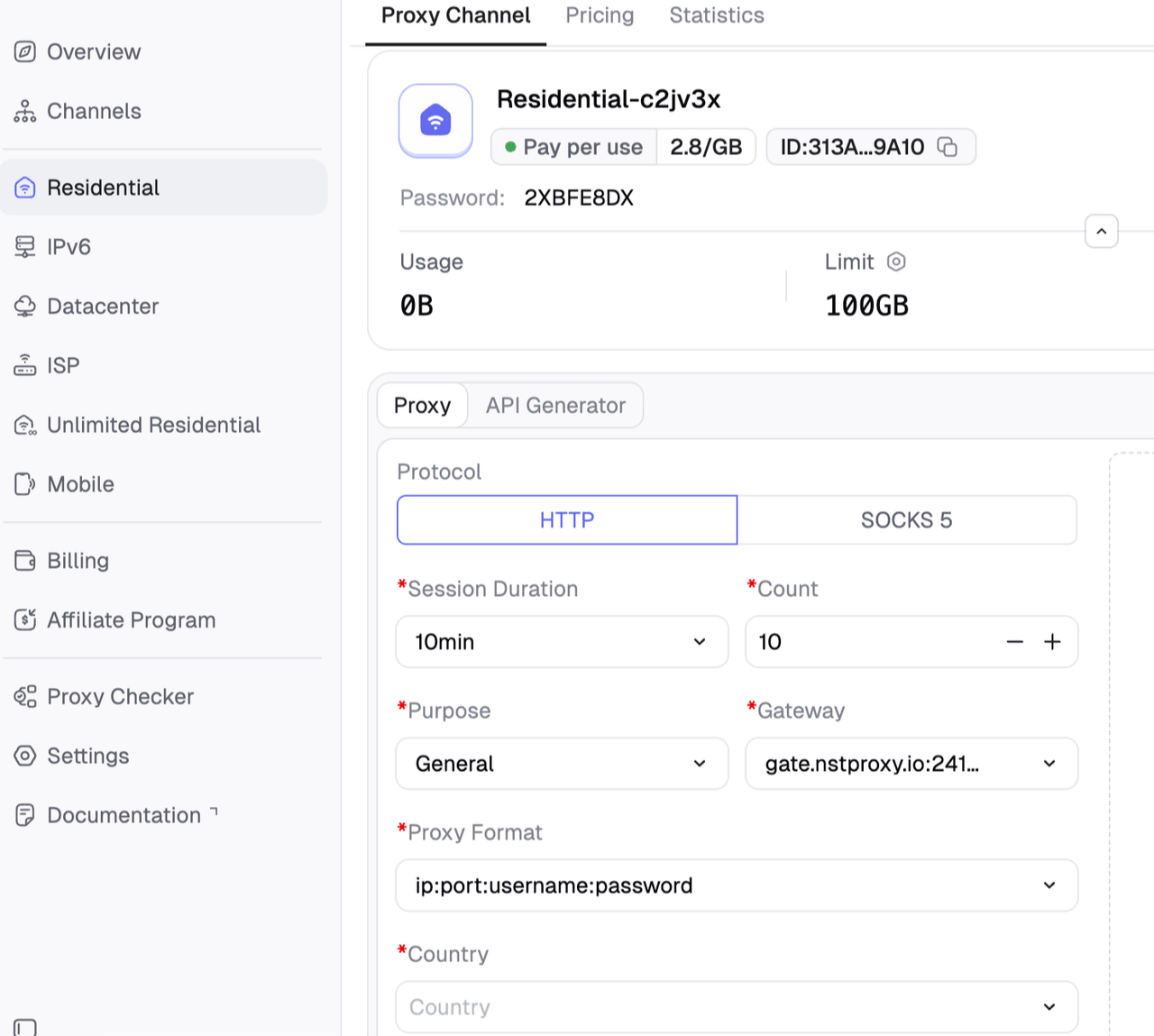
Step 4: Create a Channel
Then you can set up your Channel by choosing Country / Location; Session type (rotating or sticky); Protocol (HTTP / SOCKS5) and so on.
Step 5: Generate & Use Proxy
After creating a channel, generate your proxy credentials. You’ll get: Host/Port/Username/Password.
Then add the proxy credentials to your scraper, browser automation tool, or proxy manager.
Pros
Multiple proxy types in one platform
Strong fit for scraping, SERP monitoring, price tracking, and automation
Residential, ISP, datacenter, IPv6, and mobile options
HTTP/SOCKS5 support
Flexible pricing
Good for teams that need to test different proxy strategies
Cons
Users still need to choose the right proxy type for each target
Residential and mobile proxies cost more than datacenter proxies
Scraping success also depends on request behavior, headers, and rate limits
2. ScraperAPI
Best for: Developers who want scraping infrastructure handled for them.
ScraperAPI is not just a proxy provider. It is a scraping API that manages proxies, browsers, retries, and CAPTCHA handling for developers. This is useful if you want to focus on data extraction instead of proxy rotation logic.
Pros
Proxy management handled for you
Developer-friendly API
Good for teams that want less infrastructure work
Useful for scraping dynamic or protected sites
Cons
Less control than managing proxies directly
Can cost more than raw proxy traffic
Not ideal if you want full proxy-level customization
3. Oxylabs
Best for: Enterprise scraping and web intelligence teams.
Oxylabs is a premium proxy and scraping infrastructure provider. It offers residential, datacenter, ISP, and mobile proxies, plus scraping APIs. It is a strong choice for larger teams that need documentation, support, reliability, and compliance processes.
Pros
Premium proxy infrastructure
Strong support and documentation
Multiple proxy types
Suitable for large-scale scraping
Cons
More expensive than budget providers
May be overkill for small scraping projects
4. Bright Data
Best for: Large-scale data collection and compliance-heavy teams.
Bright Data is one of the largest proxy providers, with residential, datacenter, ISP, and mobile proxy options. It is built for enterprise data collection and offers advanced controls.
Pros
Large global network
Advanced targeting and controls
Strong enterprise tooling
Multiple proxy types
Cons
Complex for beginners
Pricing can be high
Setup may require more planning
5. Decodo
Best for: Teams that want a polished proxy platform with strong usability.
Decodo, formerly Smartproxy, offers residential, datacenter, ISP, and mobile proxies. It is often recommended in proxy comparisons because it balances usability, coverage, and performance.
Pros
Beginner-friendly dashboard
Multiple proxy products
Good documentation
Useful for scraping, SEO, and research
Cons
Not always the cheapest option
Heavy usage can become expensive
6. Webshare
Best for: Budget-conscious developers and small scraping tests.
Webshare is popular for self-service proxy buying. It offers proxy products with simple setup and accessible pricing, making it a good fit for smaller users.
Pros
Easy to start
Budget-friendly
Simple dashboard
Good for small tests and basic scraping
Cons
Less enterprise-focused
May require testing for harder targets
7. Proxy-Cheap
Best for: Users looking for low-cost residential or datacenter proxies.
Proxy-Cheap appears in the live SERP with a 2026 guide to proxies for web scraping. It is often positioned around affordability and practical proxy access.
Pros
Budget-focused positioning
Multiple proxy types
Good for price-sensitive users
Useful for testing smaller scraping jobs
Cons
Users should benchmark success rates
May not match premium providers for support or scale
8. NetNut
Best for: Business scraping workflows that need ISP-style reliability.
NetNut is known for ISP and residential proxy infrastructure. It can be useful for high-volume data collection, market research, and recurring scraping tasks.
Pros
Strong business proxy positioning
ISP and residential options
Good for recurring workflows
Useful for data-heavy teams
Cons
More suited to business users than hobby projects
May not be the cheapest for small tests
9. DataImpulse
Best for: Pay-as-you-go residential proxy users.
DataImpulse is often discussed in scraping and automation contexts because of its simple residential proxy pricing and flexible traffic-based model. It can be useful for teams that want to test residential proxies without large commitments.
Pros
Simple traffic-based pricing
Good for testing
Residential proxy access
Flexible for irregular usage
Cons
Users should test IP quality by target
May require more setup than scraping APIs
10. Browserless
Best for: Browser automation and scraping with headless browsers.
Browserless appears in the SERP with a guide to free proxy options for scraping. Its core product is browser automation infrastructure, which is useful when scraping requires real browser sessions rather than simple HTTP requests.
Pros
Good for browser automation
Useful for JavaScript-heavy sites
Developer-oriented
Helpful educational content
Cons
Not a raw proxy provider in the same way as Nstproxy
May not fit users who only need proxy IPs
Which Proxy Type Should You Choose?
Use Datacenter Proxies for Speed and Cost
Datacenter proxies are fast and affordable. They are best for:
Low-risk scraping
High-volume crawling
Public pages with weak anti-bot systems
SERP checks where speed matters
Real-time monitoring
Nstproxy Datacenter Proxies are a good fit for high-concurrency scraping because they offer low latency, high bandwidth, HTTP/SOCKS support, and a cost-effective model.
Use Residential Proxies for Harder Targets
Residential proxies are better when websites block datacenter IPs.
Use them for:
Ecommerce scraping
Localized content checks
Price monitoring
Ad verification
Social platform public data
Targets with stricter IP reputation checks
Nstproxy Residential Proxies are useful here because they provide real residential IPs across 190+ regions, precise geo-targeting, HTTP/SOCKS support, and flexible pricing.
Use ISP Proxies for Long Sessions
ISP proxies are static, stable, and faster than many rotating residential proxies.
Use them for:
Logged-in workflows
Session-based scraping
Long-running monitoring
Repeated access from the same IP
High-traffic tasks where bandwidth pricing gets expensive
Nstproxy Static ISP Proxies are useful because they provide ISP-sourced static IPs, unlimited bandwidth by IP plan, long sessions, and country-level targeting.
Use Mobile Proxies for Mobile-Sensitive Targets
Mobile proxies are best when mobile carrier IP behavior matters.
Use them for:
Mobile app testing
Mobile SERP checks
Social media workflows
App-based public data
Mobile ad verification
Mobile proxies usually cost more, so use them only when mobile trust is important.
Are Free Proxies Good for Scraping?
Free proxies can work for tiny tests, but they are not reliable for serious scraping.
Common problems include:
Dead IPs
Slow speed
Public abuse history
No location control
No support
High block rates
Unstable sessions
Security risks
The Reddit result in the SERP reflects this common reality: small-budget developers often start with VPNs or free options, but eventually need better proxy infrastructure when scraping volume grows.
For production scraping, a paid provider like Nstproxy is usually cheaper in the long run because it reduces failed requests and retry waste.
How to Choose the Best Proxy for Scraping
Use this checklist:
What sites are you scraping?
Do they block datacenter IPs?
Do you need country or city targeting?
Do you need rotating or sticky sessions?
Is speed or trust more important?
Do you need HTTP, HTTPS, or SOCKS5?
How many requests will you send per day?
What is your cost per successful request?
Do you need API access?
Can you start with a small test?
The best proxy provider is the one that gives you the lowest cost per successful scrape, not simply the lowest price per GB or per IP.
Recommended Nstproxy Setup by Use Case
Use Case
Recommended Nstproxy Product
Fast public page scraping
Datacenter Proxies
Ecommerce price monitoring
Residential Proxies
SERP scraping
Datacenter or Residential Proxies
Long-session scraping
Static ISP Proxies
Ad verification
Residential or ISP Proxies
Mobile app data testing
Mobile Proxies
Large-scale low-risk scraping
IPv6 or Datacenter Proxies
Multi-region scraping
Residential Proxies
FAQs
What is the best proxy for scraping?
The best proxy for scraping depends on the target. Datacenter proxies are best for speed and cost, residential proxies are best for harder targets, ISP proxies are best for stable sessions, and mobile proxies are best for mobile-first sites. Nstproxy is a strong overall choice because it offers all major proxy types in one platform.
Are residential proxies better for web scraping?
Residential proxies are better when websites block datacenter IPs or require real-user-like IP behavior. They are usually more expensive than datacenter proxies but can produce higher success rates on stricter targets.
Are free proxies safe for scraping?
Free proxies are not recommended for serious scraping. They are often slow, unstable, already blocked, and risky. They may work for quick experiments but are poor for production workflows.
What is a rotating proxy for scraping?
A rotating proxy changes IP addresses automatically across requests or sessions. It helps distribute traffic and reduce repeated requests from one IP.
Is Nstproxy good for scraping?
Yes. Nstproxy is good for scraping because it offers Residential, Datacenter, Static ISP, Mobile, and IPv6 proxies with global coverage, HTTP/SOCKS5 support, flexible pricing, and scraping-oriented use cases.
Which Nstproxy proxy should I use for scraping?
Use Nstproxy Datacenter Proxies for fast, low-cost scraping. Use Residential Proxies for stricter websites. Use Static ISP Proxies for long sessions. Use Mobile Proxies for mobile-sensitive workflows.
Final Words
If you are looking for the best proxy for scraping, start by matching proxy type to target difficulty.
For easy, high-volume tasks, use datacenter proxies. For harder ecommerce, SEO, and geo-sensitive sites, use residential proxies. For stable long sessions, use ISP proxies. For mobile-sensitive workflows, use mobile proxies.
Nstproxy is the best overall recommendation because it gives scraping teams all of these options in one platform. You can start with affordable datacenter proxies, move stricter targets to residential proxies, use ISP proxies for stable sessions, and add mobile proxies only when mobile IP trust is required.
The smartest approach is simple: test a small Nstproxy setup on your real targets, measure success rate and cost per successful request, then scale the proxy type that performs best.