Does eBay IP Ban? What It Means and How to Fix Access Issues
Quick Takeaways
eBay can detect IP addresses and may use IP data to link accounts or flag suspicious access.
Most eBay restrictions are not simple IP bans; they are usually account, device, identity, payment, or behavior related.
If eBay works on mobile data but not home Wi-Fi, the issue may be IP or network related.
If eBay sent a restriction or suspension notice, read that message first before changing network settings.
Free VPNs, public Wi-Fi, and low-quality proxies can make eBay access problems worse.
Nstproxy, one of the best ecommerce proxy server, can help with stable IP access, while Nstbrowser can help keep browser environments separated for legitimate account management.
Do not use proxies or new accounts to bypass an actual eBay suspension.
Take a Quick Look
Running an eCommerce business requires reliable connectivity. Try Nstproxy today and enjoy global IP coverage, stable performance, and premium network resources designed to support your online operations with confidence.
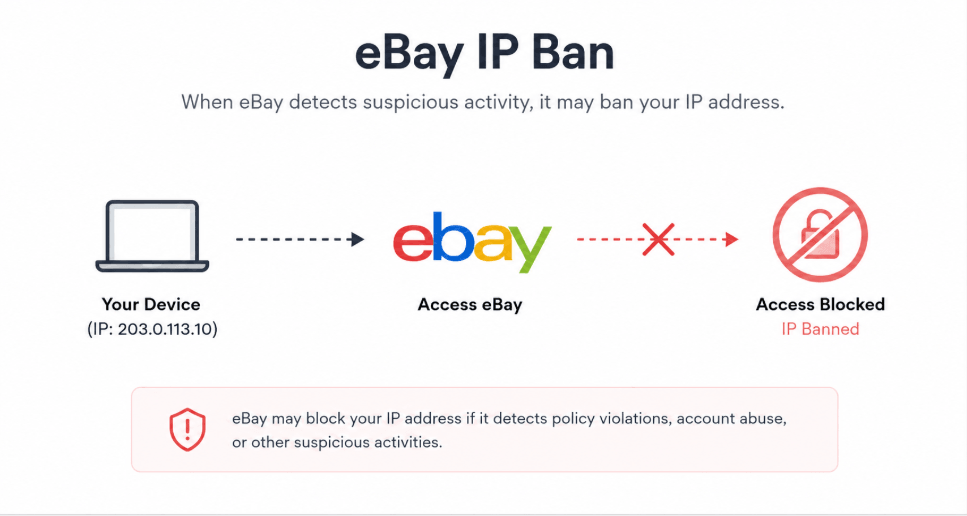
If eBay suddenly stops loading on your home Wi-Fi, shows an “Access Denied” message, or restricts an account after another person in the same household had problems, it is natural to wonder: does eBay IP ban users?
The short answer is yes, eBay can use IP-related signals. But in most cases, eBay does not rely on IP address alone. A restriction is usually based on a wider risk profile that may include your IP address, device, browser cookies, account details, address, payment information, login behavior, and selling activity.
That distinction matters. If your problem is only network-level, changing to a cleaner and more stable IP may help. If your account is suspended because of a policy issue, a proxy will not fix the account. You need to understand what kind of issue you are dealing with first.
Yes, eBay can restrict or challenge traffic based on IP-related signals. However, calling every eBay access problem an “IP ban” is too simple.
An IP address tells eBay where a connection is coming from. It can show the network, ISP, approximate location, and whether the IP belongs to a residential network, datacenter, VPN, public proxy, or mobile carrier. If one IP is connected to repeated suspicious activity, multiple restricted accounts, or unusual login patterns, eBay may treat that IP as risky.
But eBay does not need to depend on IP alone. It can also compare browser data, cookies, device information, shipping addresses, payment details, seller behavior, and account history. That is why simply changing an IP may not solve a real account restriction.
A better way to think about it is this: eBay may not always “ban your IP” permanently, but your IP can be one of the signals used to restrict access, link accounts, or trigger security checks.
eBay IP Ban vs Account Suspension vs Access Denied
Before trying to fix the issue, identify what type of problem you have.
Issue Type
What It Means
Common Signs
Best First Step
IP-based access issue
eBay blocks or challenges traffic from a network
eBay works on mobile data but not Wi-Fi
Test another network
Account restriction
eBay limits account actions
eBay message or email explains the restriction
Read the official notice
Account suspension
eBay disables buying, selling, or account access
Cannot use account normally
Follow eBay’s appeal or resolution path
Browser/session issue
Cookies or cache cause access or login errors
Works in incognito or another browser
Clear cookies and cache
Shared network issue
Multiple users share one risky IP
Other accounts on the same Wi-Fi affected
Use a cleaner, stable network
This diagnosis step is important because the wrong fix can make things worse. If the issue is an account suspension, switching IPs will not address the real cause. If the issue is browser cookies, buying a proxy is unnecessary. If the issue is a bad network or VPN IP, then a stable proxy may help.
How eBay May Detect and Link Accounts
1. IP Address
Your IP address is one of the easiest signals for eBay to observe. If multiple accounts log in from the same IP, especially if one has been restricted, eBay may treat the connection as a risk signal.
This does not mean every family member or office user is automatically banned. But if the same IP is connected to repeated policy issues, suspicious activity, or account creation patterns, it can become part of the risk profile.
2. Device and Browser Signals
eBay may also look at your browser, device type, operating system, cookies, language settings, and other environment signals. If several accounts use the same device and browser profile, changing only the IP may not separate them.
This is why users who manage legitimate business workflows often use separate browser profiles. The goal is not to hide wrongdoing, but to avoid mixing sessions, cookies, and account environments.
3. Cookies and Session Data
Cookies help eBay remember your login session, browsing behavior, and account environment. If old cookies are tied to a restricted session, they may continue causing problems even after you change networks.
Clearing cookies is one of the simplest troubleshooting steps before assuming you have an IP ban.
4. Address and Payment Details
Shipping addresses, billing addresses, bank accounts, payout methods, PayPal history, and identity details can be stronger linking signals than IP. If two accounts share the same payment or address data, eBay may connect them even if the IP changes.
5. Account Behavior
Behavior matters. Repeated duplicate listings, sudden selling spikes, suspicious buyer activity, unpaid fees, policy violations, and unusual login patterns can all trigger restrictions.
If account behavior is the cause, an IP change will not solve the underlying issue.
Signs Your eBay Problem May Be IP-Related
1. eBay Works on Mobile Data but Not Wi-Fi: This is one of the clearest signs of a possible network issue. If eBay fails on your home Wi-Fi but works immediately when you switch to mobile data, your home IP may be blocked, rate-limited, or flagged.
2. Every Device on the Same Network Fails: If your phone, laptop, and desktop all fail on the same Wi-Fi, but work on another network, the issue is probably not limited to one browser or device.
3. You See an Access Denied Message: An “Access Denied” page can appear when eBay or its security systems reject traffic from a specific network, IP, VPN, proxy, or browser environment.
4. Multiple Accounts on the Same Network Are Restricted: If several accounts used on the same Wi-Fi are affected, IP may be part of the link. But eBay may also be connecting those accounts through device, address, payment, or behavioral data.
5. eBay Fails Only When Using a VPN: Shared VPN IPs are often used by many people. If eBay works without the VPN but fails when the VPN is enabled, the VPN IP may have poor reputation.
Why eBay May Restrict an IP or Account?
1. Suspicious Login Activity
Frequent logins from different regions, devices, or IPs can look risky. For example, if an account normally logs in from California and suddenly appears from several countries in one day, eBay may ask for verification or restrict activity.
2. Multiple Accounts From the Same Environment
Using several accounts from the same IP, browser, or device can create account-linking signals. This is especially risky if one of the accounts already has restrictions.
3. Policy Violations
Selling prohibited items, duplicate listings, feedback manipulation, unpaid fees, buyer abuse, or fraud-related activity can lead to account restrictions. These are account-level problems, not just IP problems.
4. Poor IP Reputation
Public Wi-Fi, free proxies, and shared VPNs often have messy histories. If an IP has been abused by other users, your normal activity may still be affected by that reputation.
5. Location and Identity Mismatch
eBay may become suspicious if your account region, shipping address, payment method, and IP location do not match. A consistent environment is safer than constantly changing locations.
What to Do If eBay Blocks Your IP or Restricts Access
Method 1. Check eBay Messages and Email First
Start with eBay’s official notice. If your account is restricted or suspended, eBay usually sends a message explaining the issue and what you need to do.
Steps:
Try to log in to your eBay account.
Open your eBay Messages.
Check the email address registered to your account.
Look for messages about restriction, suspension, identity verification, payment issues, or policy violations.
Follow the official instructions before trying technical fixes.
If the message says your account is suspended, treat it as an account issue first. A proxy cannot remove an official account restriction.
Method 2. Test Another Network
Testing another network helps you understand whether the issue is tied to your IP.
Steps:
Turn off Wi-Fi on your phone.
Use mobile data and open eBay.
If possible, test from another trusted Wi-Fi network.
Try opening eBay in a clean browser session.
Compare the results.
If eBay works on mobile data but not your home Wi-Fi, your home IP or network may be the problem. If eBay fails everywhere after login, the issue is more likely account-related.
Method 3. Clear Browser Cookies and Cache
Old cookies can keep causing issues even after the original problem changes. Clearing them gives your browser a clean session.
Steps:
Open your browser settings.
Go to privacy or browsing data.
Search for eBay cookies and site data.
Delete eBay cookies and cached files.
Restart the browser.
Open eBay in private or incognito mode.
Test whether the site loads normally.
If eBay works after clearing cookies, the issue may have been session-related rather than a true IP block.
Method 4. Stop Repeating the Same Failed Action
If eBay is already restricting access, repeated attempts can make the situation worse. Do not keep logging in, creating accounts, changing IPs, or relisting the same item over and over.
A better approach is to pause, identify the cause, and take one clean recovery path. If eBay asked for verification, complete it. If the account has a policy notice, respond to that. If the network is the problem, fix the network environment before logging in again.
Method 5. Contact eBay Support
If the restriction seems wrong, contact eBay through official support. This is especially important if you are using a normal home connection and have no policy violations.
Before contacting support, prepare:
Your account username.
Screenshot of the error.
Time and date of the issue.
Whether eBay works on another network.
Any recent account changes or verification attempts.
Clear information makes the support conversation easier.
Method 6. Use a Stable High-Quality Proxy Like Nstproxy
If your issue appears to be caused by unstable IP reputation, shared VPNs, public networks, or location inconsistency, a high-quality proxy can help create a cleaner access environment.
Whether you're managing a single store or operating multiple eCommerce accounts, Nstproxy provides fast, stable, and reliable connectivity backed by a global proxy network. With flexible location options, premium IP resources, and enterprise-grade performance, Nstproxy helps users build a more consistent online environment for eCommerce operations, market research, and store management.
Avoiding eBay IP problems is mostly about keeping your account environment consistent. eBay does not only care about your IP. It also looks at browser sessions, account behavior, location signals, and identity details. That is why the best prevention setup combines a stable IP with a clean browser profile.
This is where Nstproxy + Nstbrowser can work together.
Nstproxy provides the IP environment. Nstbrowser helps create separate browser profiles so cookies, fingerprints, and sessions do not get mixed together. For legitimate eBay sellers, researchers, or teams, this setup can reduce accidental account linking and unstable login signals.
Step 1. Use a Stable IP Instead of Free VPNs
Free VPNs and public proxies are risky because many users share the same IPs. Some of those IPs may already be flagged.
Use Nstproxy Static ISP Proxy if you need a consistent IP for eBay login sessions. Static ISP proxies are better for eBay than rotating proxies because they keep the same network identity over time.
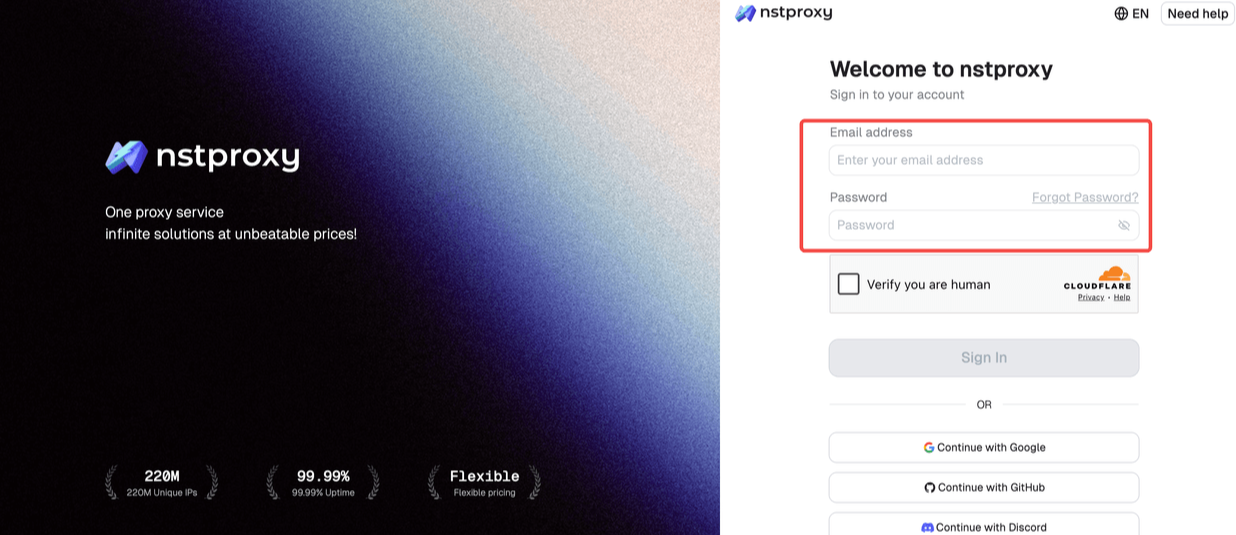
Simply go to the Nstproxy official and sign up with your email accout. Then you can access to the official dashboard.
Step 2. Match the Proxy Location to the Account Region
Choose an IP location that matches your normal eBay usage. If your account, address, and business activity are US-based, use a US proxy location.
Avoid jumping between countries. A sudden change from one country to another can create unnecessary security checks.
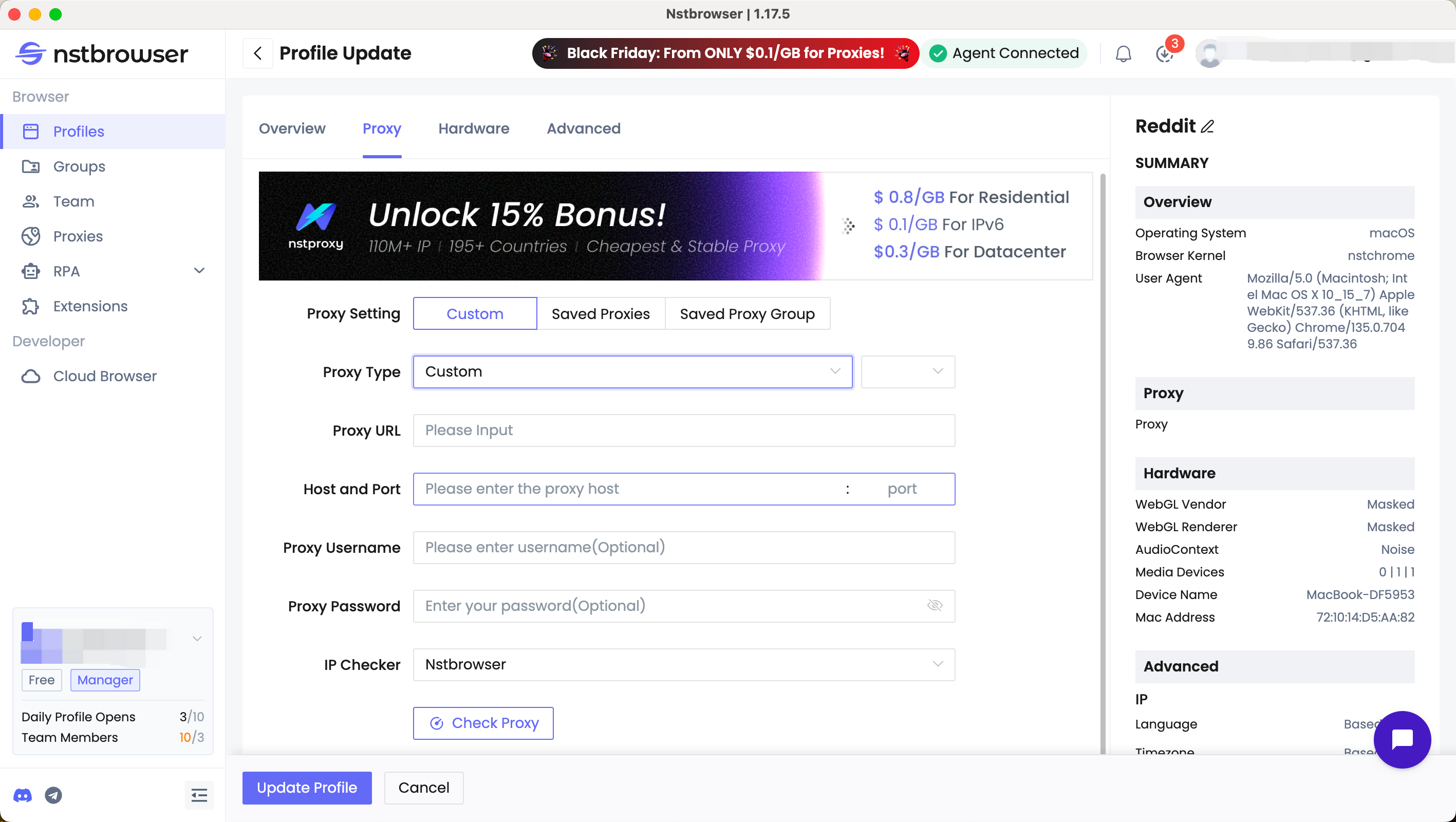
After generating your proxy details,copy it.
Step 3. Create a Separate Nstbrowser Profile
Use Nstbrowser to create a dedicated browser profile for your eBay workflow. This keeps cookies, browser fingerprints, login sessions, and proxy settings separated from your normal browsing.
A clean profile is especially useful if multiple accounts or platforms are used on the same device. It reduces accidental cookie overlap and keeps each workflow organized.
Step 4. Bind One Nstproxy IP to One Browser Profile
For stable account access, use one proxy environment per browser profile. Do not keep switching proxies inside the same eBay session.
A good setup looks like this:
One eBay workflow.
One Nstbrowser profile.
One consistent Nstproxy Static ISP IP.
One matching region.
One clean cookie environment.
This consistency is much better than changing IPs every few minutes.
Step 5. Clear Old Cookies Before Rebuilding the Setup
If you previously used a VPN, public proxy, or messy browser profile, clear old eBay cookies before logging in through the new setup.
Old cookies may still carry previous session signals. Starting with a clean browser profile reduces confusion.
Step 6. Keep Account Behavior Natural
Even with a stable proxy and browser profile, behavior still matters. Do not suddenly change selling patterns, create duplicate listings, log in from many devices, or repeatedly fail verification.
A stable IP helps with access consistency. It does not protect against policy violations.
Step 7. Avoid Using This Setup to Evade Suspensions
If eBay has suspended an account, the proper path is to read the notice and resolve the issue with eBay. Nstproxy and Nstbrowser should be used to create stable, organized access environments, not to bypass enforcement.
What Not to Do After an eBay IP Ban or Restriction
Do not create new accounts immediately. If eBay already restricted one account, creating new accounts from the same environment may create stronger account-linking signals.
Do not use free proxies. They are often slow, crowded, unsafe, and already flagged.
Do not rotate IPs aggressively. For eBay, a stable IP is usually better than constant switching.
Do not ignore official eBay notices. If eBay says your account is restricted for a policy reason, solve that issue first.
Do not mix account regions. Your IP location, shipping address, payment method, and account behavior should make sense together.
FAQs
Q1. Does eBay IP ban users?
Yes, eBay can restrict access based on IP-related signals, but most restrictions are not caused by IP alone. eBay may also use device, account, payment, address, and behavior data.
Q2. Can eBay detect my IP address?
Yes. Like most major websites, eBay can see the IP address used to access its platform.
Q3. Can eBay link accounts by IP?
Yes, IP address can be one linking signal. However, eBay may also link accounts through cookies, devices, address details, payment methods, and behavior patterns.
Q4. Is “Access Denied” on eBay an IP ban?
It can be IP-related, but not always. It may also be caused by browser issues, VPN detection, security filtering, or temporary network problems.
Q5. Why does eBay work on mobile data but not Wi-Fi?
If eBay works on mobile data but fails on Wi-Fi, your Wi-Fi IP or network may be blocked, flagged, or temporarily restricted.
Q6. Can a VPN cause eBay access problems?
Yes. Shared VPN IPs often have poor reputation or inconsistent locations, which may trigger access problems or verification checks.
Q7. Can Nstproxy help with eBay IP issues?
Nstproxy can help if the issue is caused by poor IP reputation, unstable VPNs, or inconsistent network access. Static ISP proxies are usually the best choice for stable eBay sessions.
Conclusion
So, does eBay IP ban users? Yes, eBay can use IP addresses as part of its risk system, and some access problems may be IP-related. But most eBay restrictions are more complex than a simple IP ban.
The right approach is to diagnose first. Check eBay messages, test another network, clear cookies, and confirm whether the issue is account-level or network-level. If the problem is caused by unstable IPs, shared VPNs, or poor network reputation, Nstproxy can help provide a cleaner and more stable IP environment.
For prevention, the stronger setup is Nstproxy Static ISP Proxy + Nstbrowser. Nstproxy helps keep your IP consistent, while Nstbrowser helps keep browser profiles separated and organized. Used responsibly, this setup can reduce unnecessary access issues and make legitimate eBay workflows more stable.
This guide explains how a fixed backconnect gateway selects rotating or session-pinned exit IPs. It clarifies proxy types, protocol boundaries, operational tradeoffs, and the checks buyers should run before choosing a service.
Kai Watanabe
Jul. 29th 2026
Experience Nstproxy - Start Your Free Trial Today
110M+ real IPs with 99.9% access success
Get immediate access to premium residential, datacenter, IPv6 and ISP proxy pools.
Blazing-fast average response ~0.5s for high-concurrency tasks