




Quick Takeaways
- DuckDuckGo is a privacy-focused search engine, but it is not a full proxy by default.
- DuckDuckGo can reduce search tracking, but destination websites may still see your IP address after you click a result.
- A DuckDuckGo proxy means using a proxy connection while searching or browsing through DuckDuckGo.
- Free web proxies are easy to try, but they are often slow, unstable, and not ideal for serious privacy or research work.
- Nstproxy is a stronger option when you need stable, high-quality proxy IPs for DuckDuckGo browsing, regional SERP checks, or browser-based research.
- The best setup depends on whether you use DuckDuckGo in Chrome, Firefox, the DuckDuckGo browser, or through system-level network settings.
Lead-in
DuckDuckGo is popular because it gives people a cleaner, more private way to search the web. Many users switch to it because they do not want their searches turned into a long advertising profile. But after using DuckDuckGo for a while, a natural question comes up: does DuckDuckGo hide my IP address too?
The answer is more nuanced than a simple yes or no. DuckDuckGo helps protect your search privacy, but it is not the same thing as a proxy. When you click a search result and visit another website, that destination website can still see your network IP address unless you are using a proxy, VPN, Tor, or another IP-masking method.
That is where a DuckDuckGo proxy setup becomes useful. A proxy can help route your browser traffic through another IP address, so websites see the proxy IP instead of your real one. For casual users, this may be about privacy. For marketers and SEO teams, it may be about checking regional search results. For researchers, it may be about keeping browsing workflows separate and more consistent.
What Is DuckDuckGo?
DuckDuckGo is a privacy-focused search engine. Its main appeal is that it does not build a personal search profile around you in the same way many traditional search engines do. People use it when they want less tracking, less personalization, and a cleaner search experience.
But DuckDuckGo is still a search engine. It helps with search privacy, not full network anonymity. If you search something on DuckDuckGo and then click a result, the website you visit can still receive technical information from your browser and network, including your IP address.
That distinction is the reason people search for a DuckDuckGo proxy. They want to know whether DuckDuckGo protects the search only, or whether it also hides the network identity behind the search.

What Is a DuckDuckGo Proxy?
A DuckDuckGo proxy is not usually a special product made by DuckDuckGo. In most cases, the phrase means using a proxy server while accessing DuckDuckGo or opening websites from DuckDuckGo search results.
A proxy sits between your browser and the website you visit. Instead of your browser connecting directly to DuckDuckGo or another site, the request goes through the proxy first. The website then sees the proxy IP address, not your real public IP.
This gives you more control over your browsing environment. You can choose a different IP location, keep a stable IP for a longer session, or separate your DuckDuckGo research from your normal home or office network.
The important point is that DuckDuckGo privacy and proxy privacy solve different problems. DuckDuckGo helps reduce search tracking. A proxy helps mask your IP address. Browser private mode clears local history after use, but it does not hide your IP. These tools can work together, but they are not interchangeable.
Does DuckDuckGo Have a Built-In Proxy?
DuckDuckGo does not work as a full proxy service for all browsing by default. If you open DuckDuckGo and search normally, your traffic still comes from your current network unless you have configured a proxy, VPN, or other privacy layer.
Best Proxy Types for DuckDuckGo
The best proxy type depends on what you want to do with DuckDuckGo.
| Proxy Type | Best For | Main Advantage | Main Limitation |
|---|---|---|---|
| Residential Proxy | Regional search research and real-user IP quality | Looks closer to normal consumer traffic | Usually costs more than datacenter proxies |
| Static ISP Proxy | Stable DuckDuckGo browsing sessions | Keeps the same IP for longer periods | Less suitable for large rotating tasks |
| Datacenter Proxy | Fast, lower-cost testing | Speed and affordability | Easier for some sites to detect |
| Mobile Proxy | Mobile search testing | Uses mobile carrier-style IPs | Usually more expensive |
| Free Web Proxy | Quick casual testing | Easy to open in a browser | Slow, limited, and less reliable |
For most DuckDuckGo users, Static ISP proxies and Residential proxies are the two most useful categories. Static ISP proxies are better when you want consistency. Residential proxies are better when you need real-user IP quality and regional flexibility.
Why Nstproxy Is a Strong Choice for DuckDuckGo Proxy Use?
Nstproxy fits DuckDuckGo proxy use because it provides the actual IP infrastructure behind a stable privacy or research workflow. A free web proxy may be enough for a quick test, but it is not ideal if you care about speed, location accuracy, session stability, or IP reputation.
With Nstproxy, users can choose different proxy types for different DuckDuckGo use cases. If you want long, stable browsing sessions, Nstproxy Static ISP proxies are a good fit. If you want to check regional DuckDuckGo results, Nstproxy Residential proxies are more suitable. If you need fast, lower-cost testing, datacenter proxies may be enough. For mobile search behavior, mobile proxies are the better option.
Nstproxy also supports common proxy protocols like HTTP and SOCKS5, so it can work with browser settings, proxy extensions, system proxy settings, and browser profile tools. This flexibility matters because DuckDuckGo users do not all browse the same way. Some use Chrome, some use Firefox, some use the DuckDuckGo browser, and some want the proxy to apply across the whole device.
Which Nstproxy Product Should You Use?
| Use Case | Recommended Nstproxy Product |
|---|---|
| Private DuckDuckGo browsing | Static ISP Proxy |
| DuckDuckGo regional SERP checks | Residential Proxy |
| Fast low-cost testing | Datacenter Proxy |
| Mobile search testing | Mobile Proxy |
| Long browser sessions | Static ISP Proxy |
| Rotating research tasks | Residential Proxy |
If you are not sure where to start, choose based on stability versus flexibility. For stable browsing, choose Static ISP. For regional research and more natural IP quality, choose Residential.
How to Use a Proxy with DuckDuckGo
There is no single “DuckDuckGo proxy setting” that works everywhere. The setup depends on where you use DuckDuckGo. If you search DuckDuckGo in Chrome, configure Chrome or a Chrome proxy extension. If you use Firefox, configure Firefox network settings. If you use the DuckDuckGo browser, you may need to configure the proxy at the system level.
Method 1. Use Nstproxy with DuckDuckGo in Chrome
Chrome usually relies on system proxy settings, but many users prefer a Chrome proxy manager because it is easier to switch profiles. ZeroOmega is a practical option because it lets you create a dedicated proxy profile for DuckDuckGo browsing.
Here is the clean setup process:
- Choose your Nstproxy product first.
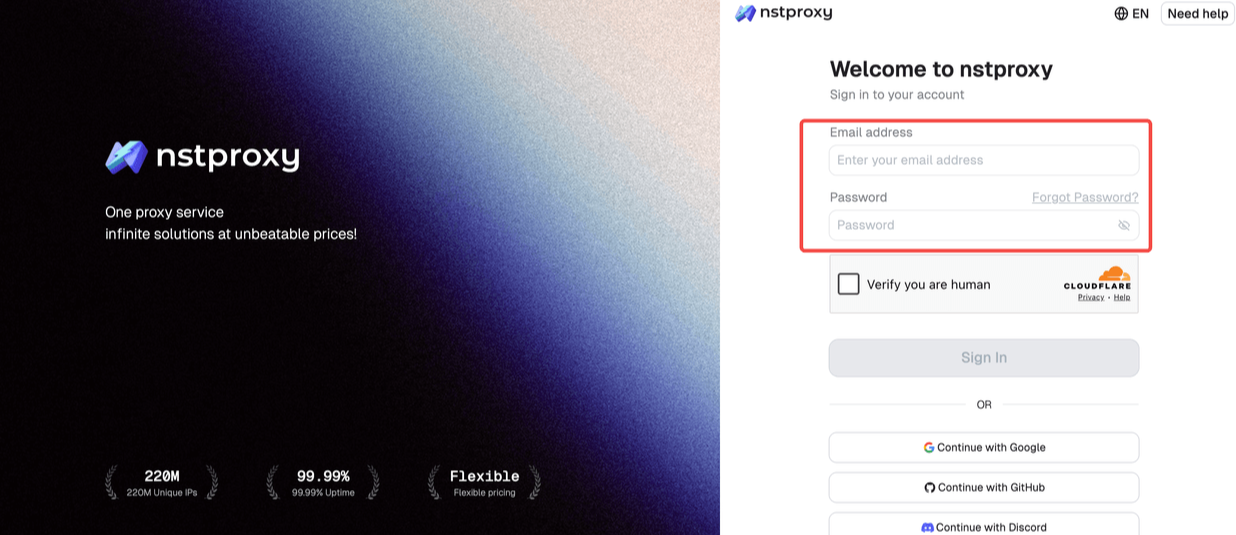
Go to Nstproxy Official and sign up with your email address. Then choose the Nstproxy product type correctly. Use Static ISP Proxy if you want a stable browsing session. Use Residential Proxy if your goal is regional search research or location-based browsing.
-
Copy your proxy details from Nstproxy.
You will need the proxy host, port, username, password, and protocol. Check whether your proxy uses HTTP, HTTPS, or SOCKS5. -
Install ZeroOmega in Chrome.
Open the Chrome Web Store, search for ZeroOmega, install it, and pin it to the toolbar so you can switch proxy profiles quickly. -
Create a new proxy profile.
Open ZeroOmega, create a new profile, and name it something clear likeNstproxy DuckDuckGo. Select the correct protocol and enter the host and port from Nstproxy. -
Add authentication details.
If your Nstproxy endpoint requires login credentials, enter the username and password exactly as shown in the dashboard. Small typing errors are one of the most common setup problems. -
Activate the profile and test your IP.
Click the ZeroOmega icon, choose your Nstproxy profile, then open an IP checker. If the proxy is working, the displayed IP should be the Nstproxy IP, not your real IP. -
Open DuckDuckGo and search normally.
Once the proxy is active, go to DuckDuckGo and use it as usual. If you are doing regional research, make sure the proxy location matches the region you want to test.
This setup is good because Nstproxy provides the IP quality, while ZeroOmega gives you browser-level control.
Method 2. Use Nstproxy with DuckDuckGo in Firefox
Firefox is convenient because it has its own proxy settings. You can configure a proxy inside Firefox without changing your whole device network.
To set it up:
-
Open Firefox settings.
Click the menu icon, go to Settings, and scroll to Network Settings. -
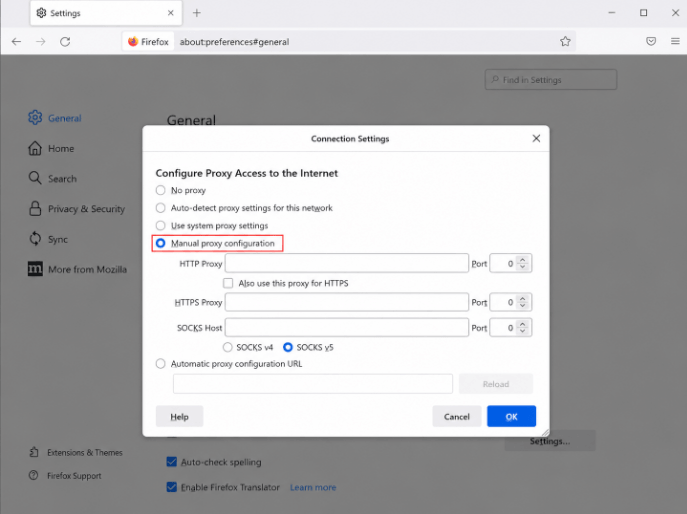
Choose manual proxy configuration.
Select Manual proxy configuration instead of system proxy. This tells Firefox to use the proxy only inside Firefox.
-
Enter your Nstproxy details.
Add the host and port in the correct fields. If you are using HTTP, enter the HTTP proxy details. If you are using SOCKS5, enter the SOCKS host and port. -
Save the settings and open DuckDuckGo.
After saving, visit an IP checker first. Once you confirm the IP has changed, open DuckDuckGo and start browsing. -
Keep the session consistent.
If you are using DuckDuckGo for research, avoid changing proxies in the middle of one workflow. A consistent IP makes results easier to compare.
Firefox is a good option if you want a dedicated DuckDuckGo research browser without affecting Chrome or other apps.
Method 3. Use System Proxy Settings
System proxy settings are useful when you want all browser traffic on the device to use the proxy. This can apply to Chrome, Edge, Safari, and sometimes the DuckDuckGo browser, depending on your operating system.
For Windows:
- Open Settings and go to Network & Internet.
- Select Proxy.
- Under Manual proxy setup, enable Use a proxy server.
- Enter the Nstproxy host and port.
- Save the settings.
- Open DuckDuckGo in your browser and check whether your IP changed.
For macOS:
- Open System Settings.
- Go to Network.
- Select your active Wi-Fi or Ethernet connection.
- Open proxy settings.
- Choose the proxy protocol you are using, such as HTTP or SOCKS.
- Enter the Nstproxy host, port, username, and password if required.
- Save changes and test your IP before using DuckDuckGo.
System-level setup is powerful, but it affects more than one browser. If you only want DuckDuckGo in one browser to use the proxy, a browser-level setup is cleaner.
Method 4. Use a Proxy with the DuckDuckGo Browser
The DuckDuckGo browser focuses on tracker protection and private browsing features. It does not always offer the same kind of manual proxy control that Firefox does. Because of that, the most reliable method is usually to configure the proxy at the system level.
The setup is simple in concept: configure Nstproxy in your device’s network proxy settings, confirm your IP has changed, then open the DuckDuckGo browser. If the browser follows system proxy settings on your device, DuckDuckGo traffic should use the proxy route.
If you need stronger control, use DuckDuckGo inside Chrome or Firefox with a dedicated proxy profile instead. That gives you clearer switching and easier troubleshooting.
Method 5. Use a Web Proxy Site
A web proxy site lets you enter a URL into a proxy page and browse through that page. Tools like CroxyProxy or Proxyium appear in the SERP because users often want a quick, no-setup option.
This method is easy, but it has limitations. Web proxies can be slow, break page layouts, show ads, limit HTTPS behavior, or fail with modern websites. They are acceptable for quick casual tests, but they are not the best choice for privacy-sensitive browsing, professional research, or long sessions.
If your goal is serious DuckDuckGo privacy or regional search monitoring, a provider like Nstproxy is a better option.
DuckDuckGo Proxy vs VPN vs Tor
DuckDuckGo alone protects search privacy, but it does not replace every privacy tool. Here is the practical difference:
| Option | Best For | Pros | Cons |
|---|---|---|---|
| DuckDuckGo alone | Private search | Simple and free | Does not fully hide your IP from destination sites |
| Proxy | Browser-level IP control | Flexible, location-specific, good for research | Requires setup |
| VPN | Whole-device IP masking | Easy to use, covers many apps | Less granular than proxies |
| Tor | Strong anonymity | Multi-hop privacy routing | Slower and may break websites |
A proxy is often the best middle ground for DuckDuckGo users who want IP control without routing every device activity through a VPN.
Common DuckDuckGo Proxy Problems and Fixes
If DuckDuckGo still shows your real IP, the proxy is probably not active in the browser you are using. Check whether your proxy profile is enabled, whether the protocol is correct, and whether another extension or system setting is overriding it.
If DuckDuckGo loads slowly, the proxy may be overloaded, too far from your location, or the wrong proxy type for your task. Try another endpoint, a closer region, or a higher-quality proxy type.
If proxy authentication keeps appearing, the username or password is usually wrong. Recopy the credentials from your Nstproxy dashboard and check for extra spaces.
If search results look wrong, check both your proxy location and DuckDuckGo’s region settings. DuckDuckGo may use browser settings, search settings, and IP location together to decide what results to show.
If websites block you after clicking DuckDuckGo results, the issue may be the proxy IP quality rather than DuckDuckGo itself. Free proxies and overused datacenter IPs are more likely to be blocked than high-quality residential or static ISP proxies.
Free DuckDuckGo Proxy: Is It Safe?
Free web proxies are tempting because they require almost no setup. You open the proxy site, type DuckDuckGo, and start browsing. For quick tests, that can be fine.
But free proxies are not ideal for serious privacy. You usually do not know who operates the proxy, how traffic is handled, or how many other people are using the same IP. Free proxies may also be slow, unstable, crowded, or already blocked by many websites.
If you are only checking whether a page opens from another route, a free web proxy may be enough. If you care about privacy, stable IP quality, regional targeting, or professional research, paid proxies are safer and more reliable.
FAQs
Q1. Does DuckDuckGo have a proxy?
DuckDuckGo is not a full proxy service by default. It is a privacy-focused search engine. To mask your IP while using DuckDuckGo, you need a separate proxy, VPN, Tor connection, or system-level proxy setup.
Q2. Does DuckDuckGo hide my IP address?
DuckDuckGo helps protect search privacy, but it does not automatically hide your IP from every website you visit. Destination websites may still see your IP unless you use a proxy or similar tool.
Q3. Can websites track me after I click DuckDuckGo results?
Yes, websites can still receive your IP address and browser information after you click a result. DuckDuckGo reduces search tracking, but it cannot control every destination website.
Q4. What is the best proxy for DuckDuckGo?
For stable browsing, a Static ISP proxy is a strong choice. For regional SERP research, Residential proxies are usually better. Nstproxy offers both options, making it a flexible choice for DuckDuckGo users.
Q5. Is Nstproxy good for DuckDuckGo?
Yes. Nstproxy works well for DuckDuckGo proxy use because it offers Static ISP, Residential, Datacenter, IPv6, and Mobile proxies, along with location targeting and HTTP/SOCKS5 support.
Q6. Is a DuckDuckGo proxy better than a VPN?
A proxy gives more browser-level control and is better for regional testing or separate browser workflows. A VPN is easier for whole-device privacy. The better option depends on your goal.
Q7. Are free DuckDuckGo proxies safe?
Free proxies may work for quick tests, but they are not ideal for privacy-sensitive browsing. They can be slow, crowded, unreliable, or operated by unknown parties.
Conclusion
DuckDuckGo is a strong choice for private search, but it is not a full proxy by default. It can help reduce search tracking, but it does not automatically hide your IP address from every website you visit after clicking a result.
If you want more control over your IP, location, and browsing environment, you need a separate proxy setup. For casual testing, a free web proxy may be enough. For stable browsing, regional DuckDuckGo SERP checks, or professional research, Nstproxy is a better fit because it offers high-quality proxy types, location targeting, and browser-friendly configuration.
The best setup is simple: use DuckDuckGo for private search, use Nstproxy for IP-level control, and configure the proxy through Chrome, Firefox, system settings, or a proxy manager depending on your workflow.


