A fake IP address usually means one of three things: a random IP string, a reserved dummy IP for testing, or a real alternate IP from a VPN or proxy.
Random IP generators are useful for test data, UI mockups, log examples, and software validation. They are not reliable for real browsing.
You cannot simply type a fake public IP and use it as your internet identity. For normal web traffic, the IP must belong to a real network route that can receive responses.
If you want websites to see a different IP address, use a VPN or proxy instead of a random fake IP.
Nstproxy is a strong option when you need real usable proxy IPs for scraping, SEO monitoring, ad verification, geo-testing, account management, automation, or privacy-focused workflows.
1. Lead-In
People search for “fake IP address” for very different reasons. A developer may need dummy IPs for test cases. A student may want to understand whether a random IPv4 address points to a real machine. A marketer may want to preview content from another country. A data team may need rotating IPs for web scraping. A regular user may simply want websites not to see their real home IP. These are not the same use case.
A random fake IP address can help you test whether your app accepts an IPv4 or IPv6 format. But it will not give you usable internet access. If your real goal is to browse, test, scrape, or access websites from another IP, you need a real network route, usually through a VPN or proxy service.
That distinction is the whole article.
2. What Is a Fake IP Address?
A fake IP address is an IP address that does not represent your actual public internet connection.
In practice, the term can mean three different things:
An address range set aside for documentation or local/private use
Tutorials, examples, internal networks
Alternate real IP address
A real IP from a VPN, proxy, ISP, or mobile network
Browsing, scraping, geo-testing, privacy
The first two are “fake” in the sense that they are not your real public IP. The third is not fake technically. It is a real IP address that belongs to another network, but websites see it instead of your original IP.
How Fake IP Addresses Work
A usable fake IP address works by routing your traffic through an intermediary server.
Normally, when you visit a website, the website sees your real public IP. That IP can reveal your approximate location, ISP, network type, and sometimes whether you are using a business, residential, mobile, VPN, or datacenter connection.
When you use a proxy or VPN, the connection changes:
Your device → Proxy/VPN server → Website
The website sees the proxy or VPN server’s IP instead of your real IP.
This does not mean the IP is “fake” from a technical perspective. It is still a real IP address. But it works like a fake identity from the website’s point of view because your original public IP is hidden.
Fake IP Address vs Proxy vs VPN
Option
What It Does
Works for Real Browsing?
Best For
Random fake IP
Generates an IP-like string
No
Test data and examples
Reserved test IP
Uses safe documentation ranges
No
Docs, tutorials, mockups
VPN
Routes your device traffic through a VPN server
Yes
Personal privacy and simple location switching
Proxy
Routes selected traffic through another IP
Yes
Browsing, scraping, automation, SEO, ad testing
Residential proxy
Uses real ISP-assigned residential IPs
Yes
Higher-trust web access and geo-testing
Static ISP proxy
Uses stable ISP-backed IPs
Yes
Long sessions and account workflows
Datacenter proxy
Uses fast server-based IPs
Yes
Low-risk, high-speed tasks
A fake IP address is usually just data. A proxy or VPN is infrastructure.
3. Why People Use Fake IP Addresses?
People use fake IP addresses for different reasons depending on the task.
1. For privacy, a fake IP helps prevent websites from seeing your real home, office, or mobile network IP. This is useful when you do not want every website to connect your browsing activity to the same public IP.
2. For web scraping, fake IPs help distribute requests across multiple IP addresses. If every request comes from one IP, websites may rate-limit or block the traffic. A rotating proxy setup can reduce request concentration and improve access stability.
3. For streaming, users may want to see how content availability changes by region. Streaming platforms often personalize catalogs by country, so an alternative IP can show what a user in another region might see.
4. For gaming, some users use alternate IPs to reduce exposure to IP-based attacks, test regional servers, or separate accounts. However, gaming platforms often have strict terms, so users should avoid abuse or ban evasion.
5. For cybersecurity and QA testing, fake IPs are used in controlled environments to test firewall rules, fraud detection, geolocation behavior, rate limits, login protection, and access control systems.
6. For SEO and ad verification, marketers use alternative IPs to check search results, ads, landing pages, prices, and localized content from different regions.
4. How to Get a Fake IP Address
Getting a fake IP address does not mean inventing a random IP and typing it into your browser. To make websites see a different IP, your traffic must pass through another real network route. The most common ways are VPNs, proxies, Tor Browser, and mobile networks.
Method 1: Get a Fake IP Address Using a VPN
A VPN gives you a fake IP address by routing your internet traffic through a VPN server. Once connected, websites see the VPN server’s IP address instead of your real home, office, or mobile IP.
This is the easiest method for everyday users because it usually works at the device level. After you connect to a VPN, most apps and websites on your device use the VPN IP automatically.
How to get a fake IP with a VPN:
Choose a VPN provider like ExpressVPN and install the VPN app on your device.
Open the app and sign in.
Select a server location, such as United States, United Kingdom, Germany, or Japan. Then click connect.
Visit an IP checker site to confirm that your visible IP has changed.
Switch to another VPN server if you want a different fake IP.
VPNs are best for personal privacy, public Wi-Fi protection, and simple region switching. However, many VPN IPs are shared by large numbers of users, so they may be detected or blocked by stricter websites.
Method 2: Get a Fake IP Address Using Proxies
A proxy gives you a fake IP address by acting as an intermediary between your device and the website. Your request goes to the proxy first, then the proxy sends the request to the website. The website sees the proxy IP instead of your real IP.
This is the best method when you need more control than a VPN can offer. With proxies, you can choose IP type, country, city, rotation frequency, and session duration.
This is where Nstproxy is a strong choice. Nstproxy provides real proxy IPs rather than random fake IP strings. Its residential proxies are sourced from real home networks, support HTTP/SOCKS5, and offer country, city, and ASN targeting. Nstproxy also provides ISP, datacenter, IPv6, unlimited residential, and mobile proxies, making it suitable for different fake IP address needs.
- Global High-Speed Network
Access 110M+ real IPs worldwide to bypass geo-restrictions easily while enjoying fast and stable connections for streaming and browsing.
- Advanced Online Security
Nstproxy’s residential and datacenter proxies help hide your real IP address, improving anonymity and reducing online tracking risks.
- Stable & Reliable Performance
Built with a strong proxy infrastructure, Nstproxy delivers reliable connections and high uptime for uninterrupted access.
- Easy Connection Testing
Use the free Proxy Checker tool to quickly test and verify your proxy connection before getting started.
- Privacy-Focused Experience
Secure proxy connections help protect your online identity and digital activity. You can also use the IP Lookup tool to confirm your current IP information.
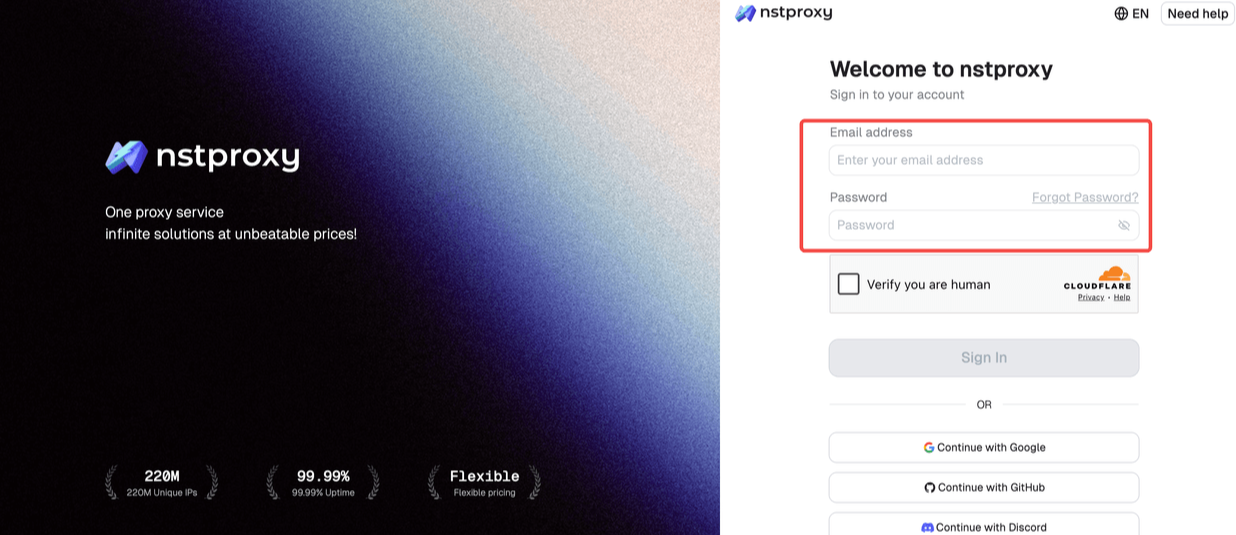
Step 1: Sign Up
Go to Nstproxy official, and then create your account using your email. Once registered, you’ll get access to your dashboard.
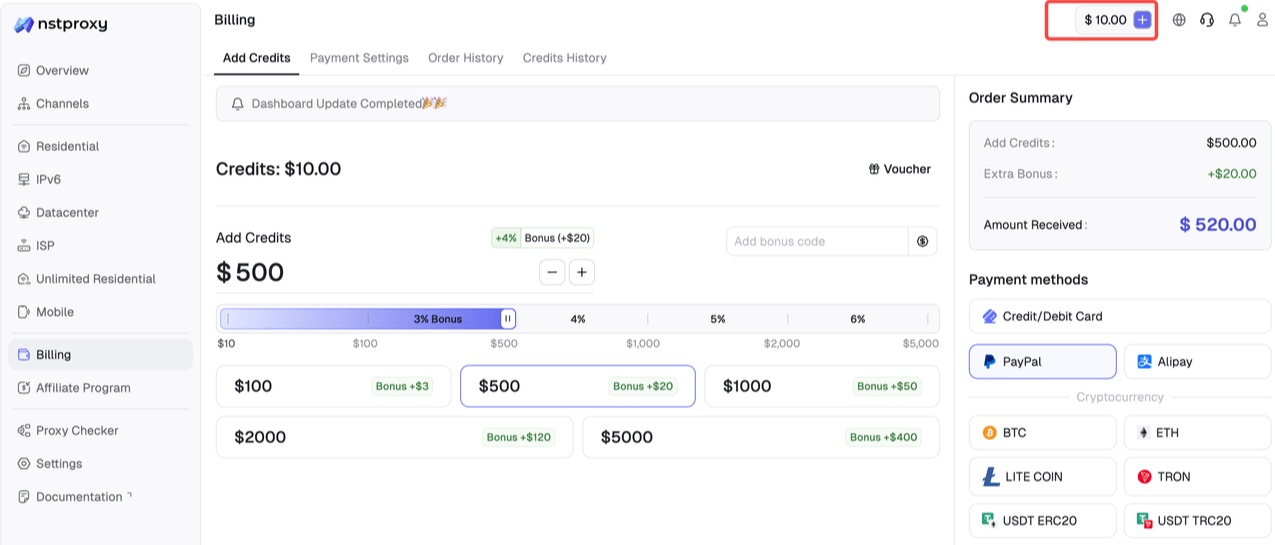
Step 2: Add Funds
Once you have registered, you can top up your balance before using proxies. Simple go to Dashboard > Billing tab. Alternatively, Nstproxy also supports a pay-as-you-go model, so you only pay for what you use.
Step 3: Choose Proxy Type
Next, select the proxy type that fits your needs by switching to the specific channel.
Residential proxies for real-user IP trust
Static ISP proxies for stable long sessions
Datacenter proxies for fast low-risk tasks
Mobile proxies for mobile-first workflows
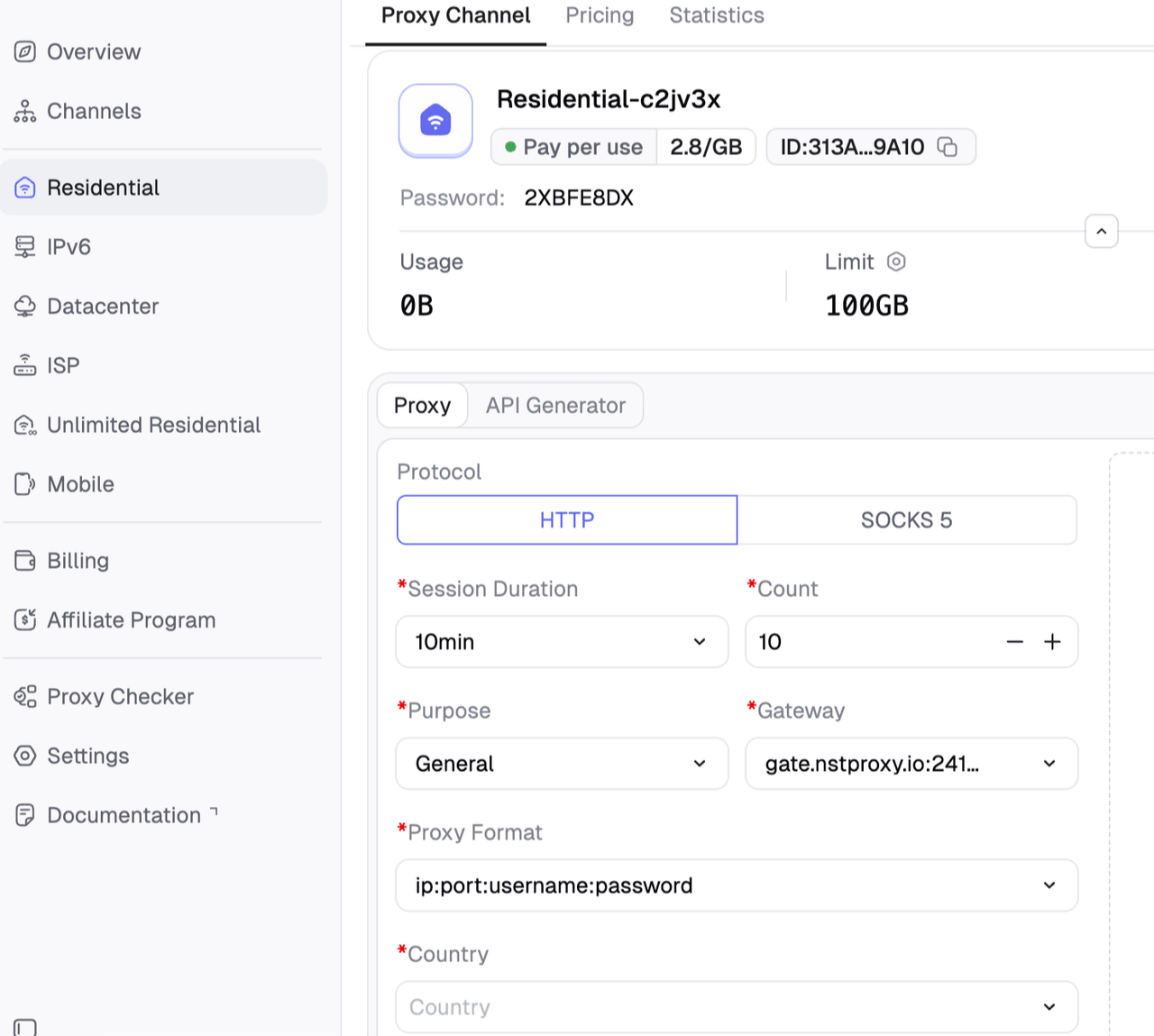
Step 4: Create a Channel
Then you can set up your Channel by choosing Country / Location; Session type (rotating or sticky); Protocol (HTTP / SOCKS5) and so on.
Step 5: Generate & Use Proxy
After creating a channel, generate your proxy credentials. You’ll get: Host/Port/Username/Password. Then copy them.
Once you get the necessary proxy details, add them to your browser, scraping tool, automation software, or proxy manager.
Bonus tip: You can use free Nstproxy IP checker to confim that websites now see the proxy IP.
Method 3: Get a Fake IP Address Using Tor Browser
Tor Browser gives you a fake IP address by routing your traffic through multiple volunteer-operated servers called nodes. The website you visit sees the final Tor exit node IP instead of your real IP.
Tor is different from a VPN or proxy because it is designed for anonymity. Your traffic passes through several relays before reaching the website, making it harder to trace back to your original IP.
How to get a fake IP with Tor Browser:
Download Tor Browser from the official Tor Project website.
Install and open Tor Browser.
Connect to the Tor network.
Visit an IP checker site inside Tor Browser.
Confirm that the visible IP is different from your real IP.
Click “New Circuit for this Site” or restart Tor Browser if you want a different exit IP.
Tor is useful for privacy-focused browsing and research, but it is not ideal for streaming, gaming, web scraping, or account workflows. Many websites block Tor exit nodes or show frequent CAPTCHAs.
Method 4: Get a Fake IP Address Using Mobile Networks
A mobile network gives you a fake IP address by routing your traffic through your carrier instead of your Wi-Fi network. If you switch from home Wi-Fi to mobile data, websites will usually see a different public IP.
This method is simple because it does not require installing a VPN or configuring a proxy. It works especially well when you want to check whether a website issue is tied to your current Wi-Fi IP.
5. Can You Use a Fake IP Address to Browse the Internet?
Not if it is just a random IP string.
For normal web browsing, traffic needs a working path. When you request a website, the website must know where to send the response. If you simply invent an IP address, the response will not route back to you.
This is why random IP generators are useful for testing, but not for real browsing.
If you want a website to see another IP address, you need one of these:
A VPN server
A proxy server
A residential proxy
An ISP proxy
A datacenter proxy
A mobile proxy
Another real network connection, such as mobile data
In other words, you do not need a fake IP. You need a usable alternate IP.
6. FAQs
Q1. What is a fake IP address?
A fake IP address is an alternative IP address used instead of your real public IP. It can mean a random test IP, a dummy documentation IP, or a real proxy/VPN IP shown to websites.
Q2. Can I use a fake IP address online?
Only if it is a real routed IP from a VPN, proxy, Tor, or mobile network. A random fake IP string cannot browse the internet.
Q3. What is the best way to get a fake IP address?
For personal privacy, use a VPN. For scraping, SEO, ad verification, automation, or geo-targeting, use proxies. For professional proxy use, Nstproxy is a strong option.
Q4. Is a proxy better than a VPN for fake IP addresses?
For business workflows, yes. Proxies offer better control over IP type, location, session length, and rotation. VPNs are easier for personal privacy.
Q5. Can Nstproxy provide fake IP addresses?
Nstproxy provides real usable proxy IPs, not random fake strings. These IPs can be used to mask your real IP for browsing, scraping, SEO monitoring, ad verification, automation, and geo-testing.
Q6. Are random IP generators useful?
Yes, but only for testing, mock data, documentation, and software validation. They do not provide working internet identities.
Q7. Which fake IP type is best for scraping?
Residential proxies are usually the best starting point because they appear closer to normal user traffic. Static ISP proxies are better for long sessions, while datacenter proxies are better for fast low-risk tasks.
Final Recommendation
If you need a fake IP address for testing, use a random IP generator or reserved documentation IP ranges.
If you need websites to actually see a different IP, use a VPN, Tor, mobile network, or proxy.
If you need reliable, controllable, real fake IPs for scraping, SEO monitoring, ad verification, geo-testing, automation, or account workflows, use Nstproxy. Residential proxies are the best starting point for real-user IP trust. Static ISP proxies are better for stable long sessions. Datacenter and IPv6 proxies are better for fast, low-risk tasks. Mobile proxies are best for mobile-first testing.
A random fake IP is only a string. A proxy IP is a working network identity.
Build a real open-source visual workflow builder for AI agents: a React Flow canvas paired with a verified topological-sort execution engine, tested end to end with real captured output.
Ivy Lin
Aug. 24th 2026
110M+ real IPs with 99.9% access success
Blazing-fast average response ~0.5s for high-concurrency tasks
From only $0.1/GB
Get immediate access to premium residential, datacenter, IPv6 and ISP proxy pools.