How to Use Proxifier to Bypass Restrictions with a Proxy Server
Quick Takeaways
Proxifier lets apps use proxies even when they do not support proxies natively.
Proxifier works on Windows and Mac.
Proxifier does not provide proxy servers by itself.
Nstproxy is a strong match for Proxifier because it offers Residential, Static ISP, Datacenter, and SOCKS5-compatible proxy options.
Proxification rules let you choose which apps use the proxy and which connect directly.
Always test your proxy inside Proxifier before using it for important workflows.
Take a Quick Look
Need a reliable proxy for Proxifier?
Nstproxy gives you stable Residential, Static ISP, and SOCKS5-compatible proxies for routing desktop apps, browsers, and tools through Proxifier.
Some apps make proxy setup easy. You open the settings, paste a proxy host and port, save it, and you are done.
Other apps are not that friendly. They connect directly to the internet, ignore system proxy settings, or simply do not offer a proxy option at all. This becomes a problem when you need to route traffic through a specific IP for testing, research, app access, privacy, or network troubleshooting.
That is where Proxifier becomes useful.
Proxifier is not a proxy provider. It does not give you IPs. Instead, it works like a traffic router for your computer. You give it a proxy server, then tell it which apps should use that proxy. With the right setup, Proxifier can route browsers, desktop tools, automation software, game launchers, scraping tools, and other apps through a proxy server.
A reliable proxy provider like Nstproxy to supply the actual proxy IPs
What Proxifier Actually Does
Proxifier routes traffic from applications that have no native proxy settings through a proxy server anyway. Browsers usually support proxies out of the box. Desktop software, older Windows programs, and many games don't. Proxifier's own documentation explains that the tool leaves connections alone until a target is set, and from that point forward every new session from the machine gets funneled through the assigned server for as long as Proxifier keeps running. That single-tool coverage is why it beats configuring proxies app by app when the goal is to bypass restrictions across a whole workflow rather than one browser tab.
Proxifier sits between the operating system and the network stack. It intercepts a connection request, checks it against a rule set, then sends it direct, through a proxy, or blocks it outright.
How Does Proxifier Help Bypass Restrictions?
In this context, “bypass restrictions” means routing authorized app traffic through a proxy when direct access does not work because of network filters, regional testing needs, app limitations, firewall rules, or routing problems.
For example, Proxifier may help when:
A desktop app does not support proxy settings.
A browser-level proxy is not enough.
You need one app to use a proxy while the rest of your computer connects normally.
Your local network blocks certain app traffic.
You need to test how an app behaves from another region.
You need stable proxy routing for research or QA workflows.
The important point is that Proxifier is a routing tool. It does not “unlock” access by itself. It sends traffic through the proxy server you choose.
What You Need Before Using Proxifier?
Before opening Proxifier, prepare the basics. This saves time and prevents most setup errors.
You need:
Proxifier installed on Windows or Mac
A working proxy server
Proxy host
Proxy port
Proxy protocol: HTTP, HTTPS, SOCKS4, or SOCKS5
Username and password if authentication is required
A clear idea of which app should use the proxy
This is where many users get stuck. They install Proxifier but do not have a reliable proxy server. Free proxy lists may work for a few minutes, then fail, timeout, or get blocked. For stable workflows, use a proper proxy provider.
Why Use Nstproxy with Proxifier?
Nstproxy provides SOCKS5 and HTTP/HTTPS proxies across residential, ISP, and datacenter IP types, and they plug directly into Proxifier's Proxy Servers menu using the same host, port, and credential fields shown earlier in this guide.
Residential IPs from Nstproxy's pool cut down on the CAPTCHA and block issues tied to datacenter ranges. For teams running Proxifier across several machines or automation scripts, static ISP proxies keep IPs consistent between sessions — something platforms often reward, since frequent IP switching reads as suspicious activity.
The setup process is simple once you understand the flow: add the proxy, test it, create a rule, then launch the app.
Step 1. Download and Install Proxifier
Download Proxifier from the official website and install the version for your operating system.
After installation, open the main Proxifier window. By default, Proxifier may allow traffic to connect directly until you add a proxy server and create rules.
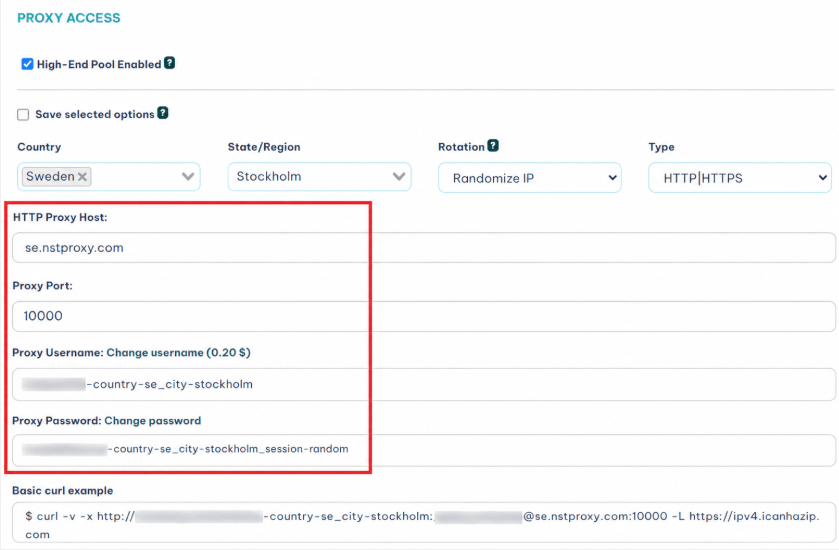
Step 2. Get Proxy Details from Nstproxy
Next, log in to Nstproxy and choose the proxy type that fits your workflow.
If you are routing one app for a long session, choose Static ISP Proxy. If you need real-user IP quality, choose Residential Proxy. If the app needs flexible traffic routing, use a SOCKS5-compatible option.
Steps:
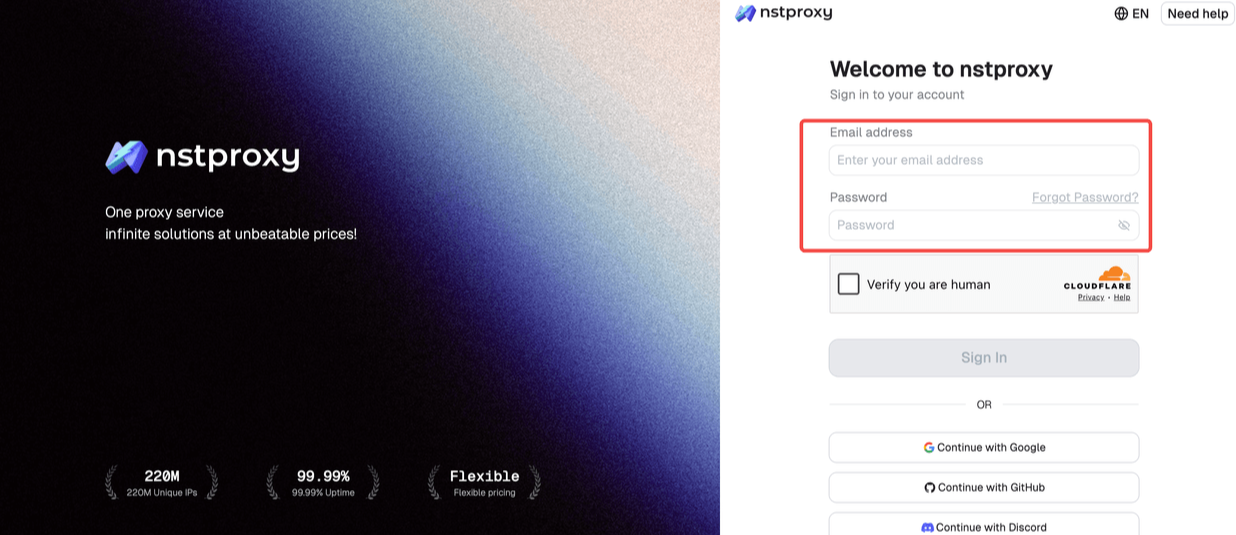
Log in to Nstproxy and sign up with your email address.
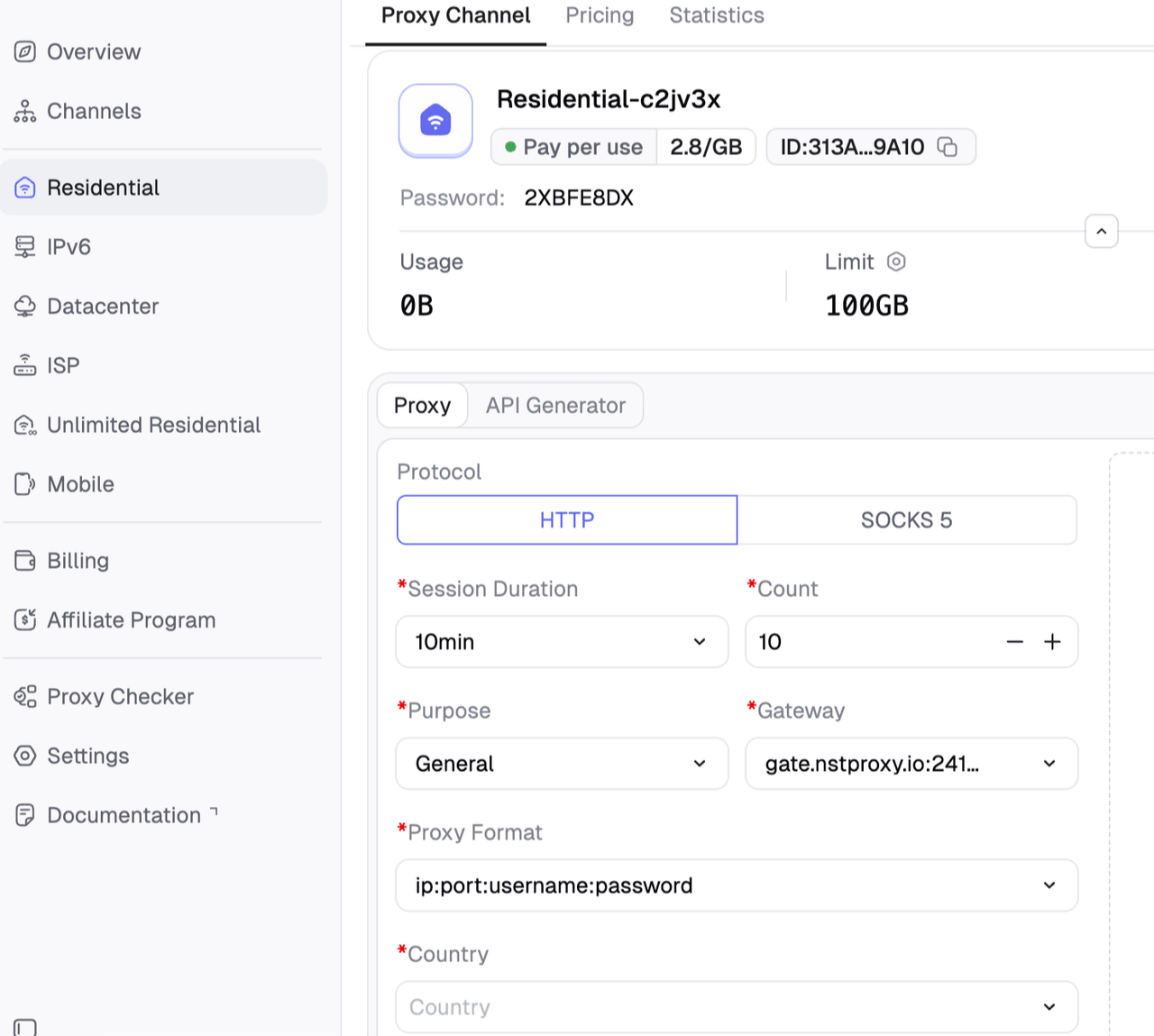
Choose the proxy product you need and thenn configure the necessary proxy details if necessary. You should confirm the protocol type, such as HTTP or SOCKS5
Then copy the proxy details.
Keep these details ready. You will paste them into Proxifier.
Step 3. Add Nstproxy to Proxifier
Now connect Proxifier to your Nstproxy server.
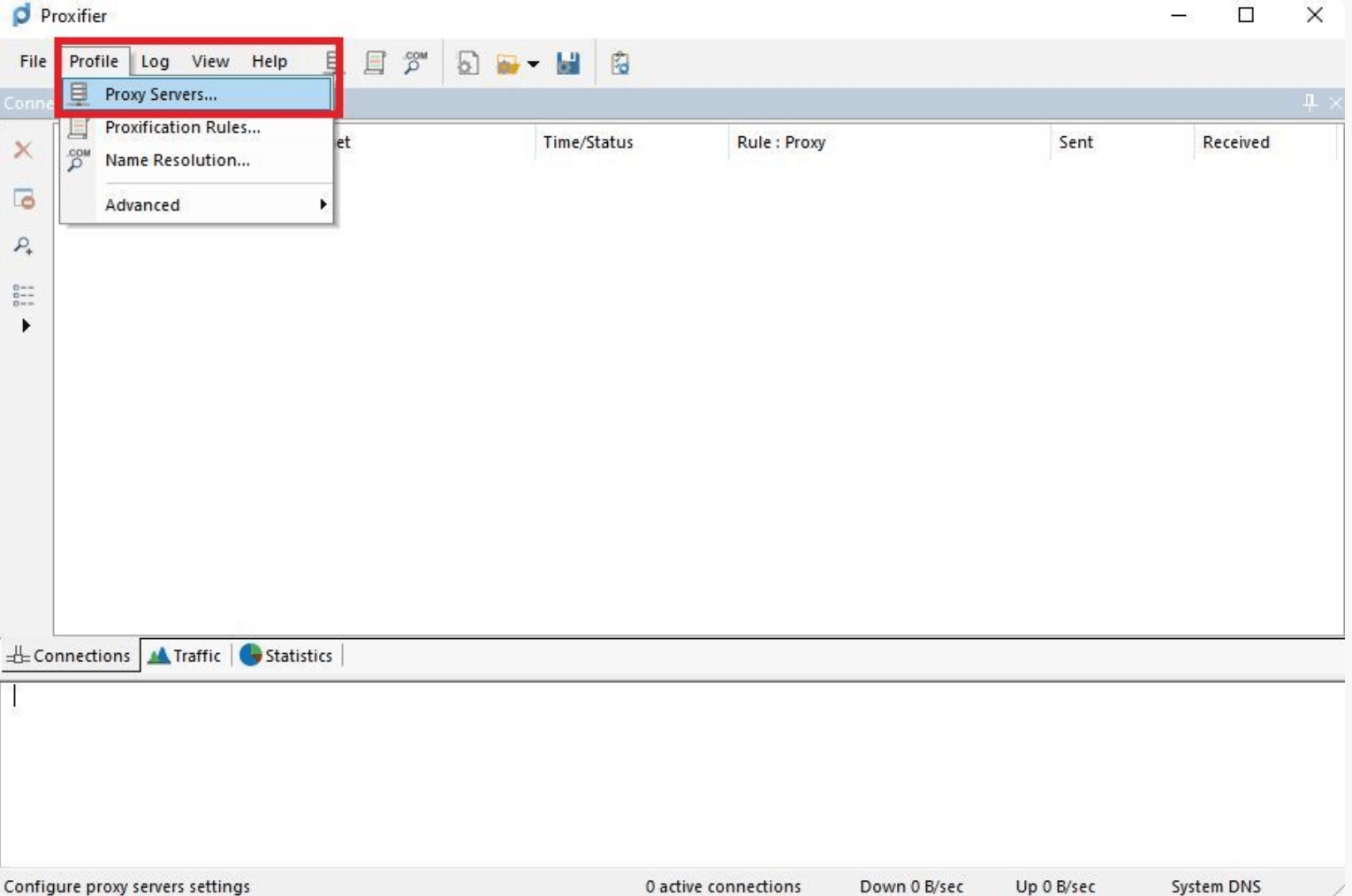
Open Proxifier > Click Profile in the top menu and select Proxy Servers.
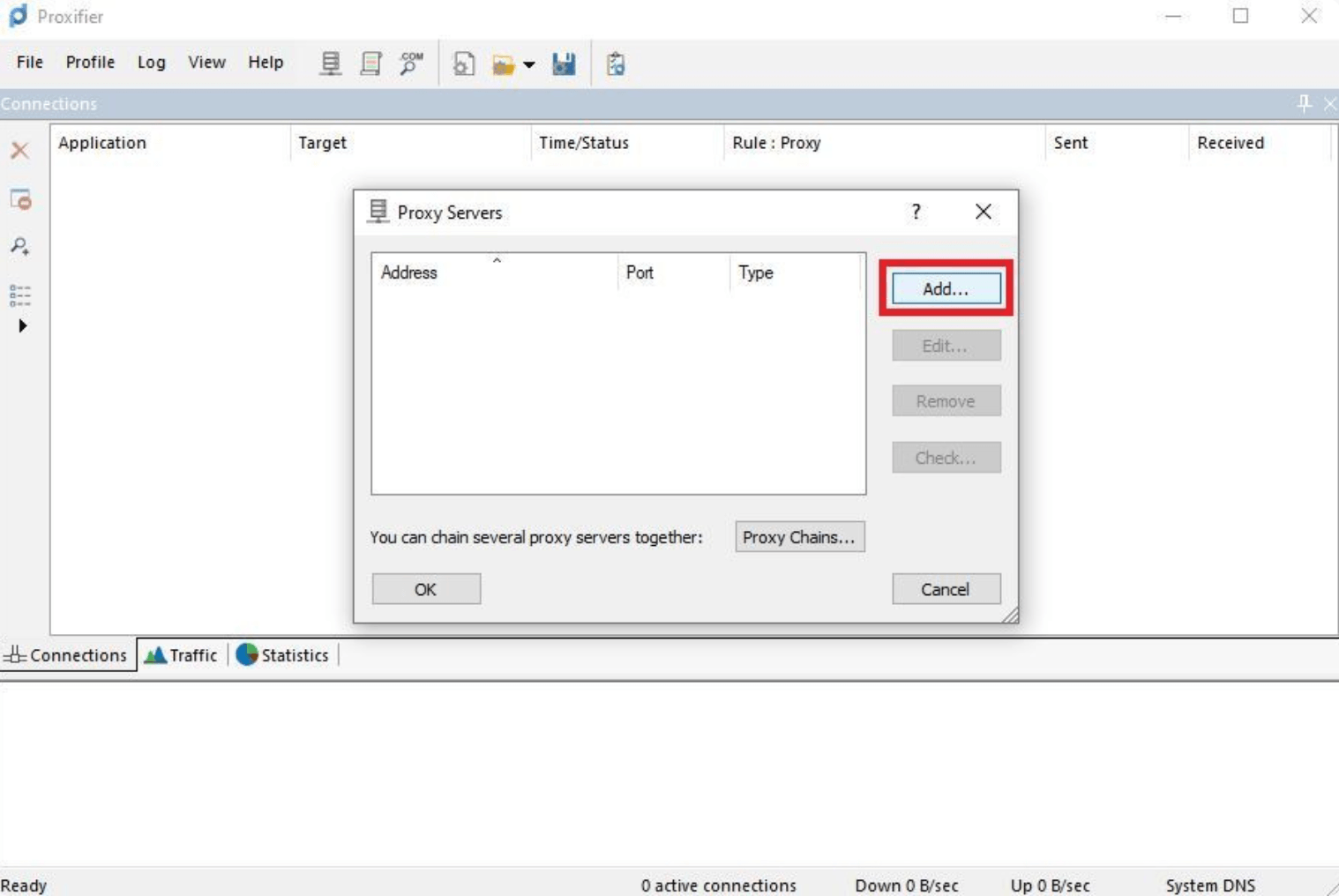
Click Add button on the right side of the pop-up window.
Then enter the proxy details you get from Nstproxy dashboard.
A new window will pop up asking if you wish this to be your default proxy for every application.
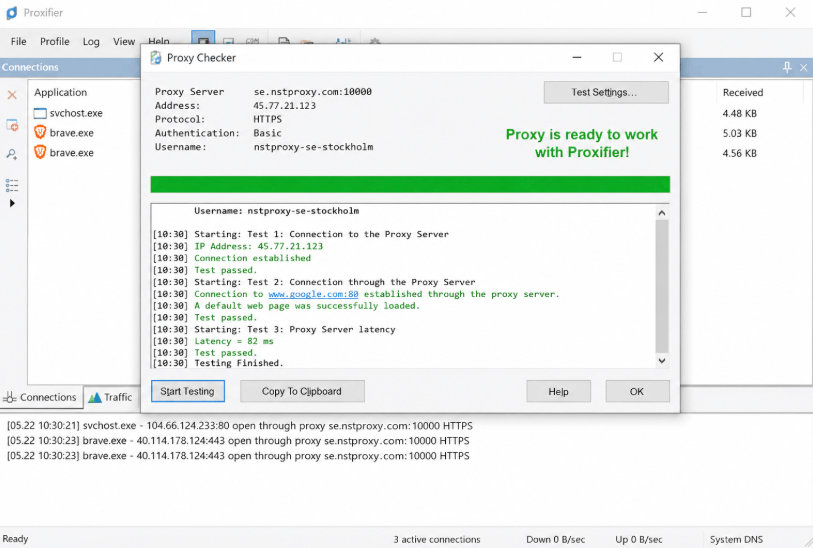
Click Check to test the connection. Afterwards, save the proxy server if the test succeeds.
Do not skip the connection test. If the proxy fails here, your app will not work through Proxifier either.
Useful Proxifier Rule Examples
Proxifier becomes powerful when you use rules carefully. You do not always need to route everything through a proxy.
1. Route One App Through Nstproxy
This is the cleanest setup for most users.
Use this when one desktop app needs proxy routing, but the rest of your computer should stay direct.
Rule setup:
Application: target app
Action: Nstproxy proxy
Default traffic: direct
2. Route One Browser Through Nstproxy
This is useful for testing websites from a specific IP while keeping other browsers normal.
Rule setup:
Application: Chrome, Firefox, or Edge
Action: Nstproxy proxy
Test with an IP checker
3. Route All Traffic Through Proxy
This is more aggressive and should be used carefully.
It may help if you want all external traffic to go through the proxy, but it can also break local tools, system updates, printers, or LAN services.
4. Keep Local Network Traffic Direct
If you use printers, routers, local servers, or LAN tools, keep local IP ranges direct.
This prevents Proxifier from sending local network traffic through an external proxy.
Best Proxy Type for Proxifier
The best proxy type depends on the app and the goal.
SOCKS5 proxies are often best for app-level routing because they are flexible and work with many types of traffic.
HTTP and HTTPS proxies are best for browser-based or web-focused traffic.
Static ISP proxies are best for stable sessions. If the app requires login or long-running activity, a stable IP is usually better than constant rotation.
Residential proxies are best when the target website or app is sensitive to datacenter traffic.
Datacenter proxies are useful for speed and lower-cost tasks, but they may not be ideal for strict websites.
Proxifier vs VPN: Which Is Better?
A VPN is easier. You turn it on, and most device traffic goes through the VPN.
Proxifier gives you more control. You can route one app through one proxy, another app through another proxy, and keep everything else direct.
Feature
Proxifier + Proxy
VPN
App-level routing
Strong
Limited
Rule control
High
Low
Proxy type choice
Residential, ISP, SOCKS5, datacenter
Usually VPN server IPs
Setup difficulty
Medium
Easy
Best for
Apps, testing, research, selective routing
General privacy
If you only need general privacy, a VPN is simpler. If you need precise app routing, Proxifier plus Nstproxy is more flexible.
Best Practices for Using Proxifier
Use high-quality proxies. Free proxies are often unstable, slow, blocked, or unsafe. A reliable provider like Nstproxy gives you better control.
Start simple. Create one rule for one app before building complex routing logic.
Test every proxy before using it. Proxifier’s connection test can save you a lot of troubleshooting.
Use static or sticky sessions for account workflows. Frequent IP changes can create unstable behavior.
Keep local traffic direct. Printers, routers, and LAN services usually should not go through an external proxy.
FAQs
Q1. What is Proxifier used for?
Proxifier is used to route desktop app traffic through proxy servers, especially when the app does not support proxy settings directly.
Q2. Can Proxifier bypass restrictions?
Proxifier can route traffic through a proxy when direct access is blocked by network filters, routing issues, or app limitations. It should be used for authorized access, testing, privacy, and troubleshooting.
Q3. Does Proxifier provide proxy servers?
No. Proxifier only routes traffic. You need a proxy provider such as Nstproxy to supply the actual proxy server.
Q4. Can I use Nstproxy with Proxifier?
Yes. Nstproxy works well with Proxifier because it provides proxy credentials that can be added to Proxifier and used in proxification rules.
Q5. Is SOCKS5 better for Proxifier?
SOCKS5 is often better for app-level routing because it is flexible. However, HTTP or HTTPS proxies may be enough for browser-based traffic.
Q6. Why is Proxifier not changing my IP?
Your rule may not be applied to the correct app, the rule order may be wrong, or the app may be bypassing the proxy. Check the Proxifier log and test the proxy server.
Conclusion
Proxifier is useful because it gives you control over app-level proxy routing. Instead of forcing your whole device through one VPN, you can decide exactly which apps use a proxy and which connect directly.
But Proxifier is only the routing layer. The quality of the setup depends on the proxy behind it. That is why Nstproxy is a strong match. With Residential, Static ISP, Datacenter, and SOCKS5-compatible proxy options, Nstproxy gives Proxifier users the stable proxy infrastructure they need for app routing, testing, research, and controlled access workflows.