Quick Takeaways
- An Instagram proxy routes your traffic through another IP address before it reaches Instagram.
- Mobile proxies are often best for app-like Instagram workflows.
- Static ISP proxies are better for stable, long-term account sessions.
- Residential proxies work well for geo-targeted research and public data access.
- Free proxies are usually a bad choice for Instagram because they are overused and risky.
- Nstproxy is a strong option because it offers Mobile, Residential, and Static ISP proxies for different Instagram use cases.
Take a Quick Look
Don't let unreliable IPs slow down your Instagram growth. With Nstproxy's global residential proxy network, you can enjoy faster connections, greater flexibility, and professional-grade performance for your social media operations.
Lead-in
If you have ever tried to manage Instagram from different locations, run public content research, test how posts appear in another country, or handle multiple client accounts, you may have run into the same problem: Instagram does not only look at your username and password. It also pays attention to your IP address, device behavior, login location, and session patterns.
That is why many marketers, creators, data teams, and social media managers search for how to use proxy for Instagram. A proxy lets you route your Instagram traffic through another IP address, which can help separate workflows, match account locations, and reduce the friction caused by unstable or low-reputation networks.
But Instagram proxies only work well when they are used correctly. A random free proxy, a constantly changing IP, or a location mismatch can create more problems than it solves. The goal is not simply to “hide” behind a proxy. The goal is to make your network environment stable, realistic, and suitable for the Instagram task you are doing.
What Is an Instagram Proxy?
An Instagram proxy is a proxy server used specifically for Instagram traffic. When you connect through a proxy, Instagram sees the proxy IP address instead of your original public IP address.
For example, if you are in one location but want to test how Instagram behaves from a US-based IP, you can route your browser or device through a US proxy. Instagram then receives traffic from that proxy IP, not directly from your home, office, or mobile network.
A proxy is different from a VPN. A VPN usually routes traffic for your whole device, while a proxy can be configured more selectively. You can use a proxy in a browser, a mobile Wi-Fi setting, a proxy manager, or a social media management tool. This makes proxies more flexible when you need different IP setups for different accounts or tasks.
Instagram cares about IP behavior because IP addresses are one part of its trust and security system. Sudden country changes, overused shared IPs, suspicious login patterns, or too many accounts coming from the same poor-quality network can all lead to verification prompts, login blocks, or account restrictions.
Why People Use Proxies for Instagram?
1. Most users do not use Instagram proxies just for privacy. They use them because Instagram is sensitive to location, session behavior, and repeated activity from the same network.
2. Social media agencies often manage accounts for clients in different cities or countries. If every account is accessed from the same office IP, that setup can look unnatural, especially when the accounts belong to different businesses or regions. A stable proxy helps separate those workflows.
3. Creators and marketers may also use proxies for geo-testing. Instagram content, ads, hashtags, Reels visibility, and shopping features can vary by region. A proxy allows teams to check how Instagram appears from another location without physically being there.
4. Data teams may use proxies for public Instagram research, such as tracking public hashtags, monitoring brand mentions, or checking competitor content. In this case, the proxy helps distribute traffic more naturally instead of sending every request from one IP.
5. There is also a practical login reason. If your account is repeatedly accessed from public Wi-Fi, shared VPNs, or unstable networks, Instagram may ask for extra verification. A clean, consistent proxy can create a more stable network environment.
Which Proxy Type Is Best for Instagram?
Not every proxy is suitable for Instagram. The best choice depends on what you are trying to do.
| Proxy Type | Best For | Pros | Cons |
|---|---|---|---|
| Mobile Proxy | App-like Instagram use, high-trust social workflows | Uses mobile carrier IPs, strong trust signals, suitable for social platforms | Usually more expensive |
| Static ISP Proxy | Stable login sessions and long-term account management | Fixed IP, fast, stable, residential-like reputation | Less flexible than rotating residential proxies |
| Residential Proxy | Geo-testing, public research, regional content checks | Real residential IPs, broad location coverage | Needs careful session and rotation settings |
| Datacenter Proxy | Basic testing or low-risk browsing | Fast and cheaper | Easier for Instagram to detect |
| Free Proxy | Not recommended | No cost | Poor reputation, unstable, often already blocked |
For most Instagram workflows, mobile, residential, and Static ISP proxies are the most practical options. Datacenter proxies may be fast, but Instagram is more likely to treat them as non-consumer traffic. Free proxies are even worse because many people abuse the same IPs, which makes them unreliable for login-based activity.
Why Nstproxy Is a Strong Choice for Instagram Proxies?
For users who need a reliable Instagram proxy solution, Nstproxy offers millions of residential IPs across multiple countries and regions. With flexible geo-targeting, fast connection speeds, and stable residential networks, Nstproxy helps marketers, agencies, and creators manage Instagram activities more efficiently.
Key advantages of Nstproxy for Instagram include:
-
Multiple proxy types for different Instagram workflows.
-
Residential, Mobile, IPV6 and Static ISP options.
-
HTTP, HTTPS, and SOCKS5 support.
-
Global location coverage.
-
Stable sessions for login-based activity.
-
Better IP quality than free or overused shared proxies.
-
Suitable for browser, mobile, proxy manager, and tool-based setup.
-
Compatible with Nstbrowser and automation tools
Whether you're growing Instagram accounts, conducting market research, or managing social media campaigns, Nstproxy provides the reliability and flexibility needed for professional Instagram operations.
How to Use Nstproxy for Instagram
Using a proxy for Instagram has two parts. First, you need to generate the appropriate proxy . Then, you need to configure it correctly in your browser, phone, or tool.
Step 1. Generate Proxy Details via Nstproxy
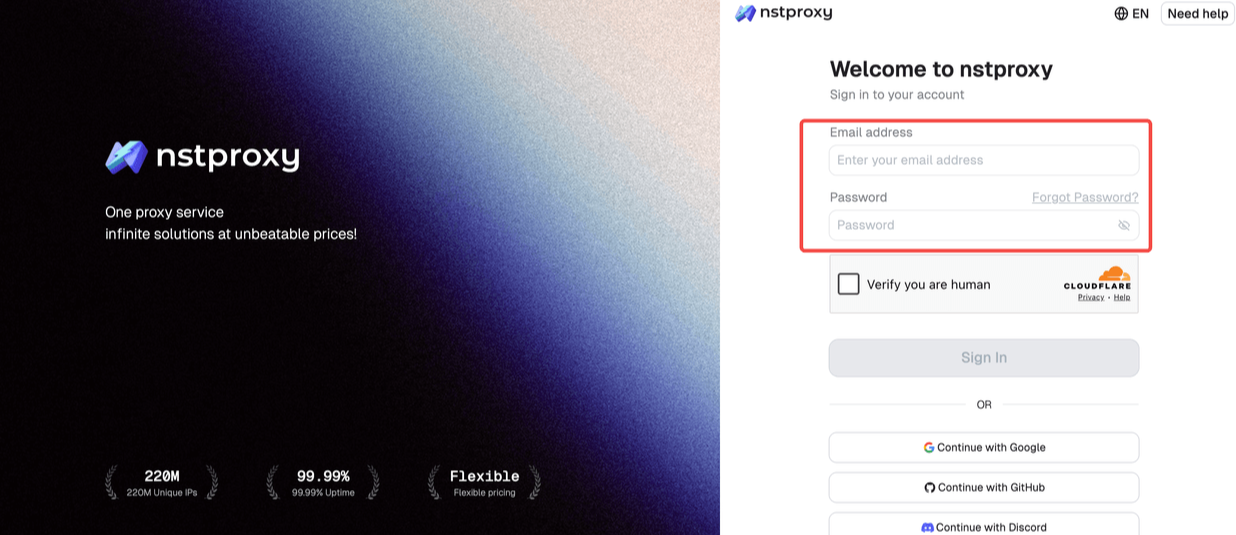
- Go to Nstproxy official, and then create your account using your email. Once registered, you’ll get access to your dashboard.
- Next, select the proxy type that fits your needs by switching to the specific channel.
- Choose a Mobile Proxy if you mainly use Instagram in a mobile-like environment or need stronger social platform trust.
- Choose a Static ISP Proxy if you need one stable IP for login sessions, client account management, or long-term use.
- Choose a Residential Proxy if you need regional research, public data access, or location-based testing.
- Then you can set up your Channel by choosing Country / Location; Session type (rotating or sticky); Protocol (HTTP / SOCKS5) and so on.
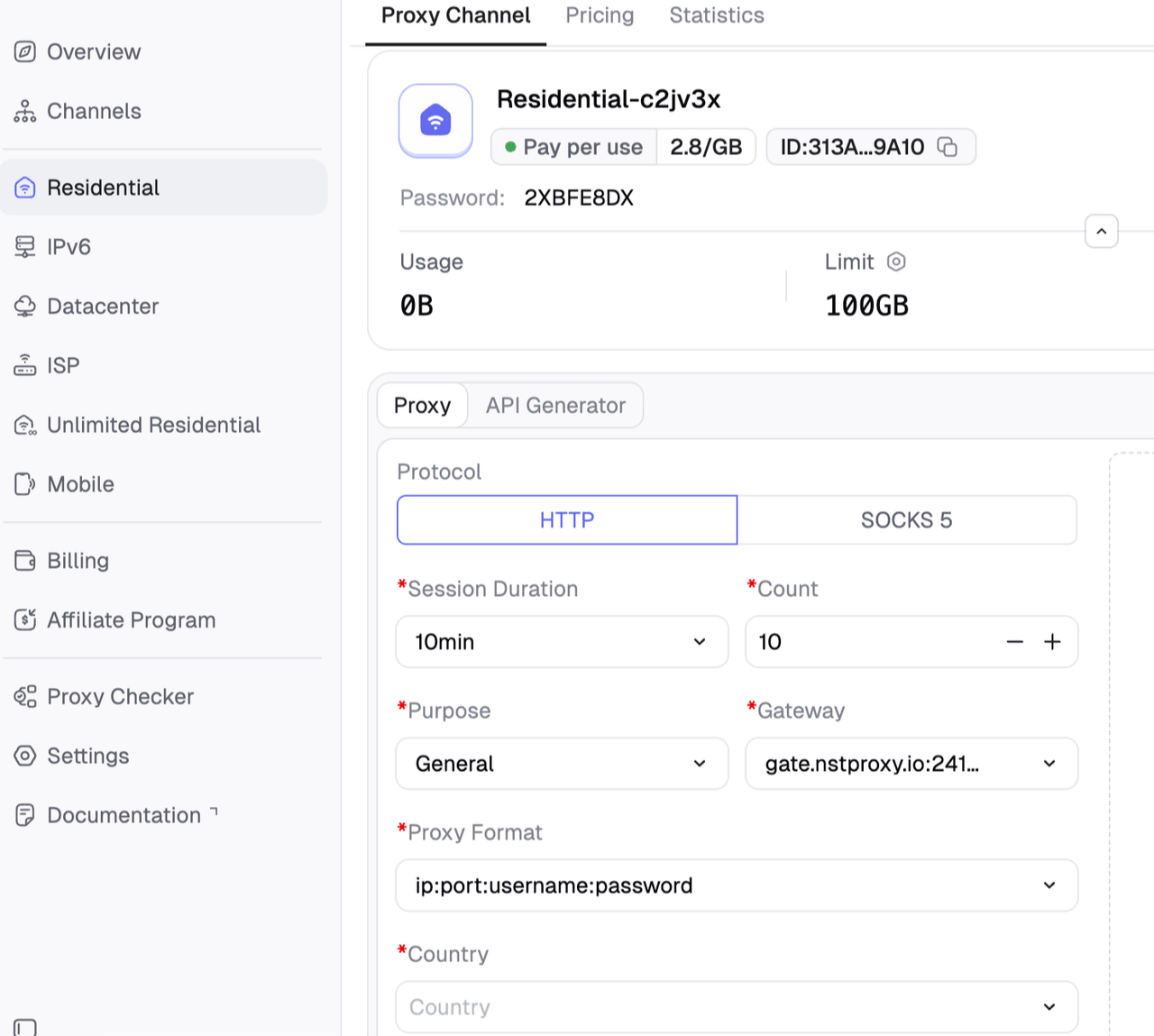
- After generating the proxy, you will usually receive four main pieces of information and then copy all the details:
-
Proxy host or IP address
-
Proxy port
-
Username
-
Password
-
Protocol type, such as HTTP, HTTPS, or SOCKS5.
Warmly Note:
- Avoid free proxies for Instagram login because they are usually slow, shared, and already flagged.
- Try to match the proxy location with the normal location of the Instagram account.
- This step matters because many Instagram proxy problems come from choosing the wrong IP type. For example, using a constantly rotating proxy for a login-heavy account can look suspicious because the account appears to jump between locations.
Step 2. Configure Nstproxy in Your Browser or Tool
1. Configure Proxy in a Browser
Browser setup is one of the easiest ways to use a proxy for Instagram, especially if you are managing Instagram from desktop.
A browser proxy extension such as ZeroOmega can make the process easier because you do not need to change your whole system network.
-
Install ZeroOmega in Chrome or a Chromium-based browser > Open the extension settings > Create a new proxy profile.
-
Name it something clear, such as
Nstproxy-Instagram. -
Then starting configure the proxy settings:
- Choose the correct protocol: HTTP, HTTPS, or SOCKS5.
- Enter the Nstproxy proxy host.
- Enter the port.
- Add your username and password if required.
- Save the profile and activate the proxy profile.
Tip: Use an IP checker to confirm that your IP has changed.
- Open Instagram in a clean browser session.
Before logging in, it is better to clear old Instagram cookies or use a fresh browser profile. This helps avoid conflicts between your old session location and your new proxy IP.
2. Configure Proxy on iPhone
If you want to use a proxy through iPhone Wi-Fi settings, you can configure it manually. This only works for the Wi-Fi network you are connected to.
- Open Settings on your iPhone > Tap Wi-Fi.
- Tap the information icon beside your connected Wi-Fi network.
- Scroll down to HTTP Proxy > Select Manual
- Enter the proxy server.
- Enter the proxy port.
- Add authentication details if your proxy requires username and password. Then save the settings.
- Open Instagram and test the connection.
One thing to remember: iPhone Wi-Fi proxy settings only apply to that Wi-Fi connection. If you switch to mobile data, the proxy will no longer apply unless you use another proxy app or network-level setup.
3. Configure Proxy on Android
Android proxy setup is similar, but the wording may vary depending on the phone model.
- Open Settings > Go to Wi-Fi > Tap the connected Wi-Fi network.
- Choose Modify network or Advanced settings > Find the Proxy option.
- Select Manual.
- Enter the proxy hostname.
- Enter the proxy port.
- Save the settings and open Instagram and test loading, login, and browsing.
If your proxy requires authentication and Android Wi-Fi settings do not support it smoothly, you may need a third-party proxy app or a browser-level setup instead.
Common Instagram Proxy Problems and Fixes
Even with a good proxy, setup mistakes can still happen.
1. Instagram Shows an “Open Proxy” or Suspicious Login Warning
This usually means the IP has poor reputation, the location changed too suddenly, or the proxy is already recognized as risky traffic.
To fix it, switch to a higher-quality proxy type such as Mobile, Static ISP, or Residential. Clear old cookies, use a stable location, and avoid repeated login attempts.
2. Instagram Keeps Asking for Verification
Verification prompts often happen when Instagram sees inconsistent signals. Your IP may say one country, your browser timezone may say another, and your past login history may show something else.
To reduce this, keep the proxy location consistent, use the same browser profile, and avoid rotating IPs during login sessions.
3. Instagram Does Not Load Through the Proxy
This is usually a setup issue.
Check the following:
- Confirm the proxy host is correct.
- Confirm the port is correct.
- Confirm username and password are entered correctly.
- Try the correct protocol: HTTP, HTTPS, or SOCKS5.
- Test the proxy on an IP checker.
- Try another browser profile.
4. Account Gets Locked After Switching Proxy
This can happen when an account suddenly appears from a new location or a low-quality IP. If the account is important, avoid frequent switching. Use one clean, stable proxy and keep the account environment consistent.
FAQs
Q1. Can I use a proxy for Instagram?
Yes, you can use a proxy for Instagram by configuring it in your browser, phone Wi-Fi settings, proxy manager, or Instagram management tool. The key is to use a high-quality proxy and keep the session consistent.
Q2. Which proxy is best for Instagram?
Mobile proxies are often best for app-like Instagram workflows. Static ISP proxies are better for stable long-term sessions, while residential proxies are useful for geo-testing and public research.
Q3. Can Instagram detect proxies?
Instagram can detect low-quality, abused, or suspicious proxy IPs. Clean Mobile, Residential, and Static ISP proxies are generally more reliable than free proxies or shared datacenter IPs.
Q4. Should I use rotating proxies for Instagram?
Rotating proxies can be useful for research, but they are not ideal for login-heavy account management. For Instagram accounts, stable or sticky sessions are usually safer.
Q5. Why does Instagram show an open proxy error?
This can happen when the IP is known as a proxy, has poor reputation, or has been used abusively. Switching to a higher-quality proxy and clearing old browser data can help.
Q6. Is Nstproxy good for Instagram?
Yes. Nstproxy is a strong option for Instagram because it offers Mobile, Residential, and Static ISP proxies. This allows users to choose the right proxy type for account stability, mobile-style access, or regional research.
Q7. How do I use Nstproxy for Instagram?
Choose the right Nstproxy product, copy the proxy host, port, username, and password, configure it in your browser or device, verify the IP location, and then open Instagram in a clean session.
Conclusion
Learning how to use proxy for Instagram is not only about entering an IP address and port. The real goal is to build a stable, believable, and task-appropriate network setup.
For casual browsing or simple testing, a basic proxy setup may be enough. For account management, long sessions, regional testing, or public Instagram research, proxy quality becomes much more important. Mobile proxies, Static ISP proxies, and Residential proxies each serve a different purpose.
Nstproxy is a practical choice because it gives Instagram users access to all three major proxy types in one platform. Use Mobile proxies for mobile-like behavior, Static ISP proxies for stable account sessions, and Residential proxies for geo-targeted research. With the right setup, Instagram proxy use becomes much more reliable, controlled, and easier to manage.