What Is Incogniton & How to Use It with Nstproxy- Full Guide
Quick Takeaways
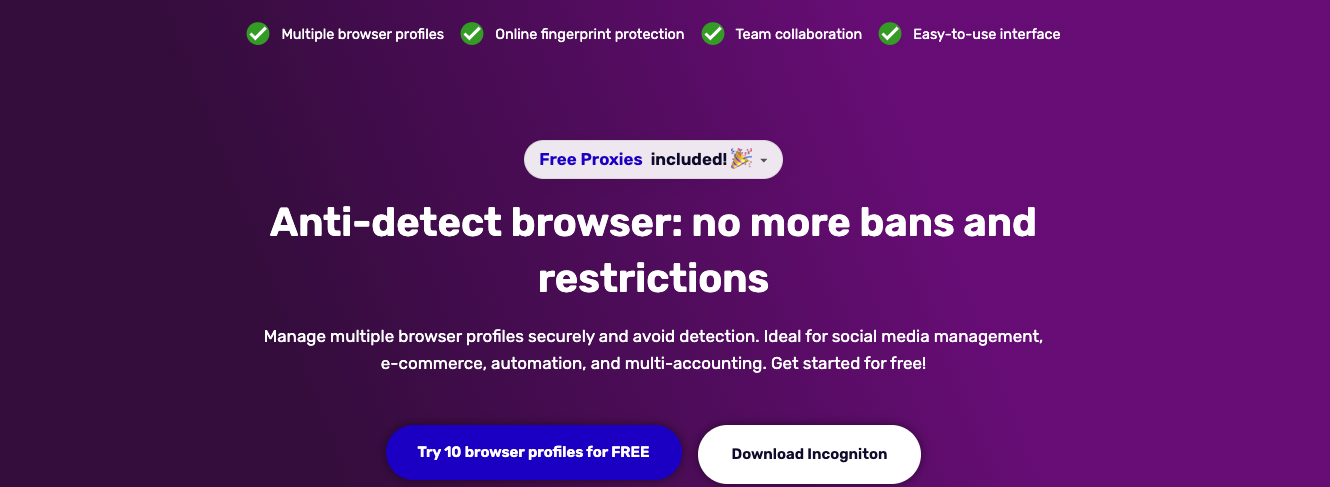
Incogniton creates isolated browser profiles with unique fingerprints — each profile appears as a completely separate device to websites
The free plan offers 10 fully functional profiles with no credit card required, one of the most generous free tiers in the anti-detect category
Paid plans start at $19.99/month for Starter Plus (10 profiles), scaling to $79.99/month for Professional (150 profiles)
Use coupon UPITNOW for 17% off any paid plan
Strong fit for solo operators, small agencies, e-commerce teams, and affiliate marketers who need reliable profile isolation without enterprise pricing
Fingerprint protection is solid for most use cases, but works best when paired with quality proxies. Nstproxy proxies which starts at $0.10/GB are a natural complement.
If you've ever had a social media or advertising account flagged while managing multiple profiles, you've already encountered the problem Incogniton is built to solve. Modern platforms no longer rely solely on IP addresses—they analyze browser fingerprints, screen resolution, time zones, fonts, and dozens of other signals to identify users. Changing your IP alone is often not enough. That's where an anti-detect browser becomes essential.
Incogniton is a popular anti-detect browser used by over one million users across social media management, e-commerce, affiliate marketing, and web scraping. Built on Chromium and available for Windows and macOS, it helps users create isolated browser profiles with unique fingerprints. In this review, we'll explore its key features, pricing, strengths, limitations, and how pairing it with Nstproxy can create a more secure and effective multi-account setup.
What Is Incogniton?
Incogniton is an anti-detect browser, which means it's a tool for creating and managing multiple browser identities from a single machine. The core mechanism is profile isolation: each browser profile gets its own independent fingerprint — canvas data, WebGL output, audio context, installed fonts, screen resolution, time zone, language, and dozens of other signals — along with its own cookies, local storage, and session data.
To the platform you're visiting, each profile looks like a completely different user on a completely different device in a completely different location. This is the fundamental difference from a regular browser's incognito mode, which only clears local history — it does nothing about fingerprinting, and platforms can still link your sessions through persistent device signals.
Incogniton is an anti-detect browser built for managing multiple isolated browser profiles with separate fingerprints, proxies, cookies, and session environments. It treats isolation as the baseline, not as a bonus feature.
The distinction matters because browser fingerprinting is where most multi-account operations fail. IPs matter, but identity consistency matters just as much — Incogniton is strongest when treated as the identity layer sitting alongside your proxy layer, not as a replacement for it.
Key Features
1. Multiple Browser Profiles
The foundation of everything Incogniton does. Each profile runs as a fully independent browser environment — separate cookies, separate local storage, separate fingerprint, separate proxy assignment. You can have dozens of profiles open simultaneously without any cross-contamination between sessions.
Each Incogniton profile has its own unique browser fingerprint — a combination of canvas data, WebGL output, audio context, installed fonts, screen resolution, timezone, language, and dozens of other signals that platforms use to identify and track users.
2. Fingerprint Generator
Rather than requiring you to manually configure each fingerprint parameter, Incogniton includes a built-in fingerprint generator that creates realistic, consistent fingerprint sets for each profile. This lowers the setup barrier significantly, especially for non-technical users who don't want to hand-tune canvas hashes and WebGL renderer strings.
3. Team Collaboration
For agencies and teams, Incogniton offers shared workspaces with role-based access controls. Admins can create profiles and assign access to specific team members without sharing login credentials. Each person only sees and interacts with what they're authorized for. This is particularly useful for social media agencies managing client accounts, or e-commerce teams where different people handle different storefronts.
4. Cookies Management
Incogniton includes built-in cookie management — import, export, and manage cookies per profile. This matters for account warm-up workflows where pre-seeded cookie histories make profiles look more like established users, reducing the likelihood of suspicious activity flags on new accounts.
5. Bulk Profile Creation
For larger operations, Incogniton supports creating hundreds of profiles at once via CSV upload. It's not a glamorous feature, but it's exactly what you need when setting up at scale — manually configuring profiles one by one becomes a real bottleneck past a certain point.
5. Selenium and Puppeteer Integration
For users comfortable with code, Incogniton also supports Selenium and Puppeteer integration, opening the door to more sophisticated automation workflows. This makes it one of the few anti-detect tools that works for both non-technical users and developers without compromise.
6. Synchronizer
Available on Windows only, the Synchronizer lets you mirror actions across multiple profiles simultaneously — useful for repetitive operations on social and crypto accounts where you need to perform the same action across many profiles at once.
7. Built-in AI Assistant
A ne7. er addition to the platform, Incogniton's built-in AI assistant helps users navigate the tool, troubleshoot issues, and get guidance on configuration, without needing to dig through documentation every time.
Incogniton Pricing
Incogniton's pricing structure is one of its most genuine differentiators in a category where competitors regularly charge €30–€100/month just to get started.
Plan
Profiles
Price
Best For
Starter (Free)
10 profiles (2 months), then 3
$0
Testing, personal use
Starter Plus
10 profiles
$19.99/month
Solo operators
Entrepreneur
50 profiles
$29.99/month
Growing teams
Professional
150 profiles
$79.99/month
Agencies, larger ops
Custom
Up to 5,000 profiles
Contact sales
Enterprise
A 30% discount applies on annual billing. Use coupon code UPITNOW for an additional 17% off any paid plan.
Incogniton probably has the most generous free plan of all the anti-detect browsers. The pricing is also great if your needs ever grow. For comparison, Multilogin starts at around €99/month and GoLogin at around $24/month for far fewer profiles at equivalent tiers.
Real User Feedback
Incogniton has accumulated over 183 reviews on Trustpilot, with a consistent pattern across platforms:
“I've been using Incogniton for quite some time now, and it has been a reliable tool for managing multiple browser profiles. The interface is clean and easy to understand, making it simple to create, organize, and switch between profiles without any hassle. The support team has been responsive, professional, and genuinely helpful.
The antidetect works reliably, profiles don't break, and the fingerprints look believable — I haven't caught any bans from accounts getting linked together.”
The consistent positives across Trustpilot, G2, and independent reviews:
Reliable profile isolation with low ban rates for standard use cases
Fast, helpful support team
Genuinely usable free plan — not a crippled demo
Solid value at the Entrepreneur tier for small agencies
The consistent negatives:
UI design hasn't been modernized — described by multiple reviewers as dated and requiring excessive manual input
No mobile app and no mobile fingerprint simulation, a meaningful gap for workflows involving TikTok or Instagram mobile-specific ad formats
Previous security incident involving a user data leak, which raised concerns about data handling practices
Performance can slow down noticeably with many profiles open simultaneously
Not as deep as custom-engine browsers like Multilogin
Pricing
Most generous free plan in category; paid plans well-priced
Annual commitment needed for best rates
Ease of use
Accessible for non-technical users
UI is dated; heavy on manual input
Automation
Selenium/Puppeteer support, REST API, Bulk CSV
Synchronizer is Windows-only
Team features
Role-based access, shared workspaces
Limited compared to enterprise tools
Mobile
Windows + macOS support
No mobile app, no mobile fingerprint simulation
Proxies
Full HTTP/HTTPS/SOCKS5 proxy integration
Built-in free proxies are unreliable — use your own
Best Use Cases for Incogniton
Social Media Management
The most common use case. Social media agencies running multiple client accounts across Facebook, Instagram, TikTok, and X need complete profile separation — a single linked session can trigger cascading bans across all accounts under management. Social media managers juggling client accounts across Facebook, Instagram, TikTok, and Twitter/X are the most obvious fit.
E-Commerce and Marketplace Operations
Managing multiple seller accounts on Amazon, eBay, Etsy, or Shopify storefronts requires each account to look like a completely independent operator. Incogniton's profile isolation handles the browser identity layer — pair it with NSTProxy residential IPs for complete separation.
Affiliate Marketing
Affiliate marketing is a core use case: test ads, offers, and landing pages across different accounts or geos without overlap or flagging.
Web Scraping
Extract data at scale without IP bans or browser fingerprint detection. Incogniton's Selenium and Puppeteer integration makes it useful for automated scraping workflows where browser identity consistency matters as much as IP rotation.
Ad Verification
Check how ads appear in different locations and devices without skewing metrics or triggering suspicion. Combine Incogniton profiles with NSTProxy's city-level geo-targeting to verify ad delivery accurately across any target market.
Crypto and Web3 Operations
Airdrop farming, multiple wallet management, and DeFi operations across separate identities are a growing use case. Several Incogniton users specifically mention crypto and airdrop workflows in their reviews.
Stepwise Guide to Pair Incogniton with Nstproxy
One of the biggest misconceptions about anti-detect browsers is that browser fingerprints alone are enough to stay undetected. While Incogniton helps create unique browser environments, your IP address remains a critical part of your online identity.
If multiple profiles connect through the same network or frequently changing low-quality proxies, platforms can still associate those accounts and increase the risk of restrictions. That's why experienced multi-account operators combine anti-detect browsers with dedicated proxies.
For account management, social media automation, e-commerce operations, and advertising campaigns, static ISP proxies are often the preferred choice. Unlike datacenter proxies, ISP proxies are provided through real Internet Service Providers, making them appear more trustworthy to platforms. At the same time, they offer the speed and stability needed for long-term account management.
Nstproxy ISP Proxies are designed for users who need consistent identities across multiple browser profiles.
Real ISP-assigned addresses with higher trust scores
Fast and reliable connections for daily operations
Coverage across multiple countries and regions
Compatible with Incogniton, AdsPower, Multilogin, and other anti-detect browsers
By assigning a dedicated ISP proxy to each Incogniton profile, you create a complete identity separation strategy: a unique browser fingerprint paired with a unique, stable IP address. This significantly reduces account association risks and provides a more reliable environment for scaling multiple accounts.
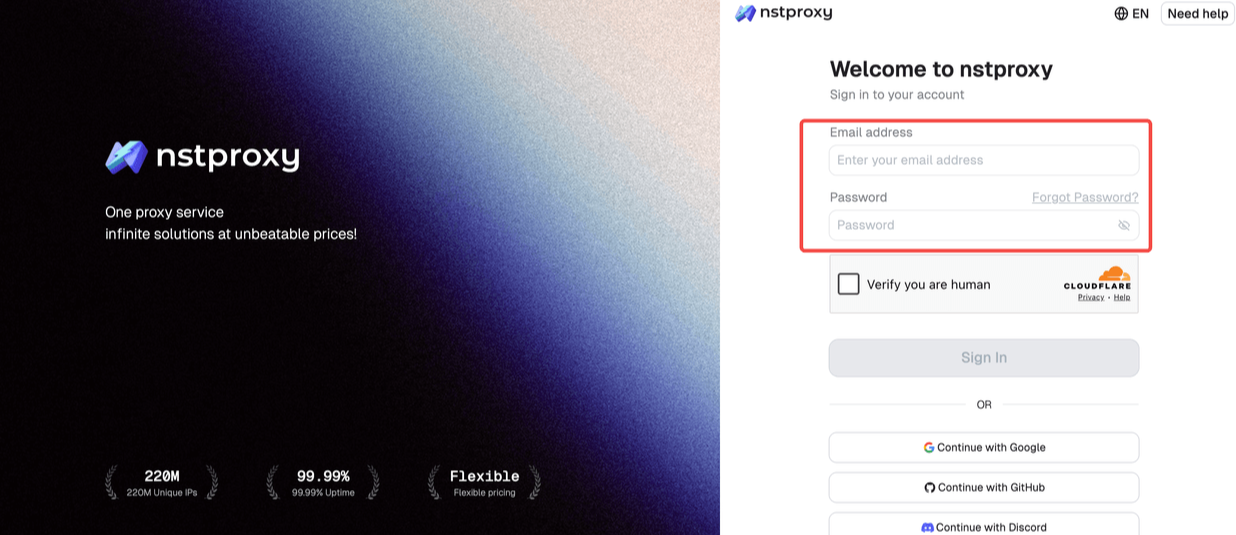
Step 1: Get your Nstproxy credentials
Sign up at nstproxy.com, go to ISP Proxies in your dashboard, select your target country and city.
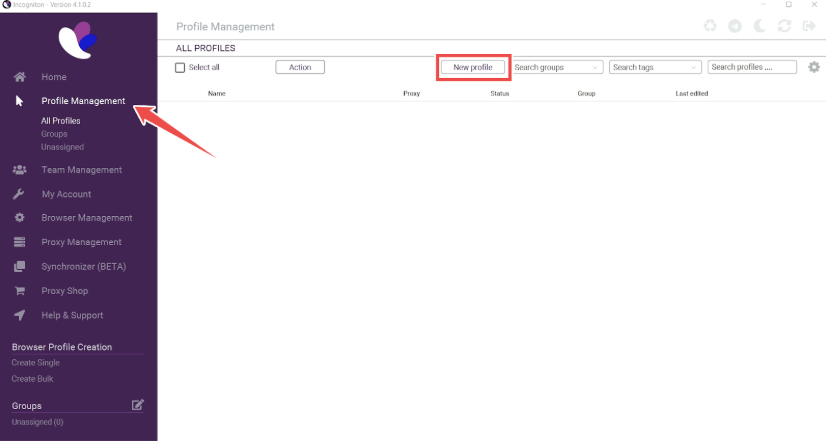
Open Incogniton and go to the Profile Management and create a New Profile.
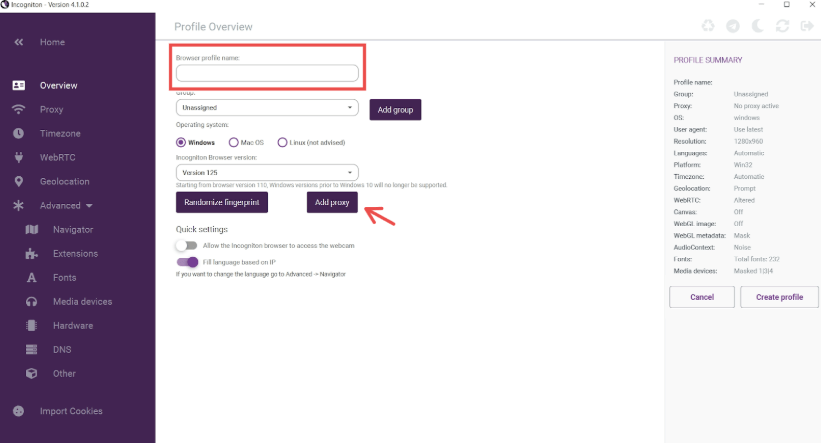
Then configure your browser profile by settings up your browser profile name, adding groups, and randomizing fingerprints.
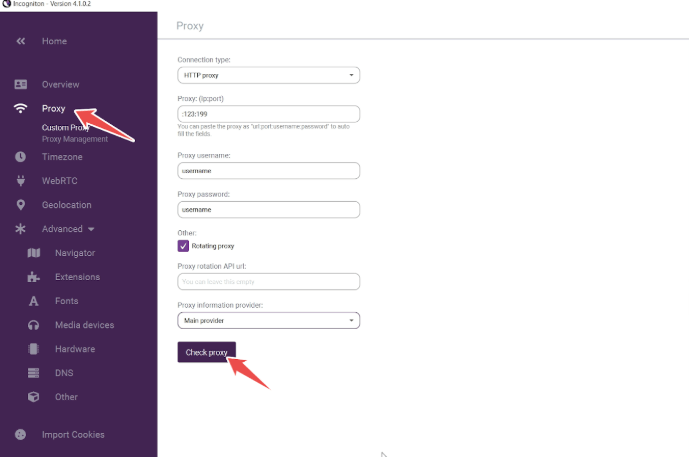
Afterward, go to the Proxy section, then fill in Nstproxy ISP details as whosn below.
Select SOCKS5 or HTTP as the protocol
Enter your Nstproxy host, port, username, and password
Click Check Proxy to verify the connection
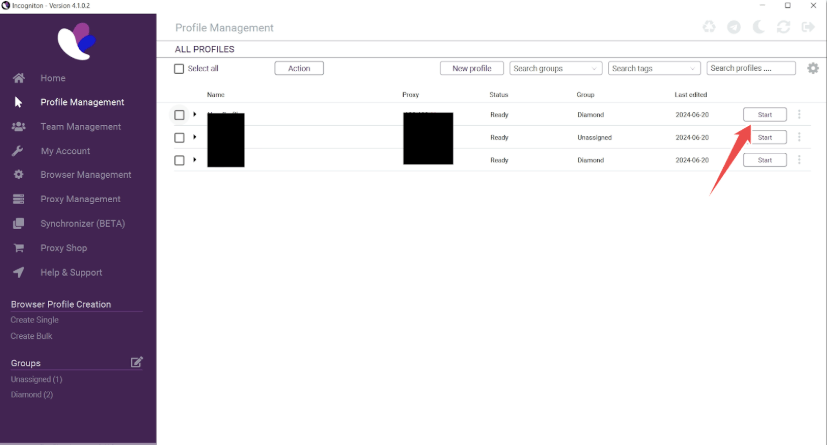
Save the profile, and click the Start button on your new profile, as illustrated below, to activate your proxy.
Step 3: Assign a unique proxy per profile
For each profile you run, assign a different Nstproxy session ID in the username parameter (e.g. session-001, session-002, etc.). This gives each profile a distinct IP address — completing the separation that Incogniton's fingerprinting starts.
Each browser profile has a unique device fingerprint and a unique residential IP. To any platform, these look like completely independent users on completely different devices in completely different locations.
Incogniton vs. Competitors
Feature
Incogniton
Multilogin
AdsPower
GoLogin
Free plan
10 profiles
No
2 profiles
3 profiles
Entry paid plan
$19.99/month
~€99/month
~$5.40/month
~$24/month
Profiles at entry
10
100
10
100
Browser engine
Chromium
Custom (Mimic/Stealthfox)
Chromium
Chromium
Selenium/Puppeteer
✅
✅
✅
✅
Team collaboration
✅
✅
✅
✅
Mobile fingerprints
❌
✅
✅
✅
Mobile app
❌
❌
❌
❌
Best for
Budget-conscious, solo to small team
Enterprise, high-stakes operations
Beginners, budget
Mid-market teams
The most popular anti-detect browser options in 2026 include Incogniton (starting around $29.99/month for 50 profiles), Multilogin (around $99/month, higher-end), AdsPower (starting around $5.40/month), and GoLogin (around $24/month).
Multilogin's custom browser engines provide deeper fingerprint protection and are better suited for high-stakes, high-budget operations. For the majority of social media management, e-commerce, and affiliate marketing workflows, Incogniton's protection level is sufficient — and the pricing difference is significant.
Frequently Asked Questions
Q: Is Incogniton safe to use?
Incogniton is a legitimate anti-detect browser from a registered Dutch company (WorkingGreen BV). It has over a million users and a track record going back to at least 2021. There was a historical user data incident, which is worth knowing — but the platform continues to operate and is widely used in professional multi-account workflows.
Q: Does Incogniton work on Mac?
Yes, Incogniton supports both Windows and macOS. However, some users have reported that Incogniton fails to pass macOS verification in certain configurations, and the Synchronizer feature is Windows-only.
Q: Does Incogniton work without proxies?
Technically yes, but not effectively. Without separate proxies assigned to each profile, all your profiles share the same IP — and platforms can link them at the network level regardless of fingerprint differences. For any serious multi-account operation, quality residential proxies like NSTProxy are essential.
Q: How many profiles can I run for free on Incogniton?
The Starter Package gives you 10 fully functional browser profiles for 2 months. After expiration, 3 permanent free profiles remain. No credit card is required to start.
Q: Is Incogniton legal?
Anti-detect browsers are legal tools. What matters is how you use them — using Incogniton for legitimate multi-account management, market research, or privacy protection is perfectly legal. Using it to violate platform terms of service or engage in fraud is another matter.
Conclusion
Incogniton is a solid anti-detect browser for anyone managing multiple online accounts. It offers reliable profile isolation, effective fingerprint protection, and useful collaboration features at a price point that remains accessible for individuals, agencies, and growing teams. The free plan also makes it easy to test the platform before committing to a paid subscription.
While no anti-detect browser can fully protect an account on its own, Incogniton provides a strong foundation for building separate digital identities. To maximize account stability and reduce association risks, it should be paired with a high-quality proxy solution that complements its fingerprint management capabilities.
For social media managers, e-commerce sellers, affiliate marketers, and media buyers, combining Incogniton with Nstproxy ISP Proxies creates a more complete multi-account setup. Incogniton handles browser fingerprint isolation, while dedicated ISP proxies provide stable, trusted IP identities for each profile. Together, they help create a more consistent and reliable environment for long-term account management and scalable operations.
If you're looking for an affordable anti-detect browser with the flexibility to support serious multi-account workflows, Incogniton is well worth considering.