Instagram Action Block: How to Fix and Get It Back to Normal 2026
An Instagram action block usually appears when Instagram temporarily stops you from doing things like liking posts, following accounts, commenting, sending DMs, or performing repeated account actions.
A Reddit user in the live SERP described the frustration clearly: they were trying to grow their account and interact with friends, but Instagram kept action-blocking them. That is the common pattern behind this keyword. Users feel they are doing normal activity, but Instagram’s system sees the behavior as too fast, repetitive, automated, or risky.
The good news is that most Instagram action blocks are temporary. The bad news is that trying to “force” your way around them can make the restriction last longer. The safer approach is to stop risky activity, secure the account, remove suspicious tools, wait, and rebuild trust gradually.
For creators, agencies, ecommerce teams, or social media managers handling multiple legitimate accounts, a high-quality proxy provider like Nstproxy can also help prevent future issues by creating cleaner, more stable account environments.
An Instagram action block is a temporary restriction that prevents an account from performing certain actions.
You may be blocked from:
Liking posts
Following accounts
Unfollowing accounts
Commenting
Sending DMs
Posting captions or comments with links
Tagging users
Performing repeated profile actions
Instagram uses action blocks to slow down behavior that looks automated, spammy, or suspicious. It does not always mean your account is permanently banned. In many cases, it is a cooldown period.
“We restrict certain activity to protect our community”
“Your account has been temporarily blocked from taking this action”
“This action was blocked. Please try again later”
Sometimes Instagram gives an expiration date. Other times, it does not.
Why Instagram Action Blocks Happen?
Instagram action blocks usually happen because the platform detects behavior that looks unnatural or risky.
Common triggers include:
Following too many accounts too quickly
Unfollowing too many accounts in a short period
Liking posts too fast
Repeating the same comment
Sending too many DMs
Using automation tools
Using follower or engagement services
Logging in from suspicious IPs or locations
Managing too many accounts from one network
Switching devices or IPs too frequently
Posting links Instagram considers risky
Receiving user reports
New account activity that ramps up too fast
A normal creator might trigger a block by aggressively following people after posting a new Reel. A social media agency might trigger blocks because many accounts are being accessed from the same office IP. In both cases, the fix starts with slowing down.
How Long Does an Instagram Action Block Last?
Instagram action blocks can last anywhere from a few hours to several days, depending on your account history, activity patterns, and whether Instagram detects repeated suspicious behavior.
Temporary blocks are commonly removed within 24 to 48 hours, but repeated actions such as aggressive following, liking, commenting, or automation can extend the restriction to a week or longer.
If Instagram shows a specific expiration date, the best option is to wait until that date before using the blocked feature again. If no date is provided, stop the restricted activity completely for at least 24 hours before testing cautiously. Continuing the same behavior too soon may trigger a longer or repeated block.
How to Fix Instagram Action Block Safely
Way 1: Stop the Blocked Action Immediately
Do not keep tapping follow, like, comment, or DM after Instagram blocks you. Repeating the action can extend the restriction.
Pause all high-frequency behavior, including:
Following
Unfollowing
Mass liking
Commenting
Sending DMs
Reposting the same message
Switching accounts repeatedly
Treat the block as a cooldown period.
Way 2: Remove Third-Party Apps and Automation
Many action blocks happen because Instagram detects automation or suspicious third-party access.
Remove:
Follower growth tools
Auto-like tools
Auto-comment tools
Mass DM tools
Engagement pods
Suspicious analytics apps
Old connected apps you no longer use
Then change your password. This can revoke access from tools connected to your account.
Way 3: Secure Your Account
If Instagram thinks your account may be compromised, security signals matter.
Do this:
Change your password.
Enable two-factor authentication.
Confirm your email and phone number.
Check login activity.
Remove unknown devices.
Avoid logging in from many locations.
This tells Instagram that the account is under legitimate control.
Way 4: Clear Cache and Reinstall the App
Several ranking guides recommend clearing cache or reinstalling Instagram. This will not remove a server-side block by itself, but it can help if local app data is causing repeated errors.
Try:
Clear Instagram app cache
Update Instagram
Reinstall the app
Restart your phone
Log in again after a waiting period
Do not immediately return to high-volume activity after reinstalling.
Way 5: Wait Before Trying Again
Waiting is often the most effective fix.
A safe approach:
Stop all aggressive actions for 24 hours.
Use Instagram normally: watch content, reply lightly, post naturally.
Do not test the blocked action every few minutes.
After the cooldown, try one small action.
If blocked again, wait longer.
The goal is to show normal human activity, not repeated retries.
Way 6: Report a Mistake
If you believe the action block is wrong, use Instagram’s built-in report option when available.
You can also try:
Go to Instagram settings.
Open Help.
Choose Report a Problem.
Explain that your account is action blocked.
Keep the message short and factual.
Do not spam support requests. One clear report is enough.
Way 7: Use Nstproxy to Build Safer Account Environments
Nstproxy cannot instantly remove an active Instagram action block. If Instagram already restricted your account, you still need to stop risky behavior and wait.
Where Nstproxy helps is prevention, diagnostics, and stable account environment management.
Nstproxy is a professional proxy provider offering Residential Proxies, Static ISP Proxies, Mobile Proxies, Datacenter Proxies, IPv6 Proxies, and Unlimited Residential Proxies.
For Instagram action block prevention, the most relevant products are:
Nstproxy Residential Proxies
Nstproxy Static ISP Proxies
Nstproxy Mobile Proxies
Why Nstproxy Helps
Instagram action blocks are often linked to suspicious patterns. IP quality and network consistency can be part of that pattern, especially for agencies or teams managing multiple accounts.
Real-user-like IP behavior: Residential proxies resemble normal home network traffic.
Stable IP sessions: Static ISP proxies are useful when accounts need consistent access.
Mobile network options: Mobile proxies are useful for mobile-first Instagram workflows.
Strong anonymity: Nstproxy helps separate your original network from controlled account environments.
High-quality IP resources: Better than free proxies, overloaded VPNs, or random shared IPs.
Country and region targeting: Useful for matching account audience or client location.
HTTP/SOCKS5 support: Easy to configure in browsers, proxy managers, and account management tools.
Which Nstproxy Product Should You Use?
Use Nstproxy Residential Proxies for most Instagram workflows. They are a strong fit for account management, regional testing, content checks, and reducing shared office IP risk.
Use Nstproxy Static ISP Proxies when you need stable long sessions from the same IP. This is useful for agencies that want consistent account environments.
Use Nstproxy Mobile Proxies when mobile carrier-style IP behavior matters, especially for app-first workflows and mobile testing.
How to Use Nstproxy Responsibly
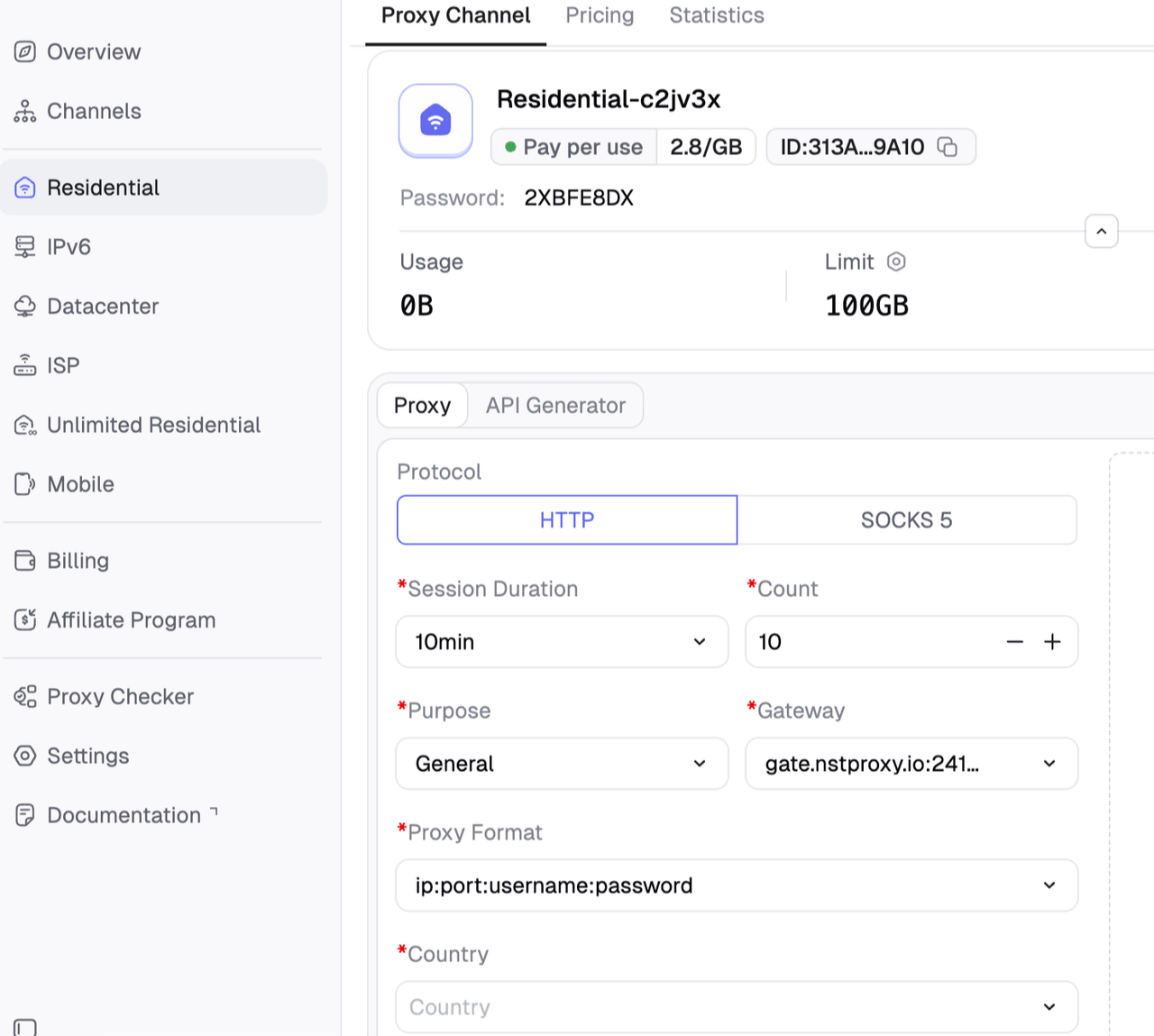
Sign up and then choose the right proxy type: Residential, Static ISP, or Mobile.
Create a channel and select the account’s target country or region.
Then assign one stable proxy environment per important account.
Note:
Avoid switching countries too often.
Keep browser, device, cookies, and IP location consistent.
Do not run spam automation.
Keep actions human-paced.
Stop activity if Instagram shows warnings.
Nstproxy should be used to build cleaner account environments, not to bypass Instagram rules or continue abusive activity.
Instagram Action Block Prevention Checklist
To avoid future action blocks:
Warm up new accounts slowly.
Avoid mass following and unfollowing.
Do not repeat the same comment.
Avoid bulk DMs.
Remove suspicious third-party apps.
Use two-factor authentication.
Keep login locations consistent.
Avoid free proxies and overloaded VPNs.
Use high-quality residential, ISP, or mobile proxies for legitimate account workflows.
Keep activity human-paced.
Stop immediately if warnings appear.
Common Mistakes That Make Action Blocks Worse
Avoid:
Repeatedly trying the blocked action
Logging in and out too many times
Switching IPs every few minutes
Using free proxy lists
Buying followers or engagement
Running automation after a block
Creating new accounts from the same risky network
Ignoring Instagram warnings
The fastest recovery is usually the calmest one: stop, secure, wait, and return slowly.
Instagram Action Block vs IP Ban vs Account Ban
Issue
What It Means
Best Fix
Action block
Specific actions are temporarily restricted
Stop activity and wait
IP restriction
Network or IP is flagged
Test another clean network and improve IP quality
Account restriction
Account is limited due to policy or trust issue
Appeal, secure account, stop risky behavior
Device/session issue
Device, cookies, or session is suspicious
Clear cache, secure login, use consistent environment
Permanent ban
Account is disabled or removed
Use official appeal process
Changing IPs alone will not fix every action block. If the behavior is the problem, you must change the behavior.
FAQs
Why did Instagram action block me?
Instagram may action block you because your account performed actions too quickly, repeated the same behavior, used third-party tools, sent too many DMs, followed too many accounts, or logged in from suspicious environments.
How long does an Instagram action block last?
Many action blocks last a few hours to 48 hours, but repeated or severe blocks can last longer. If Instagram gives an expiration date, wait until that date.
How do I remove an Instagram action block?
Stop the blocked action, remove third-party apps, secure your account, clear cache, wait, and report a problem if you believe the block is a mistake.
Can Nstproxy fix an Instagram action block?
Nstproxy cannot instantly remove an active action block. It can help prevent future issues by providing cleaner, more stable IP environments for legitimate account management and testing.
Which Nstproxy proxy is best for Instagram?
Use Nstproxy Residential Proxies for most Instagram workflows, Static ISP Proxies for stable long sessions, and Mobile Proxies for mobile-first Instagram testing.
Are free proxies safe for Instagram?
No. Free proxies are often overused, unstable, unsafe, and already flagged. They can increase the risk of action blocks or login challenges.
Final Recommendation
An Instagram action block is usually a temporary trust signal problem. The safest fix is to stop risky activity, remove automation, secure the account, wait, and return gradually.
For individual users, patience and better behavior are usually enough. For agencies, creators, ecommerce brands, and social media teams managing legitimate accounts, Nstproxy can help reduce risk by creating cleaner, more stable account environments.
Use Nstproxy Residential Proxies for most Instagram account workflows, Nstproxy Static ISP Proxies for stable long sessions, and Nstproxy Mobile Proxies for mobile-first testing. Combined with human-paced activity and account security, Nstproxy is a strong tool for preventing future Instagram action blocks.