Netflix content is region-based. A movie or show available in the United States may not appear in another country because Netflix licenses content by location. That is why many users search for unblock US Netflix: they want Netflix to detect a US network location and show the US catalog.
The main ways people try to access US Netflix are VPNs, Smart DNS tools, and proxy-based IP solutions. Each method works differently. VPNs are the mainstream consumer option. Smart DNS is often used on TVs or consoles. A proxy service like Nstproxy is useful when you need high-quality US IP access, region testing, IP reputation checks, or stable proxy infrastructure.
Netflix’s own Help Center says VPNs can make your device or network look like it is connecting from somewhere other than your actual location. It also notes that VPN use may limit content to globally available titles, and VPN use is not allowed on ad-supported plans. So use any tool responsibly and follow Netflix’s terms and local laws.
Why US Netflix Gets Blocked?
US Netflix access can fail for several reasons:
Your IP address is not detected as being in the United States.
Netflix detects a VPN, proxy, or Smart DNS service.
Your VPN server IP has already been flagged.
Your DNS location does not match your IP location.
Your browser or app cache stores old location data.
Your smart TV or router uses custom DNS settings.
Your account country or Netflix plan creates limitations.
Your ISP assigns an IP with incorrect geolocation.
Before changing tools, check your detected location on Fast.com. Click Show more info and look at the country next to Client.
How to watch US Netflix everywhere ##
Method 1: Unblock US Netflix via VPN
A VPN is the most common way users try to access US Netflix. It routes your traffic through a VPN server, so Netflix may see the server’s location instead of your original network.
Based on the current SERP and streaming VPN guides, common options include:
ExpressVPN: Often recommended for Netflix because of its streaming-focused apps, US server options, and easy setup.
NordVPN: Frequently listed in Netflix VPN comparisons for strong speeds, broad server coverage, and streaming support.
Surfshark: A budget-friendly option with unlimited device support and official Netflix troubleshooting guidance.
Proton VPN: A privacy-focused VPN that may suit users who care about security and transparency.
Private Internet Access: Useful for users who want more configuration control.
How to Use a VPN for US Netflix
Choose a reputable VPN provider.
Install the VPN app on your device.
Connect to a US server.
Open Fast.com and confirm the detected country is the United States.
Clear Netflix app cache or browser cookies.
Open Netflix again.
If Netflix still shows a proxy error, switch to another US server.
If the issue continues, contact the VPN provider’s support team.
When VPN Works Best: VPNs are best for regular users who want a simple app-based setup on desktop, mobile, Fire TV, or supported smart TV systems.
Common VPN Problems
Netflix may still block a VPN if the server IP is overused or flagged. If that happens, try another US server, clear cache, or switch to a provider with better streaming support.
Method 2: Use Smart DNS for TVs and Consoles
Smart DNS changes how certain DNS requests are routed. It is often used on devices that do not support VPN apps, such as some smart TVs, Apple TV setups, gaming consoles, and routers.
DNSFlex and SmartDNSProxy appear in the SERP for this reason.
How Smart DNS Works
Smart DNS does not encrypt all traffic like a VPN. Instead, it helps route location-sensitive requests through DNS servers designed for streaming access.
How to Use Smart DNS
Sign up for a Smart DNS provider.
Get the provider’s DNS server addresses.
Add the DNS addresses to your smart TV, console, router, or device.
Restart the device.
Clear Netflix cache if possible.
Test Netflix again.
Best For: Smart DNS is useful when you want a lightweight setup for smart TVs or consoles. It may also be faster than VPN because it does not encrypt all traffic.
Smart DNS is useful when you want a lightweight setup for smart TVs or consoles. It may also be faster than VPN because it does not encrypt all traffic.
Method 3: Clear Cache, Cookies, and App Data
Old location data can make Netflix keep showing the wrong catalog even after you change server, DNS, or network settings.
What to Clear
Browser cookies
Browser cache
Netflix app cache
Smart TV app data
DNS cache
Old VPN profiles
Steps
Sign out of Netflix.
Clear browser cache and cookies.
If using the Netflix app, reinstall it or clear app data.
Restart the device.
Reconnect using your chosen US VPN, Smart DNS, or proxy setup.
Log in again and test.
This is especially important if Netflix still shows local content after connecting to a US server.
Method 4: Check Your Connection on Fast.com
Before assuming the tool failed, verify what location Netflix sees.
If it does not show the United States, your network is not being detected as US-based.
Change VPN server, DNS settings, or proxy location and test again.
This step is simple but important. It tells you whether the issue is Netflix, your tool, or your detected IP location.
Method 5: Use Nstproxy for Region-Matched US IP Access
If only a US IP can view certain US Netflix content, then the quality and location of the IP matter. This is where Nstproxy can be useful.
Nstproxy is a professional proxy provider offering Residential Proxies, Static ISP Proxies, Mobile Proxies, Datacenter Proxies, IPv6 Proxies, and Unlimited Residential Proxies.
Why Nstproxy Helps
Nstproxy provides high-quality proxy IPs across many regions, including the United States. Its Residential Proxies use real-user-like IPs from residential-style networks, while Static ISP Proxies provide more stable ISP-based IPs for repeated testing.
Key advantages include:
US region targeting: Choose US IPs when testing US Netflix access.
Real-user-like IP behavior: Residential proxies better resemble normal home network traffic.
High-quality IP pool: More reliable than free proxy lists or overloaded VPN endpoints.
Strong anonymity: Helps mask the original network path during testing.
Stable sessions: Static ISP Proxies are useful for repeated checks from the same IP.
HTTP/SOCKS5 support: Easy to configure in browsers, proxy managers, and testing tools.
Better diagnostic control: Compare your original IP with a clean US proxy environment.
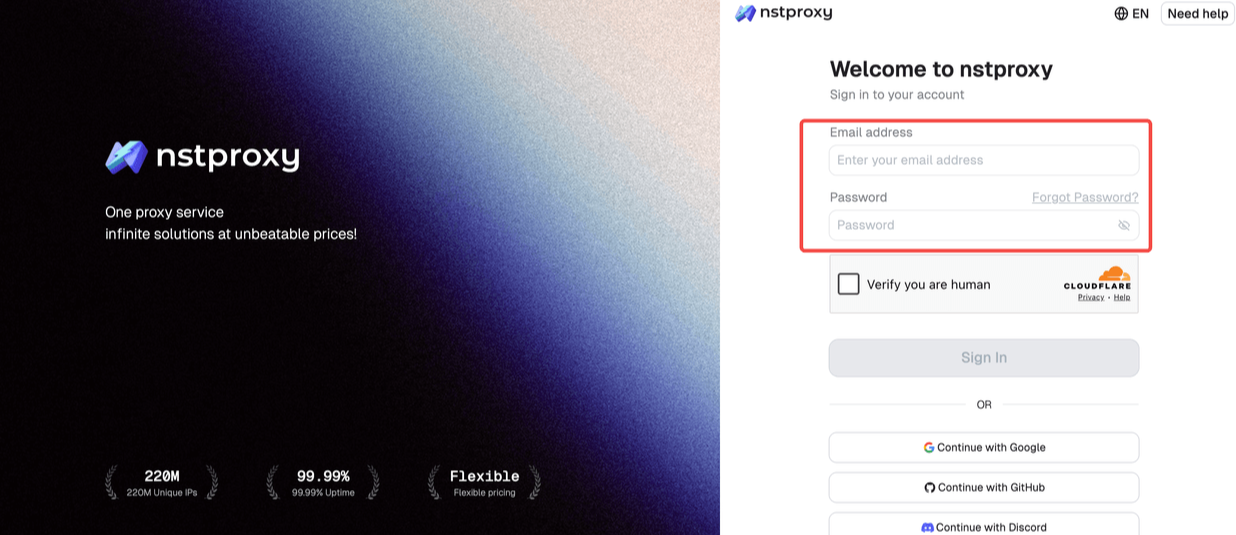
Step 1: Sign Up
Go to Nstproxy official, and then create your account using your email. Once registered, you’ll get access to your dashboard.
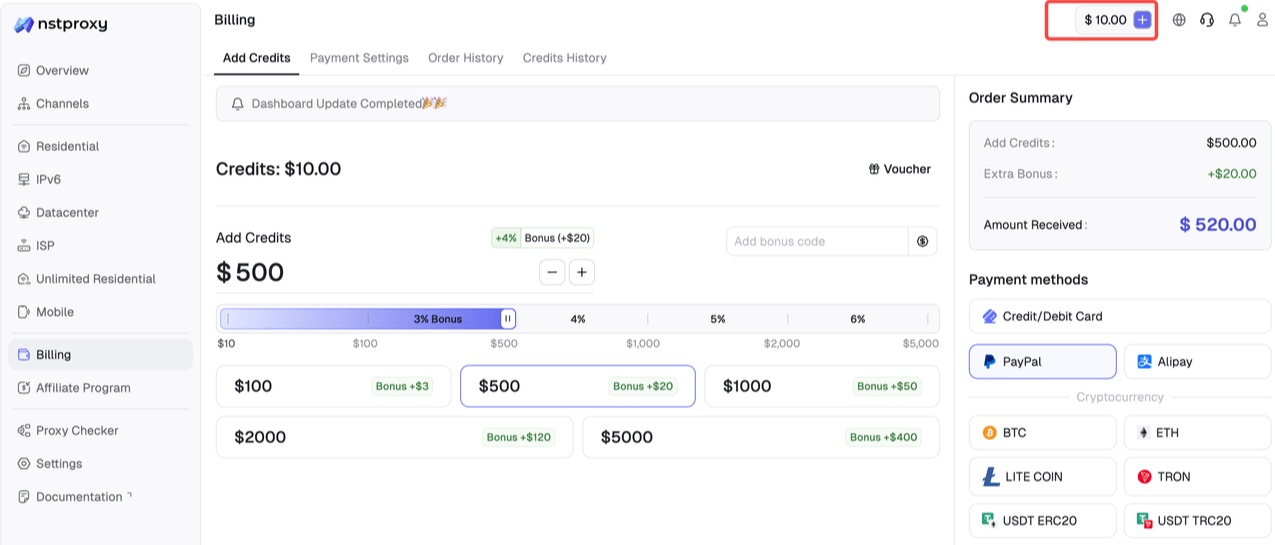
Step 2: Add Funds
Once you have registered, you can top up your balance before using proxies. Simple go to Dashboard > Billing tab. Alternatively, Nstproxy also supports a pay-as-you-go model, so you only pay for what you use.
Step 3: Choose Proxy Type
Next, select the proxy type that fits your needs by switching to the specific channel. You can choose Residential Proxies for realistic US residential IP behavior. Alternatively, choose Static ISP Proxies if you need stable repeated testing from one US IP.
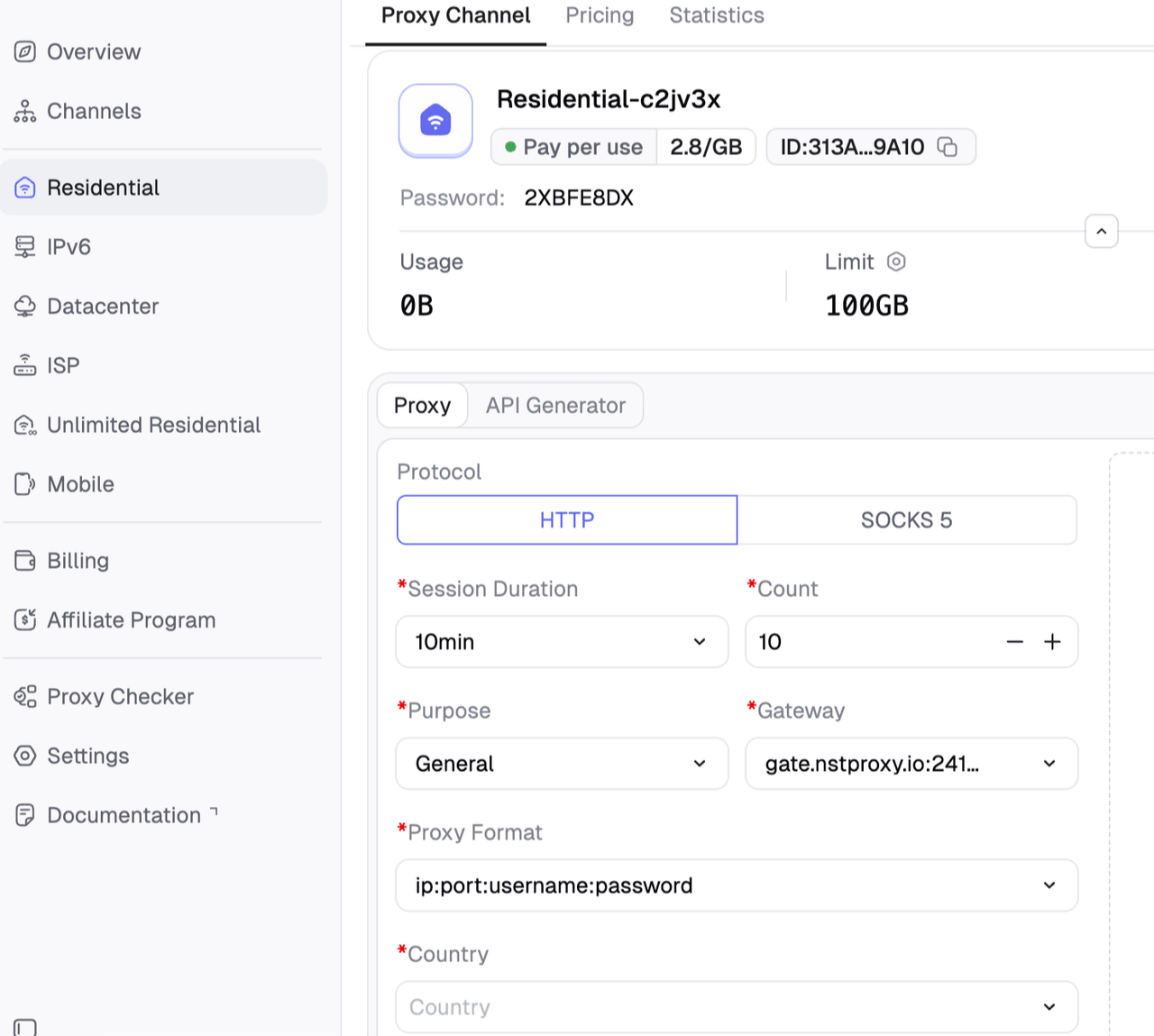
Step 4: Create a Channel
Then you can set up your Channel by choosing Country / Location; Session type (rotating or sticky); Protocol (HTTP / SOCKS5) and so on.
Step 5: Generate & Use Proxy
After creating a channel, generate your proxy credentials. You’ll get: Host/Port/Username/Password.
Nstproxy is best used for IP quality testing, QA, location diagnostics, and legitimate access troubleshooting. Follow Netflix’s terms, licensing rules, and plan restrictions.
Method 6: Fix Netflix VPN or Proxy Errors
If Netflix shows “You seem to be using a VPN or proxy,” try this:
Turn off VPN, proxy, or Smart DNS.
Restart Netflix.
Clear cookies or app cache.
Try a different US VPN server.
Check Fast.com.
Test with a clean US residential or ISP IP from Nstproxy.
If your ISP IP is wrong, contact your ISP.
If your VPN IP is blocked, contact the VPN provider or switch servers.
Do not rely on free Netflix proxies. They are usually slow, unsafe, overused, and already flagged.
Additional Tips
Clear Cache/Cookies: If Netflix still shows your local content, clear browser cookies or app cache to remove old location data.
Use Smart DNS for TVs: For devices that do not support VPN apps, Smart DNS tools like DNSFlex can be easier to configure.
Check Connection: Use Fast.com to verify whether your IP address now appears as the United States.
Try Multiple US Servers: If one VPN server fails, another US server may work better.
Use Higher-Quality IPs: If free VPNs or public proxies fail, Nstproxy Residential or Static ISP Proxies provide cleaner US IP testing.
Match Device and Region: Make sure your DNS, IP, device location, and Netflix account settings are not conflicting.
VPN vs Smart DNS vs Nstproxy
Method
Best For
Main Advantage
VPN
Everyday users
Simple app-based setup
Smart DNS
Smart TVs, consoles, routers
Lightweight and often fast
Nstproxy Residential Proxies
US IP access testing and real-user-like IP behavior
High-quality residential-style IPs
Nstproxy Static ISP Proxies
Repeated testing from stable US IPs
Stable sessions and ISP-style IP quality
Free proxies
Not recommended
Usually unreliable and risky
FAQs
How do I unblock US Netflix?
Use a reputable VPN with US servers, Smart DNS on supported devices, or a high-quality US proxy environment for testing. Also clear cache, check Fast.com, and make sure your detected country is the United States.
What VPNs work well for Netflix?
Commonly recommended VPN brands include ExpressVPN, NordVPN, Surfshark, Proton VPN, and Private Internet Access. If one US server fails, try another server or contact support.
Can Nstproxy help unblock US Netflix?
Nstproxy can help provide high-quality US IPs for access testing, location diagnostics, and IP reputation checks. Residential Proxies are best for real-user-like US IP behavior, while Static ISP Proxies are best for stable repeated testing.
Why does Netflix say I am using a proxy?
Netflix may detect VPN, proxy, Smart DNS, DNS mismatch, router settings, or an IP address that has been flagged as proxy-like.
Is Smart DNS better than VPN for Netflix?
Smart DNS can be faster and easier for smart TVs or consoles, but it usually does not encrypt traffic. VPNs are easier for privacy and app-based use. Nstproxy is better when you need controlled IP testing.
Are free Netflix proxies reliable?
No. Free Netflix proxies are often slow, overused, unsafe, and already detected. For serious testing, use a reputable VPN or a trusted proxy provider like Nstproxy.
Final Recommendation
The best way to unblock US Netflix depends on your setup Use a VPN if you want a simple app-based solution. Try ExpressVPN, NordVPN, Surfshark, Proton VPN, or Private Internet Access. Use Smart DNS if your device does not support VPN apps. Clear cache and check Fast.com after every change.
If your issue is IP quality, region detection, or repeated access testing, use Nstproxy. Nstproxy Residential Proxies are best for realistic US IP behavior, while Nstproxy Static ISP Proxies are best for stable US IP sessions.
Because Netflix content availability depends on regional IP detection, a high-quality US IP environment can make the difference. Nstproxy provides the proxy infrastructure needed to test and solve region-matched access issues more reliably than free proxies or overloaded VPN endpoints.