X Location Reveal Lessons: Privacy, IPs & Nstproxy
X’s location reveal feature changed how users think about privacy, account authenticity, and IP-based identity signals. The feature, often discussed through the new “About This Account” section, can show the country or region where an account is based. According to X’s own Help Center, this information is inferred from aggregated IP addresses.
That matters because many users previously assumed their profile location was the only location signal visible on X. The controversy showed something different: your visible bio location, account country setting, IP history, precise location settings, VPN use, and network behavior can all shape how a platform understands where you are.
For businesses, creators, journalists, researchers, and agencies, the lesson is simple: location privacy is now part of account strategy. A tool like Nstproxy can help teams test regional visibility, maintain cleaner IP environments, verify ads, and understand how location-sensitive platforms behave across regions.
What Happened With X’s Location Reveal Feature?
X introduced an “About This Account” tool that lets users see where an account is based. AP News reported that the feature exposed the foreign origins of some popular political accounts that appeared to present themselves as US-based.
The feature sparked two reactions:
Some users welcomed it as a transparency tool.
Others saw it as a privacy risk, especially for activists, journalists, creators, and users in sensitive regions.
X’s Help Center explains that the country or region displayed under “About This Account” is inferred from aggregated IP addresses, not simply from the profile location a user writes in their bio.
What Is “About This Account” on X?
“About This Account” is a public profile detail available for public accounts. It can show information such as where an account is based.
1. It is different from profile location: Your profile location is optional text. You can write “New York,” “Earth,” “Remote,” or nothing at all. It is self-declared.
2. It is different from country setting: Your country setting is non-public and helps X customize your experience and decide what content can be shown in your region.
3. It is inferred from IP history: X says the country or region shown under “About This Account” is inferred from aggregated IP addresses.
4. It can be affected by VPNs and proxies: AP News noted that X displays warnings on some accounts when location data may be inaccurate because of VPNs or proxies.
How Does X Infer Location?
X uses several location-related signals.
1. IP address: When you access X, the platform receives your IP address. This is one of the clearest network-level location signals.
2. Precise location: If enabled, X can collect precise location data such as GPS information, wireless network data, or nearby cell tower information.
3. Country setting: X uses location information to determine the country setting for your account and customize your experience.
4. Profile location: This is optional and public, but it is not the same as the location inferred by X.
5. Aggregated IP history: The public “About This Account” region is based on aggregated IP addresses, according to X’s Help Center.
Lesson 1: Your IP Address Is Part of Your Public Trust Signal
Many users think location privacy is only about GPS. The X location reveal showed that IP address history can matter too.
If you log in from one country, then use a VPN in another country, then switch to a shared proxy elsewhere, platforms may receive mixed location signals.
Use a stable and intentional network environment. Random VPN hopping can make your account look less consistent.
Nstproxy can provide controlled residential or ISP proxy environments for regional testing, brand monitoring, and business workflows where IP consistency matters.
Lesson 2: Profile Location Is Not the Same as Inferred Location
A user can write “USA” in their bio, but X may infer a different country or region from IP history.
This creates a gap between self-declared identity and platform-inferred identity.
If your brand account is managed by a global team, document who logs in, from where, and through which network. For distributed teams, Nstproxy Static ISP Proxies can provide a more stable regional access environment than random shared VPNs.
Lesson 3: VPNs Can Protect Privacy, But They Can Also Create Noise
A VPN can hide your original IP, but it can also make your location history inconsistent.
If an account uses VPN servers from many countries, X may infer confusing or inaccurate location signals.
Avoid switching locations unnecessarily. Use one consistent region when account continuity matters. Nstproxy’s residential and ISP proxies give more control over country, city, and session behavior than typical consumer VPNs.
Lesson 4: Precise Location Settings Still Matter
IP location is important, but precise location can be even more sensitive.
X’s Help Center says precise location can include GPS information and nearby network or cell tower data when enabled.
Turn off precise location if you do not need it.
On mobile:
Open device settings.
Find X in app permissions.
Set location access to “Never” or disable precise location.
In X, go to Settings and privacy.
Open Privacy and Safety.
Turn off Precise location.
Lesson 5: Location Transparency Can Expose Fake Authority
One reason the feature gained attention is that some accounts appeared to present themselves as local voices while operating from another region.
For political content, breaking news, product reviews, and local commentary, audience trust depends on authenticity.
For individual users, read location signals as one clue, not absolute proof. AP News also reported that fake screenshots and misinterpretations circulated around the feature.
For brands, monitor impersonation, fake local accounts, and region-mismatched narratives that mention your brand.
Nstproxy can support brand protection and regional monitoring workflows by helping teams view public content from different locations.
Lesson 6: Teams Need a Location Policy for Social Accounts
A creator may only have one account. A company may have dozens: brand accounts, executives, support handles, regional pages, campaign accounts, and agency-managed profiles.
If many people log in from different countries and networks, the account’s location signal may become messy.
What teams should define:
Who can access each X account
Which country or region should be used
Whether VPNs are allowed
Whether proxies are allowed
Which device or browser profile should be used
How login activity should be documented
Nstproxy Static ISP Proxies are useful for stable long-session workflows where teams want consistent regional access.
Lesson 7: Proxies Are Better Than Random VPNs for Controlled Testing
VPNs are simple, but they are often built for casual browsing. Proxies are better for structured testing and business workflows.
They offer more control over IP type, location, protocol, rotation, and session length. Use residential proxies for real-user-like regional testing, public content research, and social listening. Use static ISP proxies for stable account sessions, dashboards, and long-running monitoring. Use mobile proxies when testing mobile-first social experiences.
Nstproxy is one of the best option to help users reduce location exposure and maintain better online privacy.
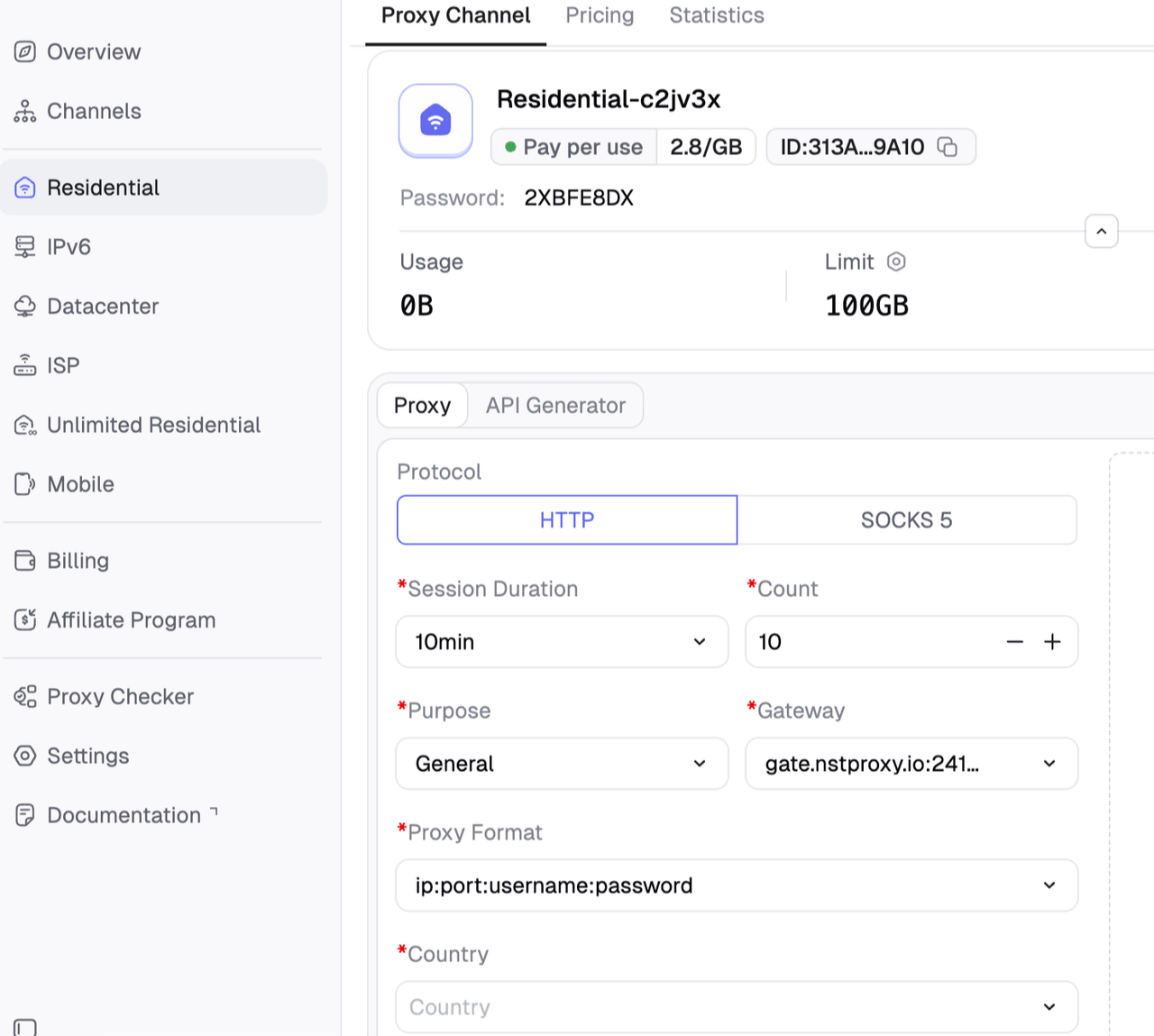
Nstproxy offers residential proxies, static ISP proxies, datacenter proxies, IPv6 proxies, unlimited residential proxies, and mobile proxies, supporting both HTTP(S) and SOCKS5 protocols.
Reduce Real Location Exposure: Hide your real IP and avoid directly revealing your actual geographic location.
Protect Privacy & Identity: Lower the risk of tracking, profiling, and location-based monitoring across platforms.
Maintain Regional Consistency: Keep account regions aligned with browsing behavior for safer multi-region operations and testing.
Real Residential IPs: Use authentic home-network IPs that look more like real users and reduce detection risks.
190+ Global Locations: Access proxy IPs from over 190 countries with targeting by country, city, or ASN.
Flexible IP Rotation: Rotate IPs automatically or keep stable sessions depending on your workflow.
Stable & Reliable Connections: Achieve a 99.98% success rate for long-running tasks and account management.
For platforms like X, where location signals can affect account visibility, recommendations, and risk detection, Nstproxy helps users create safer and more controlled regional environments without exposing their real location.
How to use Nstproxy.
Choose the right proxy type, select the target region, configure the proxy in your browser or tool, and keep sessions consistent when testing account visibility or regional content.
Practical Privacy Checklist for X Users
1. Turn off precise location.
Disable precise location in both device settings and X settings unless you truly need it.
2. Review profile location.
Do not publish a city, workplace, school, or neighborhood unless you are comfortable making it public.
3. Check “About This Account.”
Tap or click the joined date on your profile to review the public account information.
4. Avoid random VPN hopping.
Using many countries in a short period can create inconsistent signals.
5. Use stable regional access.
For business accounts, use a controlled network setup instead of unmanaged personal VPNs.
6. Separate personal and brand accounts.
Do not manage sensitive brand accounts from the same messy browser profile used for casual browsing.
7. Monitor impersonation.
Brands should watch for accounts pretending to be local representatives or official voices.
Final Verdict
The biggest X location reveal lesson is that location privacy is not just about what you type into your profile. Platforms can infer location from IP history, device permissions, precise location settings, and account behavior.
For everyday users, the first step is simple: turn off precise location, review your public profile, and avoid unnecessary location switching. For brands, agencies, and researchers, the lesson is bigger: create a controlled account-access policy and use reliable infrastructure for regional testing.
Nstproxy is a strong fit for this environment because it gives teams more control over IP type, region, and session stability. Use Nstproxy Residential Proxies for regional research and social listening, Nstproxy Static ISP Proxies for stable account sessions, and Nstproxy Mobile Proxies for mobile-first testing.
FAQs
What does “X location reveal” mean?
It refers to X’s “About This Account” feature, which can show the country or region where a public account is based.
How does X know my location?
X says it receives location information such as your IP address. If precise location is enabled, it may also collect GPS, wireless network, or cell tower information.
Is X’s location display based on profile location?
No. Profile location is optional text. X says the “About This Account” country or region is inferred from aggregated IP addresses.
Can a VPN change my X location display?
It may affect the signal, but VPNs can also create inaccurate or inconsistent location data. Random VPN switching is not ideal for account consistency.
How can I hide precise location on X?
Disable location access for X in your device settings, then turn off Precise location in X under Settings and privacy > Privacy and Safety > Precise location.
How can Nstproxy help with X location testing?
Nstproxy helps teams test regional content, ads, trends, and public account visibility using controlled residential, ISP, and mobile proxy environments.
Marcus Chen
Aug. 13th 2026
Experience Nstproxy - Start Your Free Trial Today
110M+ real IPs with 99.9% access success
Get immediate access to premium residential, datacenter, IPv6 and ISP proxy pools.
Blazing-fast average response ~0.5s for high-concurrency tasks