First confirm whether it is really an IP block, not a browser, cookie, account, or posting issue.
Router restart or mobile data can help if your ISP assigns dynamic IPs.
VPNs can work for casual access but may be detected or unstable.
Proxies provide more control, especially for city-level browsing and stable sessions.
Nstproxy Static ISP Proxies are best for stable Craigslist sessions.
Nstproxy Residential Proxies are better for location-based Craigslist research.
Take a Quick Look
Tired of Craigslist IP blocks disrupting your browsing experience? Nstproxy provides premium Residential and Static ISP proxies with stable connections, high-quality IPs, and strong anonymity for reliable access.
If Craigslist suddenly stops loading, blocks your posting, or works on mobile data but not on your home Wi-Fi, it is natural to suspect your IP address has been blocked. This can happen after repeated posting, too many requests, suspicious activity, location mismatch, shared public networks, or automation-like behavior.
But not every Craigslist issue is an IP block. Sometimes old cookies, browser cache, account restrictions, posting rules, or a temporary network issue can create the same symptoms. If you jump straight to changing IPs without diagnosing the problem, you may waste time or make the issue worse.
This guide walks through how to confirm whether Craigslist blocked your IP, what to try first, when a proxy makes sense, and how to prevent the same problem from happening again.
Craigslist may restrict traffic when one IP sends too many requests too quickly. This can happen if you refresh aggressively, check listings repeatedly, scrape pages, or use automation tools.
Even if your intent is harmless, the traffic pattern can look abnormal. When that happens, Craigslist may slow, block, or challenge access from that IP.
2. Repeated or Duplicate Posting
Posting the same or very similar listing too often may trigger Craigslist filters. This can lead to posting blocks, account restrictions, or IP-level access problems.
If the issue started right after repeated posting, changing IP alone may not solve it. You also need to stop repeating the behavior that triggered the block.
3. Location Mismatch
Craigslist is city-based. If your selected city, account behavior, and IP location do not make sense together, the session can look suspicious.
For example, repeatedly switching between distant regions or using an IP that does not match the Craigslist city you are browsing may create friction. A stable local or regional IP is usually better than jumping between unrelated locations.
4. Public Wi-Fi or Shared Network Reputation
Public Wi-Fi, office networks, dorm networks, shared VPNs, and free proxies often have many users behind one IP. If someone else abused that IP, you may inherit the problem.
This is why Craigslist may fail on one Wi-Fi network but work fine on mobile data.
5. Free Proxy or VPN Detection
Low-quality proxies and overused VPN IPs may already be blocked or flagged. Free proxies often make Craigslist problems worse because they are slow, unsafe, and heavily abused.
If you need a proxy, use a high-quality residential or static ISP proxy instead of a random free one.
Sometimes Craigslist is not blocking your IP at all. Old cookies, cached sessions, saved location preferences, or browser conflicts can create similar symptoms.
That is why browser cleanup should always come before more advanced fixes.
How to Know If Craigslist Blocked Your IP
1. Test With Another Network
The quickest test is to open Craigslist from another network. Turn off Wi-Fi and use mobile data, or try a different trusted Wi-Fi connection.
If Craigslist works elsewhere but not on your original network, your original IP or network is likely part of the problem.
2. Test Another Device on the Same Network
Try opening Craigslist on another phone, laptop, or browser while connected to the same Wi-Fi.
If every device on that network has the same issue, it may be network or IP-related. If only one device fails, the issue is more likely browser, cache, device, or account related.
3. Check the Exact Error
Different symptoms point to different causes.
Symptom
Possible Cause
Site will not load
IP/network block or connection issue
Posting is blocked
Posting behavior, duplicate listing, or account issue
Credibility check failed
Account/session verification issue
Login does not work
Account, cookies, or browser problem
Wrong city appears
Cookie or location mismatch
CAPTCHA or unusual traffic warning
Suspicious traffic or IP reputation issue
The more specific you are, the easier the fix becomes.
4. Clear Browser and Test Again
Before assuming your IP is blocked, clear Craigslist cookies and cache. Then test in private or incognito mode.
If Craigslist works after browser cleanup, the problem was likely session-related rather than IP-based.
How to Unblock IP on Craigslist
Method 1. Use a High-Quality Proxy Like Nstproxy for Craigslist IP Blocks
Frequent Craigslist IP blocks can interrupt browsing sessions and reduce access reliability. Nstproxy helps minimize these issues with premium Residential and Static ISP proxies, delivering high-quality IPs, exceptional stability, and strong anonymity for a smoother and more consistent Craigslist experience.
Why Choose Nstproxy to Reduce Craigslist IP Blocks?
• Premium Residential IPs – Real-user IP addresses that provide a more natural browsing experience.
• Static ISP Proxies – Long-lasting, consistent IPs ideal for maintaining stable sessions over extended periods.
• High-Quality IP Pool – Access clean and reliable IP resources across multiple locations.
• Exceptional Stability – Minimize connection interruptions with a robust proxy infrastructure.
• Strong Anonymity – Protect your identity and online activity with secure proxy connections.
• Flexible Location Options – Choose from a wide range of geographic locations to match your browsing needs.
• HTTP & SOCKS5 Support – Easy integration with browsers, proxy managers, and other tools.
• Fast & Reliable Performance – Enjoy low-latency connections and a seamless user experience.
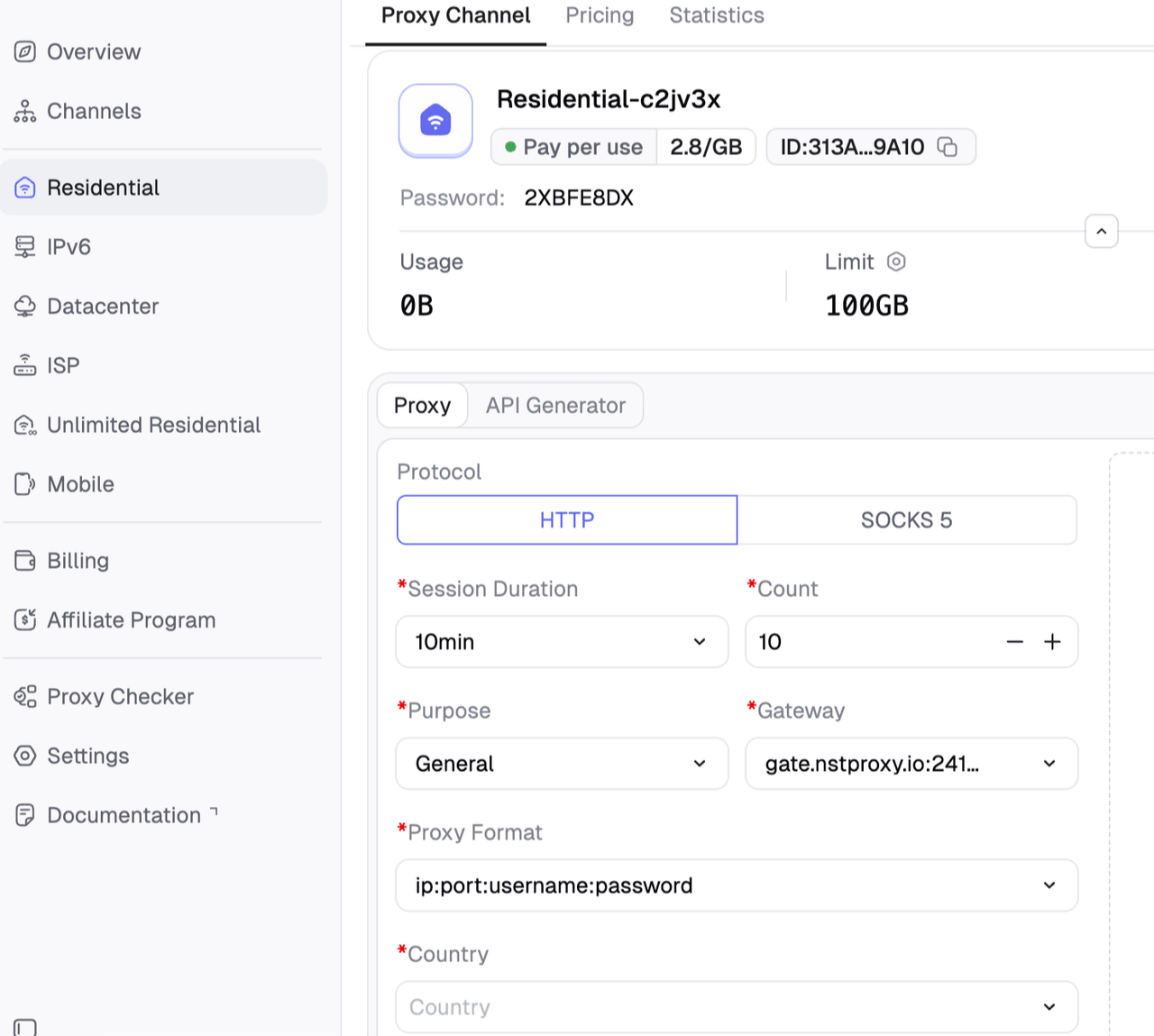
Register and sign up Nstproxy dashboard. Then choose the product type you need. Then choose US proxy and configure other settings on the dashboard.
Configure:
Country / Location;
Session type (rotating or sticky);
Protocol (HTTP / SOCKS5) and so on.
Step 2. Configure Nstproxy in Browser
Here we use a free browser extension like ZeroOmega as an example.
Install ZeroOmega in your browser > Open ZeroOmega settings.
Create a new profile named Nstproxy-Craigslist.
Choose HTTP, HTTPS, or SOCKS5 > Enter your Nstproxy host > Enter the port > Enter your username and password > Save the profile.
Click Apply changes and activate the profile.
Note: You can open an IP checker to test the IP and open Craigslist to see if it works.
Method 2. Wait and Stop Repeating the Same Action
Some Craigslist restrictions are temporary. If you keep repeating the same posting, refreshing, or scraping behavior, you may extend the issue.
Steps:
Stop posting or refreshing repeatedly.
Wait several hours or longer.
Avoid the action that triggered the block.
Open Craigslist from a clean browser session.
Test access again.
If the issue continues, move to the next method.
This is the safest first step when the block appeared after repeated activity.
Method 3. Restart Your Router
If your ISP uses dynamic IP addresses, restarting your router may assign a new public IP. This is one of the simplest fixes users often mention in Reddit-style discussions.
Steps:
Visit an IP checker and record your current IP.
Turn off your modem or router.
Wait 5-10 minutes.
Turn the router back on.
Reconnect to the internet.
Check whether your IP changed.
Open Craigslist again.
If the IP did not change, your ISP may use sticky or static IP assignment.
This method is free, but it is not guaranteed.
Method 4. Switch to Mobile Data or Another Network
Switching networks helps confirm whether the original IP is blocked. Mobile data usually uses a different carrier IP.
Steps:
Turn off Wi-Fi on your phone.
Enable mobile data.
Open Craigslist.
Test whether Craigslist loads.
If it works, your Wi-Fi IP is likely the issue.
If needed, use a stable alternative network while resolving the original IP problem.
This is a good diagnostic method, even if it is not your long-term solution.
Method 5. Clear Cookies, Cache, and Browser Session
Craigslist may remember old session signals even after your IP changes. Cleaning browser data can fix symptoms that look like IP blocks.
Steps:
Open browser settings.
Clear Craigslist cookies.
Clear cached files.
Restart the browser.
Open Craigslist in private or incognito mode.
Select the correct city manually.
Test browsing or posting again.
This should be done before and after changing networks or proxies.
Method 5. Use a VPN
A VPN changes the IP Craigslist sees by routing traffic through a VPN server. It may help for casual access, but shared VPN IPs can also be blocked.
Steps:
Choose a reputable VPN.
Select a US server near your target Craigslist city.
Connect to the VPN.
Clear Craigslist cookies.
Open Craigslist.
Test access.
If it fails, try another nearby server.
Avoid switching locations repeatedly while logged in.
Limitations:
Shared VPN IPs may have poor reputation.
VPNs are less precise than proxies for Craigslist city workflows.
Some VPN IPs may already be flagged.
What Not to Do When Craigslist Blocks Your IP
1. Do Not Keep Posting the Same Ad
Repeating the same blocked action can make the restriction worse. If a post was blocked, stop and review the content, category, city, and posting frequency before trying again.
2. Do Not Use Free Proxies
Free proxies are often already blocked or unsafe. They can cause slow loading, broken sessions, and more access problems.
3. Do Not Rotate IPs Aggressively
Craigslist is location-sensitive. Frequent IP changes can create more suspicion, especially during logged-in sessions.
4. Do Not Ignore Location Consistency
Your IP location, selected city, browser session, and account behavior should make sense together.
How to Prevent Future Craigslist IP Blocks
1. Keep Browsing Behavior Natural
Avoid aggressive refreshing, rapid page requests, and automation-like patterns. Human browsing is slower and more varied.
2. Match IP to Craigslist City
Use regional consistency for browsing and research. If you need a city-specific workflow, use an IP near that city.
3. Use Static Sessions for Account Workflows
Static ISP proxies are better for login and posting workflows because they keep the same IP throughout the session.
4. Clean Browser Data When Switching Regions
Old cookies can conflict with new IP locations. If you change cities or proxy regions, clear Craigslist cookies first.
5. Respect Craigslist Posting Rules
Follow category, location, and posting limits. Do not repost the same ad repeatedly or use proxies to bypass platform rules.
FAQs
Q1. Why did Craigslist block my IP?
Craigslist may block or restrict your IP because of too many requests, duplicate posting, suspicious activity, public network reputation, VPN/proxy use, or location mismatch.
Q2. How long does Craigslist block an IP?
The length can vary. Some restrictions may clear after hours, while others may last longer if the same behavior continues.
Q3. How do I unblock my IP on Craigslist?
Start by confirming the issue. Then try waiting, clearing cookies, restarting your router, switching to mobile data, using a VPN, or using a stable proxy like Nstproxy Static ISP Proxies.
Q4. Can restarting my router unblock Craigslist?
Yes, if your ISP assigns a new dynamic IP after restart. If your public IP does not change, this method will not help.
Q5. Is a VPN good for Craigslist IP blocks?
A VPN can help for casual access, but shared VPN IPs may already be flagged. Proxies offer better location and session control.
Q6. Are proxies better than VPNs for Craigslist?
For Craigslist workflows, proxies are often better because they allow city-level targeting, browser-only setup, and stable sessions.
Q7. Is Nstproxy good for Craigslist?
Yes. Nstproxy Static ISP Proxies are useful for stable sessions, while Nstproxy Residential Proxies are useful for city-level Craigslist research.
Conclusion
If Craigslist blocked your IP, do not jump straight to random free proxies. First confirm whether it is really an IP block. Try simple fixes such as waiting, clearing cookies, restarting your router, and switching networks.
If the issue is IP-based and you need a more stable solution, use a high-quality proxy instead of free proxies. Nstproxy offers solid and reliable solutions to avoid IP ban on Craigslist
Most importantly, keep your location, session, and browsing behavior consistent so you do not trigger the same problem again.