How to Play Roblox Without VPN: Safe and Easy Methods
Quick Takeaways
You do not always need a VPN to play Roblox.
If Roblox is blocked by school or work Wi-Fi, mobile hotspot, cloud gaming, DNS changes, or a proxy-enabled browser profile may help.
If Roblox only works with VPN, the real issue may be DNS, routing, firewall, antivirus, TLS verification, or local network filtering.
Cloud gaming is useful when Roblox cannot be installed on a school Chromebook.
Web proxies may open the Roblox website, but they usually cannot run the full Roblox client.
Nstproxy and Nstbrowser work best together for browser-based Roblox access: Nstproxy provides the proxy IP, while Nstbrowser provides the clean browser profile and proxy integration.
Avoid suspicious “Roblox unblocked” sites and never enter your Roblox password on unknown proxy pages.
Take a Quick Look
Looking for a more stable and secure browsing setup? Pair Nstbrowser with Nstproxy to create isolated browser profiles, maintain consistent IP identities, and reduce network-related disruptions. Start using Nstbrowser and Nstproxy today.
Roblox is easy to open at home, but it can become frustrating on school Wi-Fi, work Wi-Fi, managed Chromebooks, public networks, or devices with strict filters. Some users can only launch Roblox when a VPN is turned on. Others see connection errors, failed logins, blocked pages, or messages like TLS verification failure.
That is why many players search for play Roblox without VPN. A VPN can help in some cases, but it is not always available. It may be blocked by the network, slow down gameplay, increase ping, or be unavailable on school-managed devices.
The good news is that a VPN is not the only option. Depending on the problem, you may be able to play Roblox through a personal network, mobile hotspot, cloud gaming platform, DNS change, secure browser profile, proxy setup, or by fixing the Roblox client itself.
This guide explains the practical options and helps you choose the right method for your situation.
What Does “Play Roblox Without VPN” Mean?
“Play Roblox without VPN” can mean a few different things. Some users want Roblox unblocked on school Wi-Fi. Some want to play on a Chromebook without downloading the Roblox app. Some want to fix Roblox because it only works when a VPN is turned on. Others want a faster option because VPNs increase latency.
These are different problems.
If the Roblox website is blocked, a browser-based method may help. If the Roblox desktop client cannot connect, you may need to fix DNS, firewall, TLS, antivirus, or installation issues. If the device is managed by a school or workplace, downloads may be restricted at the device level. If the network blocks game traffic, switching networks may be the cleanest solution.
So before trying random tools, first identify the type of block.
Why Roblox and VPNs Are Blocked at School or Work?
Schools and workplaces usually block Roblox for practical reasons. Roblox is a gaming platform, so administrators may restrict it to reduce distractions, control bandwidth usage, or keep devices focused on study and work. In many cases, the network does not only block the Roblox website. It may also block game traffic, downloads, login requests, or the ports Roblox needs to connect properly.
VPNs are often blocked for the same reason. A VPN can hide traffic from the local network and bypass filtering rules, so schools and offices may block VPN apps, browser extensions, and known VPN server IPs. That is why some users cannot use a VPN even when Roblox itself is already blocked.
Common reasons Roblox fails without VPN include:
School or work network restrictions.
The network may block Roblox domains, game servers, or traffic patterns. In this case, Roblox may not load at all, or the website may open while games fail to launch.
DNS filtering.
Some networks block Roblox at the DNS level, which means your device cannot properly find or connect to Roblox domains. Changing DNS may help if this is the main issue.
Router or ISP routing issues.
Sometimes Roblox works through a VPN because the VPN uses a different route to Roblox servers. Without the VPN, your normal network path may be unstable or blocked.
Firewall or antivirus interference.
Security software may mistakenly block Roblox connections, especially if it scans web traffic or restricts game clients. This can cause launch failures, login problems, or connection errors.
Incorrect system time or TLS problems.
Roblox needs secure connections. If your device time, certificates, or HTTPS inspection settings are wrong, Roblox may show errors such as TLS verification failure.
Managed device policies.
School Chromebooks, work laptops, or parent-managed devices may block app installs, game clients, browser extensions, or certain websites. In this case, the device itself is part of the restriction.
Corrupted Roblox installation.
If Roblox files are broken or outdated, the app may fail even when the network is fine. Reinstalling Roblox from the official source can fix this.
Public Wi-Fi game traffic blocks.
Hotels, libraries, airports, and public networks sometimes block gaming traffic to save bandwidth. Roblox may work on mobile data but fail on that public Wi-Fi.
How to Play Roblox Without VPN
Once you know why Roblox is not working, the next step is choosing the right fix. The methods below go from simple network checks to more advanced browser and proxy setups. You do not need to try everything at once. Start with the method that matches your situation.
Method 1. Try Roblox on a Personal or Unrestricted Network
Before changing DNS or setting up tools, first confirm whether your current network is the problem. If Roblox works on another network, the issue is likely school Wi-Fi, work Wi-Fi, or public network filtering.
Steps:
Disconnect from the restricted Wi-Fi and connect to home Wi-Fi, mobile data, or another trusted network.
Open Roblox, log in, and try launching a game.
If Roblox works on the new network, your original network is likely blocking Roblox.
If Roblox still fails, check the app, firewall, DNS, device settings, or account status.
This quick test helps you avoid fixing the wrong problem.
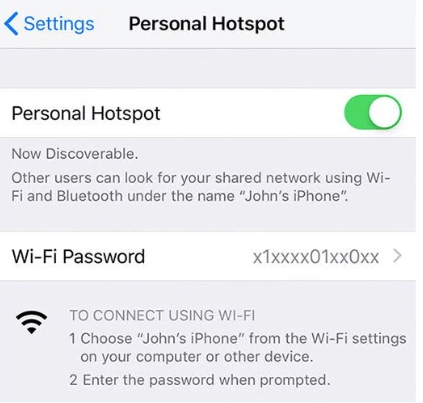
Method 2. Use Mobile Hotspot
If Roblox is blocked on Wi-Fi but works elsewhere, mobile hotspot is often the simplest no-VPN solution. It uses your mobile carrier network instead of the restricted Wi-Fi.
Steps:
Turn on mobile data and enable Personal Hotspot or Mobile Hotspot.
Connect your laptop, tablet, or Chromebook to the hotspot.
Open Roblox and launch a game.
If it works, your Wi-Fi network is the blocker.
Watch your data usage, because Roblox can consume mobile data during longer sessions.
This method is best for quick access, but it may not be ideal for long gameplay if your mobile plan is limited.
Method 3. Use Cloud Gaming Platforms
If you cannot install Roblox, especially on a school Chromebook, cloud gaming may be a better option. The game runs on a remote server and streams to your browser, so your device does not need to install the Roblox client.
Steps:
Open a trusted cloud gaming platform that supports Roblox.
Search for Roblox and check whether it is available in your region.
Sign in if required, then launch Roblox from the platform.
Use a stable network to reduce lag.
Avoid unknown “Roblox unblocked” sites that ask for your Roblox password.
Cloud gaming is useful for no-download access, but availability can change.
Method 4. Change DNS Settings
If Roblox fails because of DNS filtering, changing DNS can help. This method is simple, free, and does not require a VPN.
Steps:
Open your device’s network settings and find DNS settings.
Replace the current DNS with a trusted public DNS, such as Cloudflare 1.1.1.1 / 1.0.0.1 or Google DNS 8.8.8.8 / 8.8.4.4.
Save the changes and restart your browser or device.
Open Roblox and test whether the website and game launch correctly.
DNS changes help with DNS-level blocks, but they will not fix device policies or deeper network filtering.
Method 5. Use Nstproxy With Nstbrowser for Browser-Based Access
A proxy can route browser traffic through another IP address without using a full VPN. But for Roblox, the better approach is not just “use any proxy.” A cleaner setup combines a high-quality proxy with a browser profile tool.
This is where Nstproxy + Nstbrowser fit together.
Nstproxy provides a stable residential or datacenter IP connection. It helps users bypass network restrictions, maintain a consistent browsing identity, and reduce disruptions caused by unstable or frequently changing IP addresses. This is especially useful when accessing platforms that rely on location consistency, account trust, and reliable network sessions.
Nstbrowser provides the browser environment. It lets users create separate browser profiles, configure proxies, and keep cookies, cache, and session data organized. This is useful when Roblox website access, cloud gaming pages, or browser-based login sessions are affected by messy browser data or network restrictions.
How to play Roblox with Nstproxy & Nstbrowser
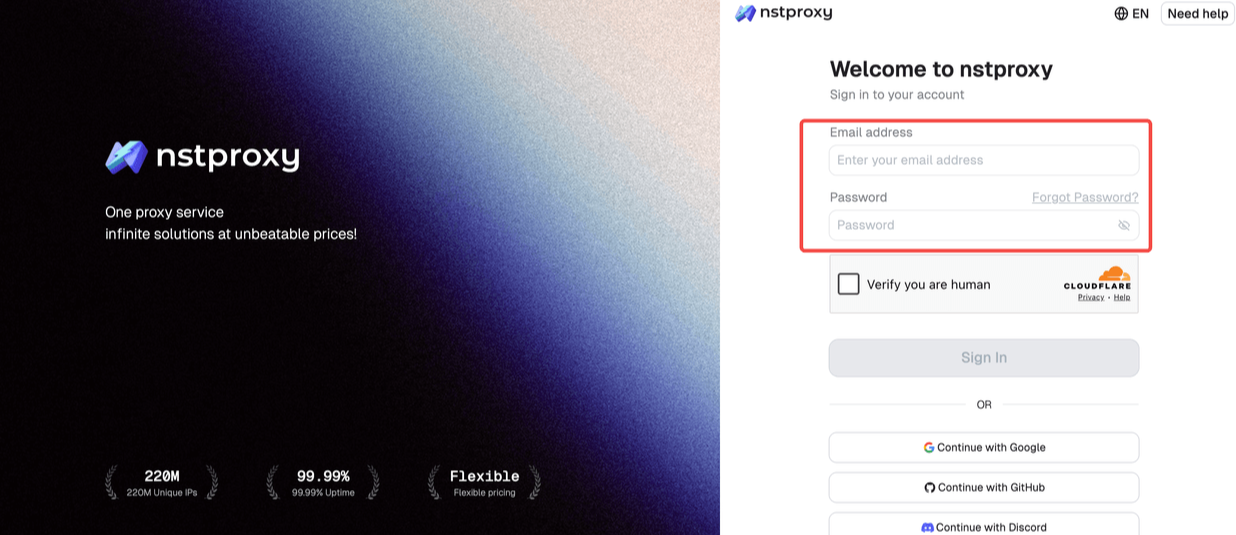
Step 1. Sign in
Then open Nstproxy official, go to the sign-in page and register/sign in with your email.
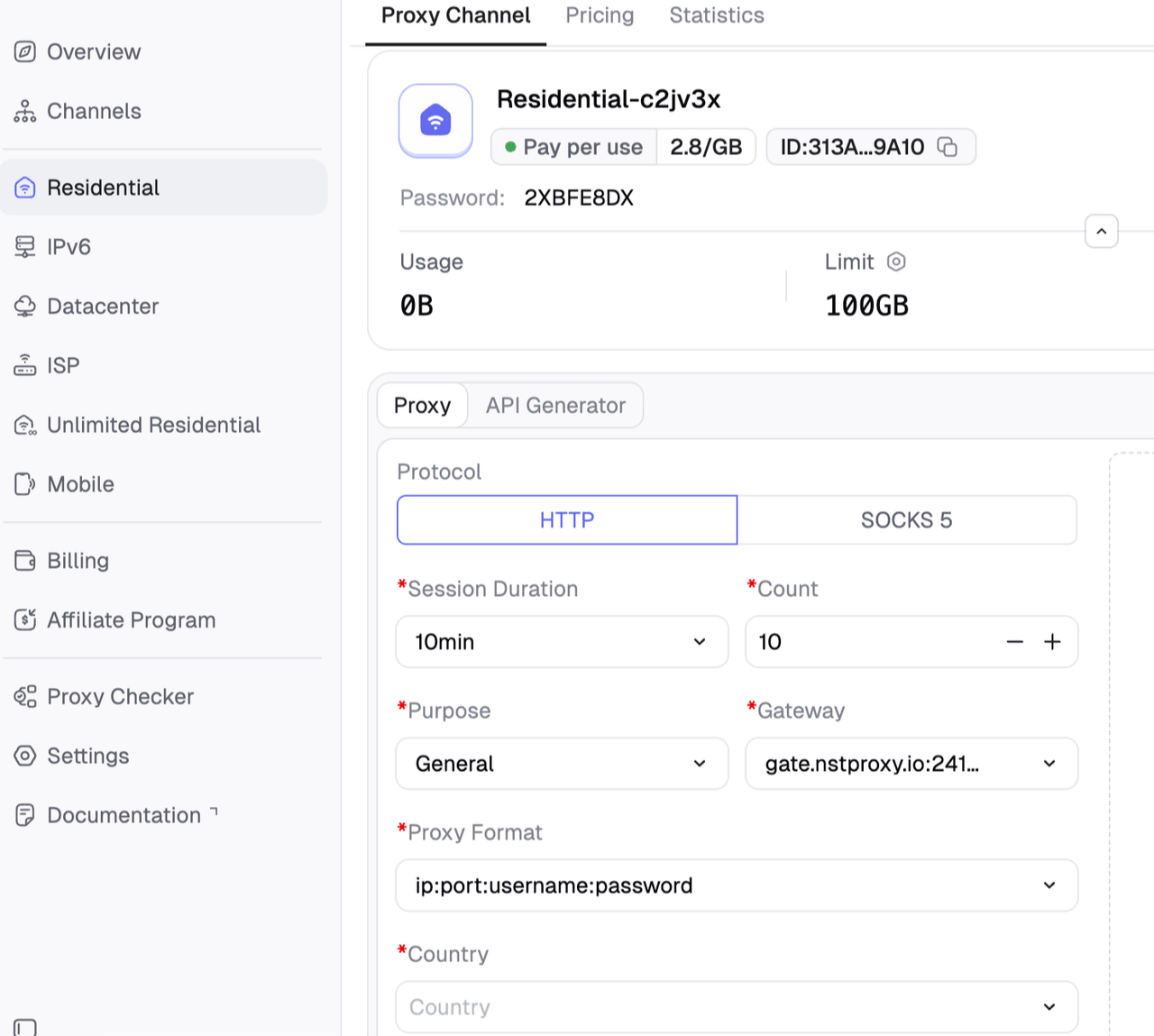
Then choose the proxy type and generate the proxy. Copy the proxy host, port, username, and password from Nstproxy.
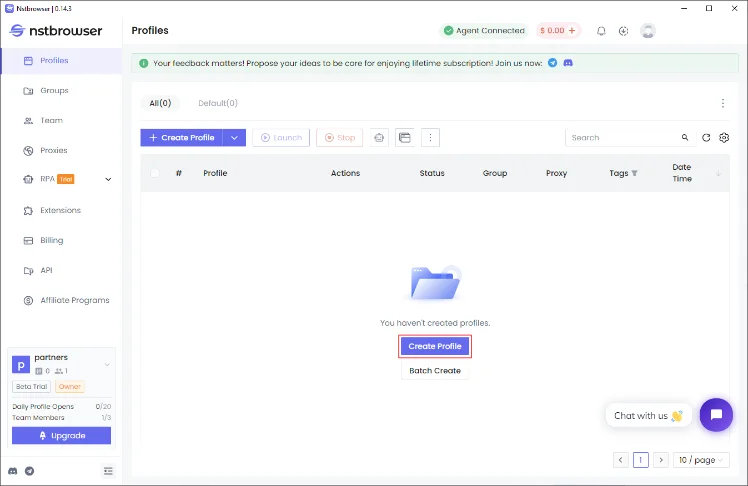
Please install Nstbrowser and register or sign in your account.
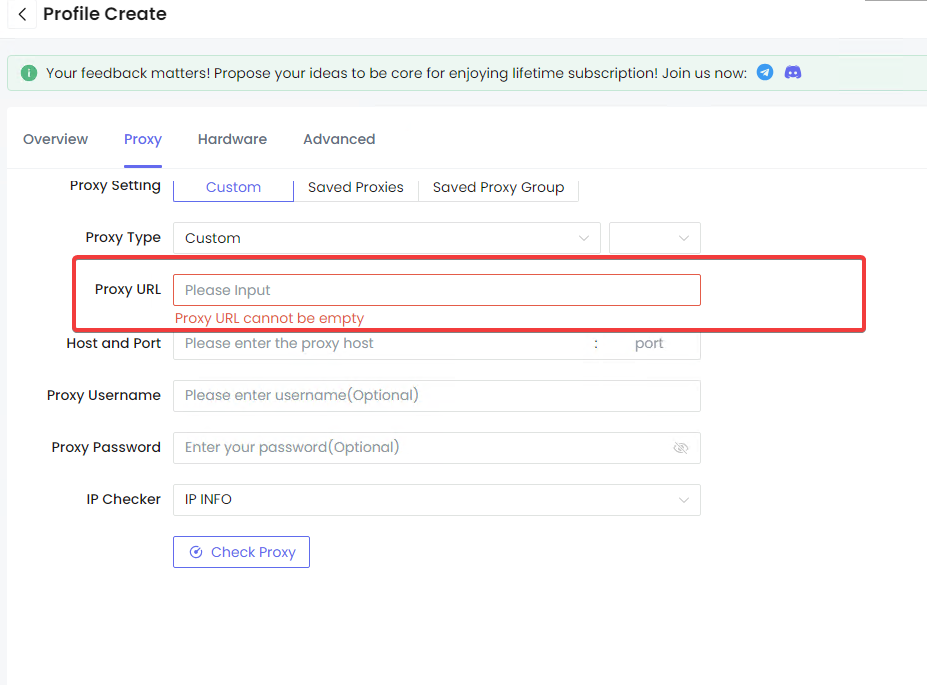
Step 2. Configure Nstbrowser and Nstproxy
Create a new browser profile in Nstbrowser and give it a clear name.
Copy your Nstproxy credentials, including the protocol, host, port, username, and password. And paste it to Nstbrowser.
Configure the proxy settings within the Nstbrowser profile and save the configuration.
Launch the profile and verify that the assigned Nstproxy IP is active using an IP-checking website.
Browse normally using the profile, and keep the same proxy and browser profile paired together for better session consistency and account stability.
Step 3. Then browse Roblex normally
Open Roblox within that profile.
This setup is more controlled than a VPN because it routes only that browser profile instead of your whole device.
Method 6. Use a Web Proxy Carefully
A web proxy may help open the Roblox website, but it usually cannot run the full Roblox game client. Treat it as a quick access test, not a full gaming solution.
Steps:
Open a trusted web proxy and enter https://www.roblox.com.
Check whether the Roblox website loads.
Do not enter your Roblox password on unknown proxy pages.
If gameplay does not launch, use cloud gaming, mobile hotspot, or Nstproxy with Nstbrowser instead.
Web proxies are limited and can be risky if the site is not trustworthy.
Method 7. Fix Roblox Connection Errors Without VPN
If Roblox only works when a VPN is on, the VPN may be hiding a local device or network problem. In that case, fixing the underlying issue is better than depending on a VPN.
Steps:
Check that your system date, time, and timezone are correct.
Restart your router and device.
Change DNS to Cloudflare or Google DNS.
Allow Roblox through firewall or antivirus settings.
Reinstall Roblox from the official website or app store.
If you see TLS verification errors, check certificates, HTTPS scanning, or managed network filtering.
Test Roblox on another trusted network to confirm whether the issue is local.
This method is especially useful for errors like TLS verification failure, failed launch, or Roblox working only through VPN.
Best Method by Situation
Situation
Best No-VPN Method
School Wi-Fi blocks Roblox
Mobile hotspot, cloud gaming, Nstbrowser + Nstproxy
Work Wi-Fi blocks Roblox
Personal network or mobile hotspot where allowed
Chromebook cannot install Roblox
Cloud gaming
Roblox website is blocked
DNS change, proxy browser, mobile data
Roblox app shows connection error
Fix DNS, firewall, certificates, reinstall
VPN is too slow
Static ISP proxy or mobile data
Need browser-only access
Nstbrowser + Nstproxy
Need stable sessions
Nstproxy Static ISP Proxy
Random “unblocked” sites look unsafe
Avoid them; use trusted tools
Proxy vs VPN vs Cloud Gaming for Roblox
Method
Best For
Pros
Cons
VPN
Full-device routing
Easy, broad coverage
Can be slow or blocked
Nstproxy Static ISP + Nstbrowser
Stable browser-based access
Clean profile, fixed IP, browser-level control
Setup needed
Nstproxy Residential + Nstbrowser
Region testing
Flexible locations
Needs careful setup
Cloud Gaming
Chromebook/no download
Runs in browser
Availability changes
Mobile Hotspot
Quick network bypass
Simple
Uses mobile data
DNS Change
DNS filtering
Free and easy
Does not change IP
Web Proxy
Basic website access
No install
Usually not enough for full gameplay
For Roblox, VPNs are simple but not always ideal. If you only need browser-level access, Nstbrowser with Nstproxy gives more control. If you cannot install Roblox, cloud gaming may be more practical. If the Roblox app is broken, connection troubleshooting matters more than any proxy.
What Not to Do
1. Do Not Use Suspicious “Roblox Unblocked” Sites
Some sites may contain aggressive ads, fake login pages, unsafe redirects, or malware. If a site asks for your Roblox password outside the official Roblox login flow, avoid it.
2. Do Not Enter Your Password on Unknown Proxy Pages
Use trusted login paths only. Your Roblox account may contain Robux, private messages, purchases, and personal data.
3. Do Not Use Proxies for Cheating or Exploits
Nstproxy and Nstbrowser should be used for stable access and clean browser sessions, not cheating, exploiting, or bypassing Roblox account enforcement.
4. Do Not Ignore Roblox Client Errors
If Roblox shows TLS, firewall, or connection errors, fix those directly. A proxy may not solve a corrupted app, certificate issue, or antivirus conflict.
5. Do Not Use Random Free Proxies
Free proxies are often slow, unsafe, and unreliable for gaming. They may also break login pages or expose your traffic.
FAQs
Q1. Can I play Roblox without VPN?
Yes. You can play Roblox without VPN by using a personal network, mobile hotspot, cloud gaming, DNS changes, or a proxy-enabled browser setup. The best method depends on whether Roblox is blocked by the network, the device, or the Roblox client itself.
Q2. How do I play Roblox on school Wi-Fi without VPN?
If permitted, try mobile hotspot, cloud gaming, DNS changes, or a secure browser profile with proxy integration. If the school manages the device or network, some restrictions may not be removable without administrator permission.
Q3. Can I play Roblox on a school Chromebook without downloading it?
Sometimes. Cloud gaming platforms may let you play Roblox in a browser without installing the Roblox app. Availability changes, and school-managed Chromebooks may still block some sites.
Q4. Are VPNs illegal on Roblox?
VPNs are not illegal by themselves. However, using a VPN or proxy to break Roblox rules, evade account enforcement, commit fraud, cheat, or violate regional laws can create account or legal risk. Roblox’s Terms of Use allow Roblox to suspend or terminate accounts that violate its terms or community standards.
Q5. Can Roblox detect if you are using a VPN?
Roblox and related security systems may be able to detect some VPN or proxy traffic, especially from heavily shared or abused IPs. Detection is not only about the IP; account behavior, device signals, login patterns, and security checks may also matter.
Q6. Why does Roblox only work with VPN?
If Roblox only works with VPN, your normal network may have DNS filtering, firewall blocks, ISP routing issues, TLS inspection, antivirus interference, or device restrictions. Try DNS changes, firewall checks, router restart, reinstalling Roblox, or testing another network.
Q7. Can web proxies run Roblox games?
Usually not. A web proxy may open the Roblox website, but full Roblox gameplay often requires the Roblox app, client, or a cloud gaming platform. This time, use a high quality proxy and browser setup is good for Roblox games.
Q8. Is it safe to use Roblox unblocked sites?
Be careful. Some unblocked sites may be unsafe or fake. Avoid sites that ask for your Roblox password, request downloads, show suspicious pop-ups, or redirect through unknown pages.
Conclusion
Playing Roblox without VPN depends on why Roblox is blocked or failing. If the issue is school or work Wi-Fi, mobile hotspot, cloud gaming, DNS changes, or a proxy-enabled browser profile may help. If Roblox fails because of TLS, DNS, firewall, antivirus, or installation problems, fix the client and network settings first.
For users who need browser-based Roblox access without a VPN, Nstproxy and Nstbrowser work best as a pair. Nstproxy provides stable, high-quality proxy IPs, while Nstbrowser keeps the browser profile, cookies, and proxy configuration organized. Use Nstproxy Static ISP Proxy for stable sessions and Residential Proxy for location testing.
The safest approach is to use trusted tools, keep sessions consistent, avoid suspicious unblocked sites, and follow Roblox’s rules while solving the real access problem.