How to Make My IP Address Private in 6 Ways [Don't Miss]
Quick Takeaways
An IP address is a network identifier used to send and receive internet traffic.
Masking your IP means making websites see another IP instead of your real public IP.
VPNs are the easiest option for personal privacy.
Proxies are better for controlled workflows like scraping, SEO monitoring, ad verification, and account sessions.
IP masking hides your visible IP, but it does not fully hide cookies, browser fingerprints, logged-in account behavior, or device signals.
Lead-in
Every time you visit a website, your public IP address is visible to that website. It can reveal your approximate location, your internet service provider, your network type, and sometimes whether you are browsing from a home connection, business network, mobile carrier, VPN, or datacenter.
For many everyday users, this feels like a privacy concern. For marketers, developers, QA teams, SEO specialists, and data teams, it can also become a practical problem. If you need to test regional content, scrape public data, verify ads, check search results, or maintain a stable online account session, exposing the same real IP every time may not be ideal.
This guide explains what an IP address is, why people mask IP addresses, and how to hide your IP with six practical methods. It also shows how to use Nstproxy to change your visible IP with proxies, especially when you need more control than a normal VPN can provide.
What Is an IP Address?
An IP address is a unique number assigned to a device or network connected to the internet. It works like a return address for online traffic. When your device sends a request to a website, the website needs an IP address so it knows where to send the response.
Without an IP address, internet communication cannot work. That is why you cannot completely “remove” your IP from the internet. You can only make websites see another IP instead of your real one.
What Is an IP Address Used For?
IP addresses are used to route internet traffic between devices, networks, websites, apps, and servers. They help websites deliver pages, detect approximate location, manage security, apply rate limits, personalize content, and block suspicious traffic.
For example, a website may use your IP address to decide which country version of a page to show. A security system may use your IP to detect repeated login attempts. A streaming service may use your IP location to decide which content catalog appears.
Public IP vs Private IP
A public IP address is the address websites see when you access the internet. This is the IP most people want to mask.
A private IP address is used inside a local network, such as your home Wi-Fi or office network. Examples include addresses that start with 192.168.x.x or 10.x.x.x. These private IPs are not usually visible to public websites.
When people ask how to mask an IP address, they usually mean how to hide or replace their public IP address.
What Does It Mean to Mask an IP Address?
Masking an IP address means hiding your real public IP and showing another IP instead. This usually happens through a VPN, proxy server, Tor Browser, mobile carrier network, or another internet route.
A simple proxy or VPN flow looks like this:
Your device -> VPN/proxy server -> Website
The website sees the VPN or proxy IP, not your original home, office, or mobile IP.
Users keep searching on 'how to block your ip address' on webiste may out of various reasons.
1. Protect Personal Privacy: Many users mask their IP so websites cannot easily see their real home, office, or mobile network IP. This reduces basic IP-based tracking and makes it harder for websites to associate every visit with the same public IP.
2. Browse More Safely on Public Wi-Fi: Public Wi-Fi networks can expose users to more privacy and security risks. Using a VPN or secure proxy on public Wi-Fi can help hide your real network identity and protect traffic routing.
3. Access Geo-Specific Content: Some websites show different pages, prices, search results, or content depending on IP location. Masking your IP helps users test how content appears from another city, country, or region.
4. Support Web Scraping and Data Collection: If a scraper sends all requests from one IP, websites may rate-limit or block that traffic. Proxies help distribute requests across different IPs and reduce request concentration.
5. Run SEO Monitoring and Ad Verification:Marketers often need to check localized search results, ads, landing pages, and pricing from different markets. Geo-targeted proxies make these checks more accurate than testing from one fixed office IP.
6. Maintain Stable Account Sessions: Some workflows require a consistent login environment. For social media, e-commerce, dashboards, and business accounts, a stable IP can be better than constantly changing networks. This is where static ISP proxies are especially useful.
7. Test Apps, Security, and Regional Access: Developers and QA teams use different IPs to test login systems, firewalls, rate limits, fraud checks, and regional access behavior. This helps identify problems before real users encounter them.
How to Mask IP Address in 6 Proven Ways
Now please refer the below guide to mask your IP address.
Method 1. Hide Your IP Using a VPN
A VPN masks your IP by routing your device traffic through a VPN server. Once connected, websites see the VPN server’s IP address instead of your real public IP.
This is the easiest method for everyday users because it usually works across the whole device. Your browser, apps, and online services can all use the VPN route while the VPN is connected.
Recommended VPNs (2026):
ExpressVPN — Best overall (fastest speeds, most reliable, beginner-friendly)
NordVPN — Most feature-rich, great balance of speed and security
Surfshark — Best value for money, unlimited devices
Proton VPN — Strong privacy focus, has a good free plan
How to mask your IP with a VPN:
Step-by-Step Instructions:
1. Choose and Sign Up for a VPN: Visit the official website of your chosen VPN (e.g., expressvpn.com), create an account, and subscribe. Most offer a 30-day money-back guarantee.
2. Download the VPN App: Download the application for your device (Windows, Mac, Android, iOS, etc.) from the official website.
3. Install the App: Run the installer and complete the installation.
4. Open and Log In: Launch the VPN app and sign in with your account credentials.
5. Select a Server Location: Choose a server in the desired country:
United States (for US content)
United Kingdom
Germany, Japan, Netherlands, or Switzerland (good for privacy and speed)
6. Connect to the VPN: Click the Connect button and wait a few seconds for the connection to establish.
7. Verify Your IP Has Changed: Open any of these IP checker websites:
whatismyipaddress.com
ipleak.net
whoer.net
Confirm that your displayed IP address now matches the VPN server’s location.
VPNs are best for personal privacy, public Wi-Fi protection, and simple location switching. However, shared VPN IPs are often detected by stricter websites. VPNs also offer less control than proxies especially for scraping, automation, geo-targeting, and long account sessions.
Method 2. Hide Your IP Using a Proxy
A proxy masks your IP by routing selected traffic through a proxy server. Unlike a VPN, which often routes your whole device, a proxy can be configured for one browser, one app, one scraper, one automation tool, or one workflow.
Nstproxy provides real proxy IPs that can replace your visible public IP. It is more suitable than a random free proxy when you need stable, high-quality, and controllable IP masking.
Enhanced Privacy: Keep your real IP address hidden and protect your online identity.
Real Residential IPs: Access genuine residential IPs for a more authentic browsing experience.
Global Coverage: Choose IP addresses from countries and regions around the world.
Fast and Reliable: Enjoy stable connections and consistent performance whenever you go online.
Easy IP Rotation: Switch IP addresses effortlessly to maintain anonymity and flexibility.
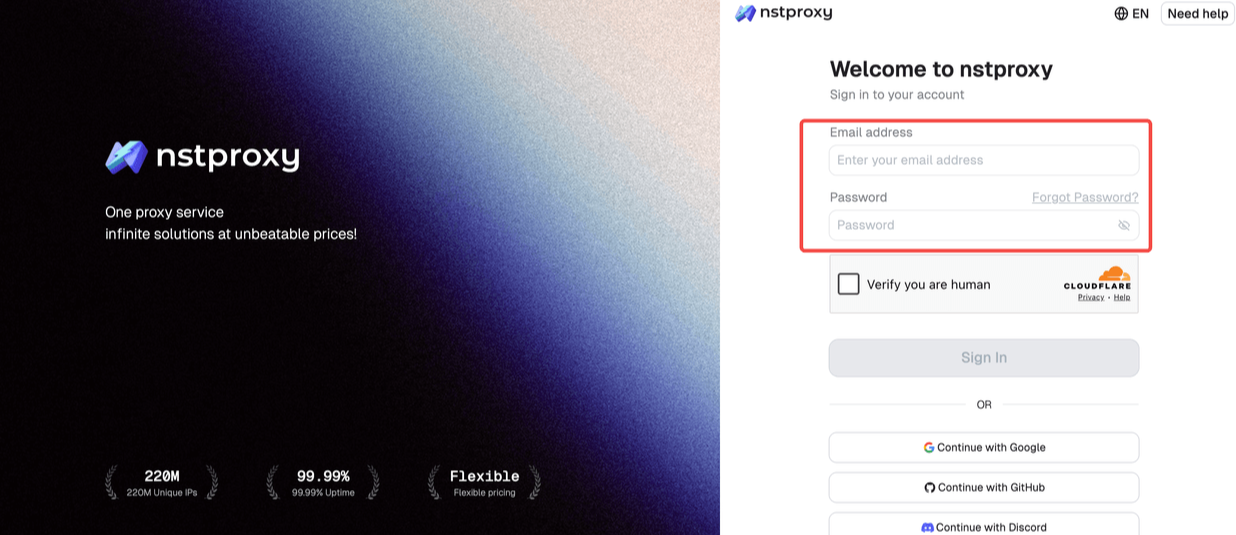
Step 1: Create a Nstproxy account
Go to Nstproxy and create an account or log in to your dashboard.
Step 2: Add Funds
Once you have registered, you can top up your balance before using proxies. Simple go to Dashboard > Billing tab. Alternatively, Nstproxy also supports a pay-as-you-go model, so you only pay for what you use.
Step 3: Choose Proxy Type
Next, select the proxy type that fits your needs by switching to the specific channel.
Choose Static ISP Proxies if you need one stable IP for long browsing sessions, account workflows, or consistent access.
Choose Residential Proxies if you need real-user IP trust, flexible location targeting, or rotating IPs.
Choose Datacenter Proxies if speed and cost matter more than trust.
Choose Mobile Proxies if you need mobile-network IPs.
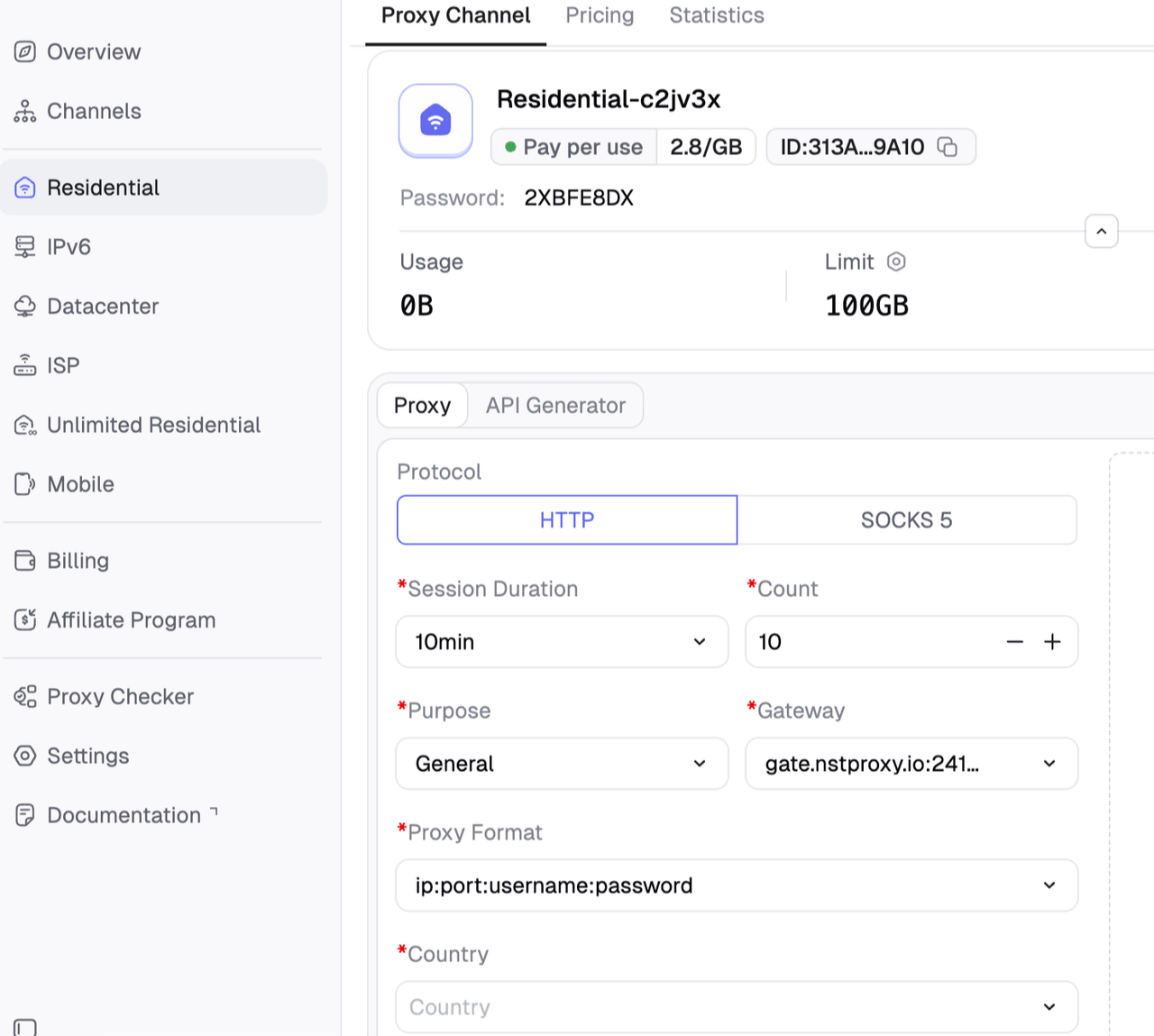
Step 4: Create a Channel
Then you can set up your Channel by choosing Country / Location; Session type (rotating or sticky); Protocol (HTTP / SOCKS5) and so on.
Step 5: Generate & Use Proxy
After creating a channel, generate your proxy credentials. You’ll get: Host/Port/Username/Password
Step 6.Add the proxy to your browser or tool
For browser use, configure system proxy settings or use a trusted proxy manager extension. For scraping or automation, paste the proxy endpoint into your tool’s proxy field.
A standard proxy format often looks like this:
http://username:password@host:port
Check whether your IP changed
Nstproxy offers useful IP Lookup & Proxy Tool to identify its location, ISP, ASN, and proxy status.
Proxies are best for web scraping, SEO monitoring, ad verification, market research, account workflows, geo-targeted testing, and automation. The main limitation is that setup takes more care than a VPN, and proxy quality matters a lot. Free proxies are often slow, abused, unsafe, or already blocked. Nstproxy is an overall excellent tool and affordable solution.
Method 3. Mask Your IP Address via Tor Browser
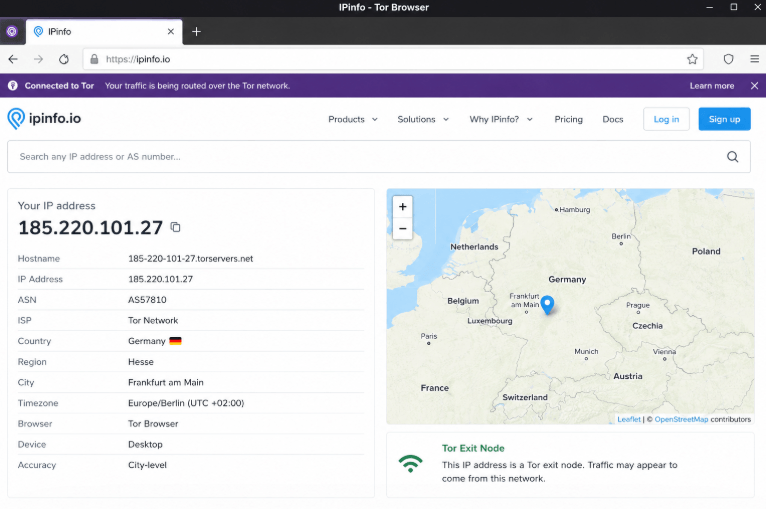
Tor Browser masks your IP by sending traffic through several volunteer-operated relays. The website sees the final Tor exit node IP instead of your real IP.
Tor is different from a VPN or proxy because it is designed for anonymity rather than performance. It can make tracing traffic more difficult, but it is usually slower and less predictable.
How to mask your IP with Tor Browser:
Download Tor Browser from the official Tor Project website.
Install Tor Browser on your device.
Open Tor Browser.
Click connect.
Visit an IP checker website inside Tor.
Confirm that the visible IP is different from your real IP.
Use “New Circuit for this Site” if you want a different Tor route.
Avoid logging into personal accounts if anonymity is your goal.
Tor is best for anonymity, privacy-focused browsing, and research. It is not ideal for streaming, scraping, gaming, or account workflows because many websites block Tor exit nodes or show frequent CAPTCHAs.
Method 4. Use Mobile Data
Switching from Wi-Fi to mobile data masks your home or office IP with a mobile carrier IP. If your home Wi-Fi IP is blocked or exposed, mobile data gives you a quick alternate route.
Some mobile carriers may assign a new IP when you toggle airplane mode, though this is not guaranteed.
How to mask your IP with mobile data:
Turn off Wi-Fi on your phone and enable mobile data.
If you need another mobile IP, turn on airplane mode for 10-30 seconds.
Then turn airplane mode off. Reconnect to mobile data.
Check your IP again.
Mobile data is best for quick IP changes, testing whether your Wi-Fi IP is blocked, and mobile access testing. The limitation is control. You usually cannot choose the exact city, carrier route, or session duration.
Method 5. Restart Your Router
Some internet service providers assign dynamic public IPs. Restarting your router or modem may request a new IP from the ISP.
This is a simple method for home users, but it is not guaranteed. Many ISPs keep the same IP assigned for days or weeks.
How to mask your IP by restarting your router:
Visit an IP checker and record your current public IP.
Turn off your router or modem.
Wait 3-10 minutes.
Turn the router back on.
Reconnect to the internet.
Visit the IP checker again.
Compare the new IP with the old one.
If the IP did not change, wait longer or contact your ISP.
Router restart is best for basic troubleshooting and one-time IP refreshes. It is not useful for professional workflows because it offers no location control, no session control, and no guarantee that the IP will change.
Method 6. Use Public Wi-Fi Carefully
Public Wi-Fi can mask your home IP because websites see the public network’s IP instead of your home network IP. However, it is not a secure or reliable privacy method.
Public Wi-Fi IPs are shared by many users. Their reputation may be poor, and the network may expose you to security risks if not protected properly.
How to mask your IP with public Wi-Fi:
Connect to a public Wi-Fi network.
Avoid logging into sensitive accounts unless the connection is protected.
Use HTTPS websites only.
Use a VPN or secure proxy if possible.
Open an IP checker website.
Confirm that your visible IP changed.
Disconnect when finished.
Public Wi-Fi is only suitable for quick testing or temporary IP changes. It is not recommended for sensitive account access, payments, business workflows, or long sessions.
Best Way to Mask IP Address by Use Case
Use Case
Best Method
Personal privacy
VPN
Public Wi-Fi protection
VPN
Web scraping
Residential or datacenter proxies
SEO monitoring
Residential proxies with geo-targeting
Ad verification
Residential proxies
Long account sessions
Nstproxy Static ISP Proxies
Stable business workflows
Nstproxy Static ISP Proxies
Real-user IP trust
Nstproxy Residential Proxies
High anonymity
Tor Browser
Quick IP change
Mobile data or router restart
Mobile testing
Mobile proxies
Low-risk high-speed tasks
Datacenter or IPv6 proxies
VPN vs Proxy vs Tor: Which Is Best?
Method
Best For
Pros
Cons
VPN
Personal privacy
Easy setup, full-device coverage
Shared IPs may be detected, less workflow control
Proxy
Scraping, SEO, testing, account workflows
More control, geo-targeting, session options
Requires setup and proxy quality matters
Tor
Anonymity
Strong privacy routing
Slow, often blocked, less control
Mobile Data
Quick IP change
Simple and fast
Limited location and session control
Router Restart
Home IP refresh
Free
Not guaranteed
Public Wi-Fi
Temporary IP change
Easy access
Security risks and shared IP reputation
If your goal is casual privacy, use a VPN. If your goal is controlled IP masking for work, proxies are usually better. If your goal is anonymity, Tor is stronger but slower. If your goal is a quick test, mobile data or router restart may be enough.
Common Mistakes When Masking Your IP
1. Thinking IP Masking Means Full Anonymity
IP masking hides your visible IP, but websites can still track cookies, browser fingerprints, login behavior, device signals, and payment details. If you log into the same account, the website can still recognize you.
2. Using Free Proxies
Free proxies are often slow, unstable, unsafe, and overused. Many have poor IP reputation and may already be blocked by popular websites.
3. Rotating IPs Too Often
Frequent IP changes can look suspicious for logged-in sessions. For account access, use a stable IP instead of constantly rotating. Nstproxy Static ISP Proxies are a better fit for this type of long session.
4. Ignoring DNS or WebRTC Leaks
Your real IP may leak if DNS or WebRTC is not handled properly. After setting up a VPN or proxy, use leak-checking tools to confirm your IP is not exposed.
5. Choosing the Wrong Proxy Type
Residential proxies, ISP proxies, datacenter proxies, and mobile proxies solve different problems. Choosing the wrong one can cause slow speeds, blocks, or unstable sessions.
FAQs
Q1. What is the easiest way to mask my IP address?
The easiest way is to use a VPN. Install the VPN app, choose a server location, connect, and check your visible IP with an IP checker.
Q2. Can I mask my IP address for free?
Yes, you can use methods like Tor Browser, public Wi-Fi, router restart, or limited free VPNs. However, free methods often have speed, security, reliability, or IP reputation limitations.
Q3. Is a VPN better than a proxy?
A VPN is better for simple personal privacy because it is easy to use and covers most device traffic. However, shared VPN IPs are often detected by stricter websites.
A proxy is better for controlled workflows like scraping, SEO monitoring, ad verification, automation, and stable account sessions.
Q4. Can websites still track me after I mask my IP?
Yes. Websites may still track cookies, browser fingerprints, device signals, login behavior, and account activity. IP masking is only one privacy layer.
Q5. Which Nstproxy proxy should I use to mask my IP?
Use Nstproxy Static ISP Proxies for stable long sessions and account workflows. Use Nstproxy Residential Proxies for real-user IP trust, geo-targeting, scraping, SEO monitoring, and ad verification.
Q6. Is masking an IP address legal?
Masking an IP address with a VPN, proxy, or Tor is legal in many places. However, legality depends on how you use it and the rules of the platform or website you access.
Q7. How do I know if my IP is masked?
Visit an IP checker before and after turning on your VPN, proxy, Tor, or alternate network. If the visible IP changes from your original public IP, your IP is masked.
Q8. Does 1.1.1.1 hide my IP address?
No. 1.1.1.1 is a DNS resolver, not an IP masking tool by itself. It may change DNS resolution, but it does not make websites see a different public IP unless used with a separate VPN-like service.
Conclusion
An IP address identifies where internet traffic should be sent. Masking your IP means replacing your visible public IP with another IP through a VPN, proxy, Tor, mobile network, router refresh, or public Wi-Fi.
For simple privacy, a VPN is the easiest choice. For anonymity, Tor is stronger but slower. For quick troubleshooting, mobile data or router reset may work. For controlled and professional IP masking, proxies are the best option.
Nstproxy provides secure, reliable, and high-performance proxy solutions that help you hide your real IP address and protect your online privacy.